funny-dog / dsh-agent-cleaner
Disk cleanup, orphan MCP process audit, and comment-preserving config repair for AI coding agents
About this plugin
Written by the registry from verified metadata, not from the README.
dsh-agent-cleaner is a DSH plugin published from the plugins/dsh package in the funny-dog/agent-cleaner repository.
Capabilities and topics
dsh-agent-cleaner
A DeepSeek Harness (DSH) plugin for auditing and cleaning stale AI coding agent caches, orphan sessions, zombie MCP processes, and broken configuration files — right inside DSH.
Supports Claude Code, OpenCode, Codex CLI, DSH, Gemini / Antigravity, Cursor, Aider, and Ollama.
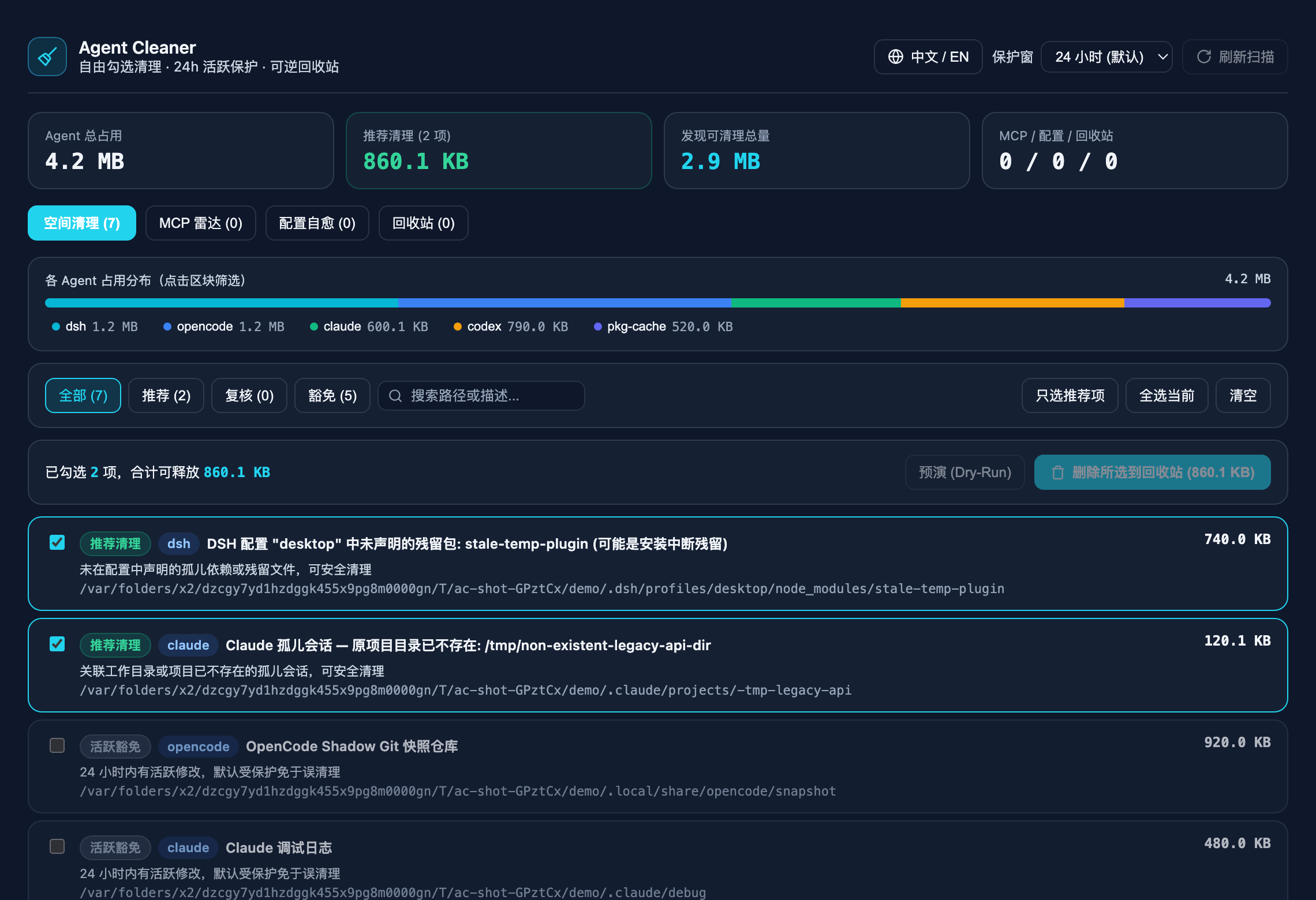
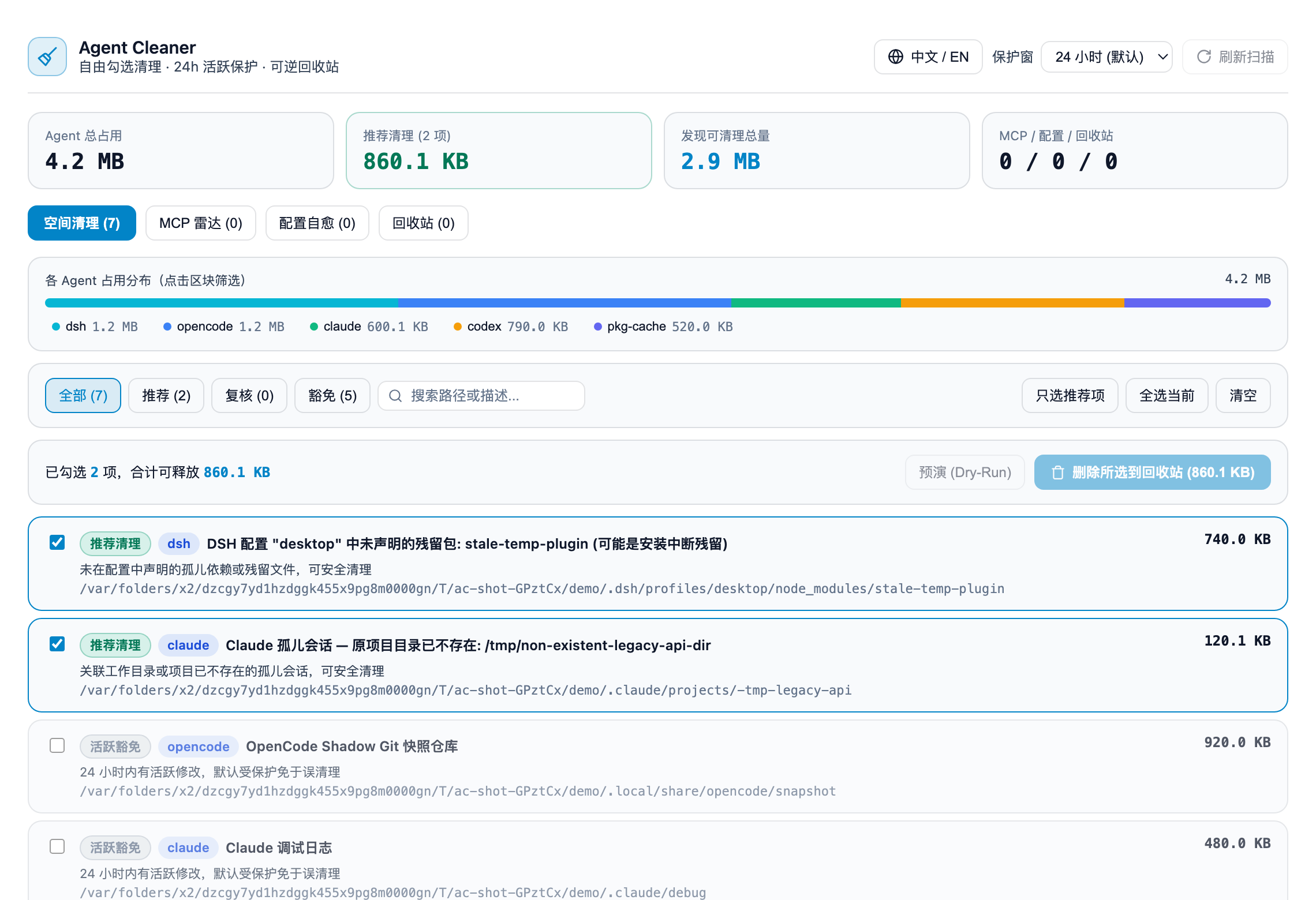
What You Get
- Visual Cleanup Panel in DSH: Open Agent Cleaner from the left sidebar to inspect disk usage by tool, filter by
Recommended/Optional/Active Guard (24h), and clean selected items. - Built-in DSH Agent Tools: Registers
agent_cleaner_scan,agent_cleaner_clean,agent_cleaner_doctor, andagent_cleaner_mcpso you can simply ask DSH in chat:- "Scan my AI coding tool caches and tell me what can be safely cleaned."
- "Check for orphan MCP processes and broken MCP configs."
- Reversible Trash: Items are moved to
~/.agent-cleaner/trash/<batchId>/instead of being permanently deleted, so you can restore any batch from the Trash tab at any time. - 24h Active Guard: Files modified within the last 24 hours are protected by default.
- Orphan MCP Process Radar: Detects and terminates
PPID=1zombie stdio MCP processes without touching active SSE/HTTP services. - Comment-Preserving Config Doctor: Repairs invalid MCP links across JSON, JSONC, TOML, and YAML configs while preserving comments and backups (
~/.agent-cleaner/backups/).
Installation
DSH Desktop
Open Settings → Plugins in DSH Desktop, search for dsh-agent-cleaner, and install directly from the plugin panel.
DSH Web / CLI
dsh plugin --profile web add dsh-agent-cleaner
Or install directly from the GitHub repository subpath:
dsh plugin --profile web add github:funny-dog/agent-cleaner#path:/plugins/dsh
Zero Setup: On first scan, the plugin automatically downloads the matching prebuilt
agent-cleanerengine for your OS/architecture into~/.agent-cleaner/bin/. No Rust toolchain is required.
Optional Configuration
If you want to customize the 24-hour protection window, point to a local binary, or use a custom download mirror, add this to your profile's cordis.patch.yml:
- id: agent-cleaner
  name: dsh-agent-cleaner
  config:
    exemptRecentHours: 24
    # binaryPath: /path/to/agent-cleaner
    # downloadUrl: https://mirror.example.com/agent-cleaner-darwin-arm64.tar.gz
License
MIT
Badge
Listed here? Link back with this badge — paste the snippet into your repository README.

[](https://dsh-plugin.com/plugins/funny-dog/agent-cleaner/plugins/dsh)