mouse985 / dsh-context-cap
Composer control that caps the routed model's context window so automatic compaction fires earlier and long conversations stay cheap.
About this plugin
Written by the registry from verified metadata, not from the README.
dsh-context-cap is a DSH plugin published from the mouse985/dsh-context-cap repository.
Capabilities and topics
dsh-context-cap
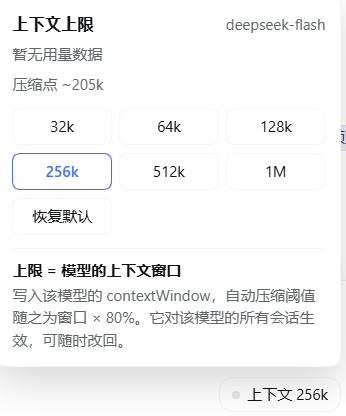
对话框里的一枚「上下文上限」控件:把当前模型的 contextWindow 直接调到 32k / 64k / 128k / 256k / 512k / 1M,从而让自动压缩提前触发,长对话不再把单次请求顶到 1M。
它改的是什么
模型容量是提供方适配器持有的,来自 settings 命名空间里该提供方的配置段(就是「设置 → 模型」里那排 128k / 256k / 512k / 1M 按钮写的同一份数据):
| 提供方配置形状 | 写入路径 |
|---|---|
单目录 models: [...](llm-deepseek) | 整个 models 数组(替换目标行的 contextWindow) |
多提供方 providers.<route>.models(llm-pi-ai) | 整个 providers.<route>.models 数组 |
覆盖表 defaultContextWindow + modelOverrides(llm-deepseek-account) | 已有 override 条目 → modelOverrides.<modelId>.contextWindow;没有条目 → defaultContextWindow(modelOverride 要求 inputModalities,凭空造条目会被 schema 拒) |
dsh-compaction-basic 每个 step 边界用 ctx.llm.resolveModelInfo() 的容量算阈值(floor(window × thresholdRatio),默认 0.8)。窗口降到 128k → 压缩点在 ~102k,代价随之为窗口的一部分;tokenMeter 的占用率也按新窗口算。写入走 settings.mutate,配置消费者(适配器)按 settings/document-updated 重新解析,不需要重启(提供方声明 applies: 'restart' 时面板会提示)。
客户端接线
控件只做三件 Remote 调用,全部按运行中应用的真实契约(见 dsh-api-session-controller / dsh-api-settings-controller 的 typert.remote-client):
| 调用 | 参数 | 返回 |
|---|---|---|
session.modelCatalog() | 无 | { default: { provider, model, reasoningEffort? }, routableProviders, groups, failures }(不含 contextWindow) |
settings.describe() | 无 | { writable, hasDocument, namespaces: [{ ns, value, user, revision, applies, secrets }] } |
settings.mutate(ns, ops, expectedRevision?) | 三个位置参数 | 该命名空间的新 view;error.code === 'settings-conflict' 表示版本冲突 |
传输层按顺序尝试,失败原因全部拼进面板错误文本:
ctx.get('remote.<ns>', false)上的方法(remote.session/remote.settings),位置参数直接 spread——这是装配好的客户端自己带 transport,最稳。- 同源 HTTP 兜底:
POST /api/<namespace>/<method>,body{ type: 'client-request', rpcId, method: '<ns>/<method>', payload: <参数记录> }(参数记录失败时再试{ args }包一层)。
不要再写 ctx.remote.session、connection.api 这类点属性读取:cordis 的追踪代理会抛 cannot get property "<key>" without inject。也不需要把 remote.<ns> 塞进 inject——ctx.get(key, false) 是注册表读取,非 strict 模式在提供方 fiber 未 ACTIVE 时也照常返回,插件自己的 inject 只留 ['slots', 'locale']。读失败会退避重试 3 次(500ms 间隔),不把胶囊钉死在 —。排障时在浏览器控制台跑 __dshContextCap.probe(),它会列出两个命名空间的可用方法链与 HTTP 能力。
显示的窗口取设置项的值:写入后 load() 立刻重读该命名空间,所以胶囊与面板马上同步,不用等下一轮对话。会话投影 contextPressure.contextWindow 只在设置项没有容量(提供方固定)时兜底——它按 step 重新解析,滞后一轮。
用法
- 会话输入框右侧(发送键之前)出现「上下文 1M」胶囊,点击展开面板(见上方截图)。
- 面板显示当前用量与压缩点,选一档即写入。
- 「恢复默认」把该行
contextWindow去掉,回到提供方默认值。
已知边界
- 按模型生效,不是按会话:
contextWindow属于提供方模型目录,同模型的所有会话共享;想按会话隔离需要 Host 侧按会话覆写容量(本插件不做)。 - 只有自动压缩启用时才真的省钱:本插件只改容量;压缩引擎没挂载时,它只影响占用率显示与提供方溢出判定。
- 单次超大粘贴仍会照发:压缩保留的尾部是不可分割单元,一段就超上限的文本压不掉;这类输入请在发送前自行裁剪。
- 容量只降不拦:写入的是「声明容量」,提供方真实窗口没变;真正的保护来自压缩在阈值处提前收口。
Badge
Listed here? Link back with this badge — paste the snippet into your repository README.

[](https://dsh-plugin.com/plugins/mouse985/dsh-context-cap)