onehumanbeing / dsh-esp32agent
Manina AI: let an AI model use a real iPhone with a $7 ESP32: AirPlay eyes, USB HID hands, any OpenAI-compatible vision model. No Mac, no developer account, no jailbreak.
About this plugin
Written by the registry from verified metadata, not from the README.
dsh-esp32agent is a DSH plugin published from the integrations/dsh package in the onehumanbeing/esp32-iphone-agent repository.
Capabilities and topics
ESP32 Agent plugin for DeepSeek Harness
English · 简体中文
A DeepSeek Harness (dsh) plugin that lets the agent see and drive a real iPhone through an ESP32 Agent (Manina AI) board. It adds:
- the
esp32agentMCP server (npx -y esp32agent mcp):screenshot,tap,longpress,swipe,type_text,press_key,press_button,device_info, plus saved intents and history. Tools show up asmcp__esp32agent__<tool>. - the
maninaskill: the see-act loop, how to save what worked, and safety rules.
▶ Watch the demo · ⚡ Flash the firmware in your browser · 📖 Setup guide
Based on ESP32 iPhone Agent by Henry Yuan (MIT).
Quick start
-
Get a board. Seeed Studio XIAO ESP32S3 (standard 8 MB flash / 8 MB PSRAM) with its antenna, and a short USB-C data cable (Lightning iPhones XS to 14: Bluetooth mode, the board on any USB power, no cable to the phone): hardware guide.
-
Flash the firmware from your browser (Chrome or Edge, board on USB): manina.ai/install?build=testflight. Firmware v0.2.3 or later (v0.2.2 works over Bluetooth only).
-
Pair the computer within 3 minutes of powering the board up (USB mode: plugging it into the iPhone; needs Node.js 18+ and
ffmpeg). In Bluetooth mode, pair the board on the iPhone in the same window (Settings → Accessibility → Touch → AssistiveTouch → Devices → Bluetooth Devices):npx -y esp32agent pair -
Set up the iPhone: join the board's Wi-Fi hotspot (
npx -y esp32agent netshows its name and password), turn on Control Center → Screen Mirroring → ESP32 Agent, and enable Settings → Accessibility → Touch → AssistiveTouch. Optional:npx -y esp32agent net joinputs the board on your home Wi-Fi instead, so dsh's commands and screenshots go over Wi-Fi rather than Bluetooth. -
Install the plugin and restart
dsh web:dsh plugin --profile web add dsh-esp32agent # or straight from GitHub dsh plugin --profile web add "github:onehumanbeing/esp32-iphone-agent#main&path:/integrations/dsh" -
Try a small task in dsh:
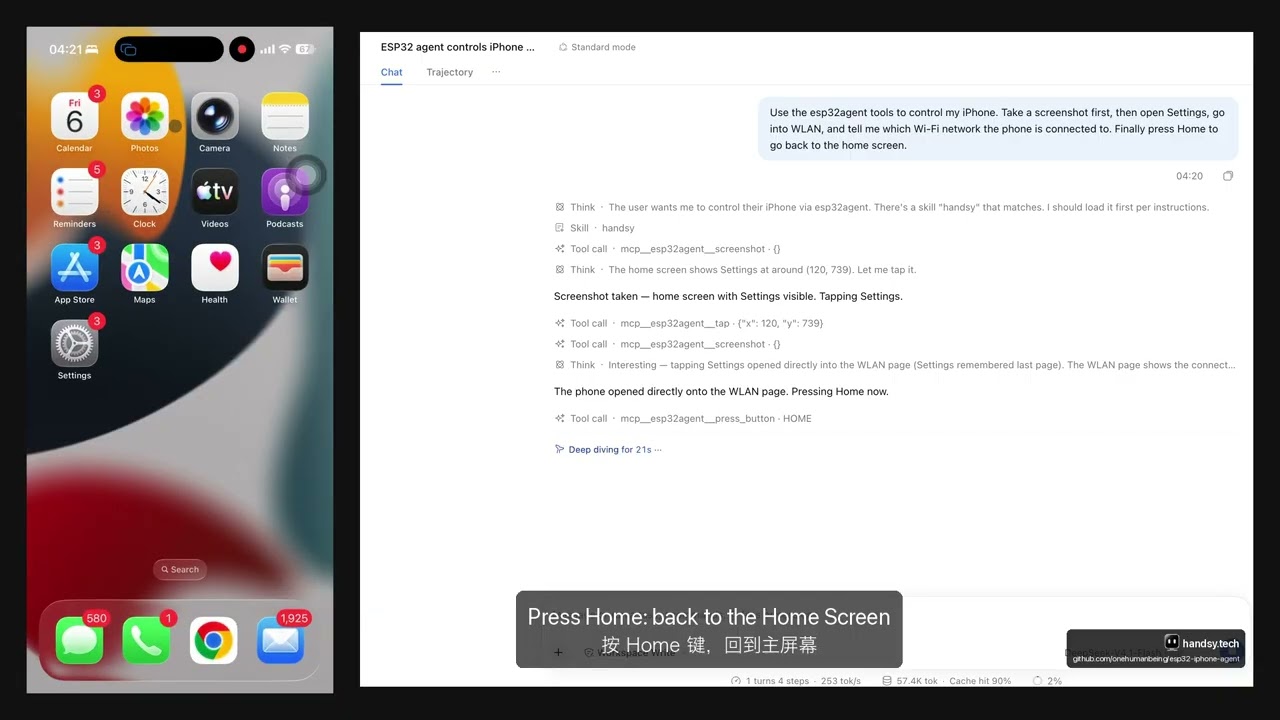
Use the esp32agent tools to control my iPhone. Take a screenshot first, then open Settings, go into WLAN, and tell me which Wi-Fi network the phone is connected to. Finally press Home.
Full setup, troubleshooting and every command: manina.ai/docs/cli.
Check that the layer is loaded (use your own profile name):
dsh --profile web --dump-config | grep esp32agent
With several boards, set ESP32AGENT_DEVICE to the board id before starting dsh; the plugin passes it to the MCP
server (dsh drops the rest of the inherited environment).
Safety
dsh has no per-action confirmation for MCP tools, and these tools act on a real phone. The manina skill tells the
agent to ask before anything that spends money, sends a message, calls someone, deletes data or changes security
settings, and to hand passwords and one-time codes to you. Review
the skill before you give the agent open-ended tasks.
Development
skills/manina/SKILL.md is a copy of skills/manina/SKILL.md (a package can't
reach files outside its folder). Run ./check-skill-sync.sh after editing either one.
dsh plugin --profile test add link:$PWD
Badge
Listed here? Link back with this badge — paste the snippet into your repository README.

[](https://dsh-plugin.com/plugins/onehumanbeing/esp32-iphone-agent/integrations/dsh)