How DeepSeek Harness Agents Read and Edit Files
DeepSeek Harness agents can use filesystem tools to read UTF-8 text, replace literal text, or write a complete file when those tools are available. The expected observation policy adds freshness checks, but it is optional: the actual deployment composition determines which guards apply.
DeepSeek Harness: which tools handle files?
The tool catalog describes model-facing read, edit and write tools. The filesystem reference separates the tool consumer, filesystem service, local provider and optional observation policy. That separation matters: the same tool schema does not prove that every deployment has the same backend or policy.
| Tool | Documented operation | Important inputs |
|---|---|---|
read | Return line-numbered UTF-8 text | file_path; optional offset and limit |
edit | Replace literal text in an existing UTF-8 file | file_path, old_string, new_string; optional replace_all |
write | Create or fully replace a UTF-8 file | file_path and the full content |
For read, offset is the first line, numbered from one, and defaults to 1; limit defaults to 2000 lines. Output is also bounded by byte and backend limits. A returned window is not necessarily the entire file. For edit, the default replace_all is false, so old_string must occur exactly once; an empty new_string deletes the match. With replace_all true, all matches are replaced. write supplies complete content, so a partial replacement text would replace the whole file rather than patch only a passage.
DeepSeek Harness: how should a file change be requested?
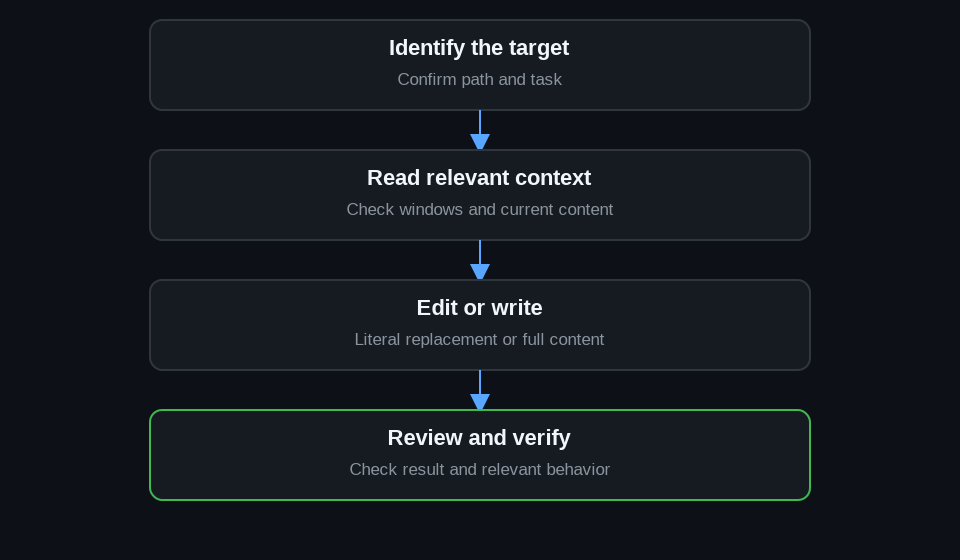
- Select the intended workspace and describe the target file and desired behavior. Ask for a bounded change and mention any constraints that matter for the project.
- Have the agent read the relevant text and surrounding context. If a read is windowed or truncated, inspect additional relevant content before deciding how the change fits.
- For a localized change, use literal replacement with enough context to identify the intended occurrence. For a new file or deliberate full replacement, provide the complete desired content.
- Review the resulting change and run checks appropriate to the affected behavior. A successful tool result confirms an operation, not that the program or document now meets its intended requirements.
- If an error reports stale or unobserved content, inspect the current file again and reassess the change before retrying. Do not blindly repeat a mutation against a changed file.
The path is resolved by the filesystem backend. The provider's displayed path may be local, workspace-relative or a remote URI, depending on the backend. Do not assume every deployment maps a displayed path to the same local location. The registry and permission setup also do not imply that every path visible to the tool is automatically appropriate for the requested task.
DeepSeek Harness: what does the observation policy protect against?
The optional dsh-fs-observation-policy tracks whether an owner has observed a target as present, absent or not yet seen. The owner is normally the agent's session. With the policy active, an edit of an unseen target returns FS_NOT_OBSERVED; an edit of a confirmed absent target returns FS_NOT_FOUND; a present observation supplies a version guard. A write to an unseen or absent target uses a create-if-absent guard, while a present observation uses a replace-if-version guard.
A read window can establish a present observation even if it did not show the entire file: the freshness check concerns the file version, not whether the reader saw every line. That does not mean a narrow window gives enough context for a correct change. Read the surrounding material needed to understand the task before editing, especially when replacing a whole file.
The backend checks a guarded edit's version before literal matching. A changed version can therefore yield FS_STALE_VERSION rather than a match error against newer content. The reference describes literal matching and atomic replacement inside one mutation critical section. When a target appears after an absent observation, create-if-absent rejects instead of overwriting it. These checks address particular freshness races; they are not a substitute for reviewing content.
DeepSeek Harness: what do common failures mean?
| Code | Documented meaning | Useful next step |
|---|---|---|
FS_NOT_OBSERVED | No prior observation for the owner, or a guarded create found an existing target | Read the current target and reassess the intended operation |
FS_STALE_VERSION | The version no longer matches, or a provider edit targeted a missing file | Re-read and check what changed |
FS_NOT_FOUND | A target is absent, including an edit rejected after confirmed absence | Check the path and whether creation is intended |
FS_SANDBOX_DENIED | A sandbox-enforcing backend's policy denied a write or edit | Inspect the active policy and request |
FS_PERMISSION_DENIED | The host kernel refused access | Inspect host permissions and the actual error |
FS_AMBIGUOUS_EDIT / FS_EDIT_NOT_FOUND | Filesystem error codes for ambiguous or missing literal edits | Inspect the text and choose the intended literal match |
An edit normally requires one literal match unless replace_all is requested. If the text appears more than once, add context that uniquely identifies the desired occurrence instead of changing all matches accidentally. If it is absent, compare the current file with the requested text. Do not treat a sandbox denial as equivalent to an operating-system permission denial: the reference distinguishes the two sources.
DeepSeek Harness: what are the limits and safety boundaries?
The observation policy is optional. Without it, the documented bare filesystem seam allows write to create or overwrite unconditionally and edit to replace literal text without that observation guard. A deployment loading these tools is expected to load the policy, but expectation is not proof of its presence. Other tools or backends can have different behavior; check the active composition.
Freshness checks do not establish that a change is authorized, correct or safe. Review the requested paths, permissions and resulting diff. Avoid exposing secrets in tool output or shared examples. A workspace selection identifies the work context; it is not itself a guarantee that all access is confined to that directory. See workspace selection for its documented scope.
DeepSeek Harness: what do the terms mean?
- Observation: recorded presence or absence, and a version when present, for a policy owner and target.
- Version guard: a check that the file still matches the observed backend version.
- Literal replacement: matching exact text rather than interpreting a pattern.
- Backend: the provider that resolves and operates on filesystem targets.
- Full write: creation or replacement using the complete supplied content.
Frequently asked questions
Does edit replace every match by default?
No. By default the old text must appear exactly once.
Does a partial read count as an observation?
With the observation policy, a windowed read can establish a present version observation.
Is the observation policy mandatory?
No. It is optional; check the actual deployment composition.
Sources
Every claim in this article was checked against the sources below. Community discussions are user reports, not official behavior.
This is an independent community article, not official DeepSeek documentation. Listing a plugin in the registry is not a security review.