Publish a DeepSeek Harness Plugin Bundle
To distribute a DeepSeek Harness plugin as an installable bundle, publish its code together with a dsh.bundle manifest and configuration patch. Test the package in a profile, declare compatibility, and choose a distribution method whose build and trust requirements users can understand.
DeepSeek Harness: What makes a package an installable bundle?
The packaging guide distinguishes a bundle from a profile. A bundle is a package that ships a configuration layer through dsh.bundle; a profile is a runnable composition with an ordered list of bundles and its own patch. The author distributes the bundle. The user installs it into the profile they intend to run.
A package without dsh.bundle can still install as a plain dependency, but the guide says dsh plugin warns and activates no layer. That can be useful for a library imported by plugins, but it does not by itself mount a plugin for the user. A marketplace entry is another separate concern: the plugin market guide describes an index of installable bundles, not a replacement for the package and patch.
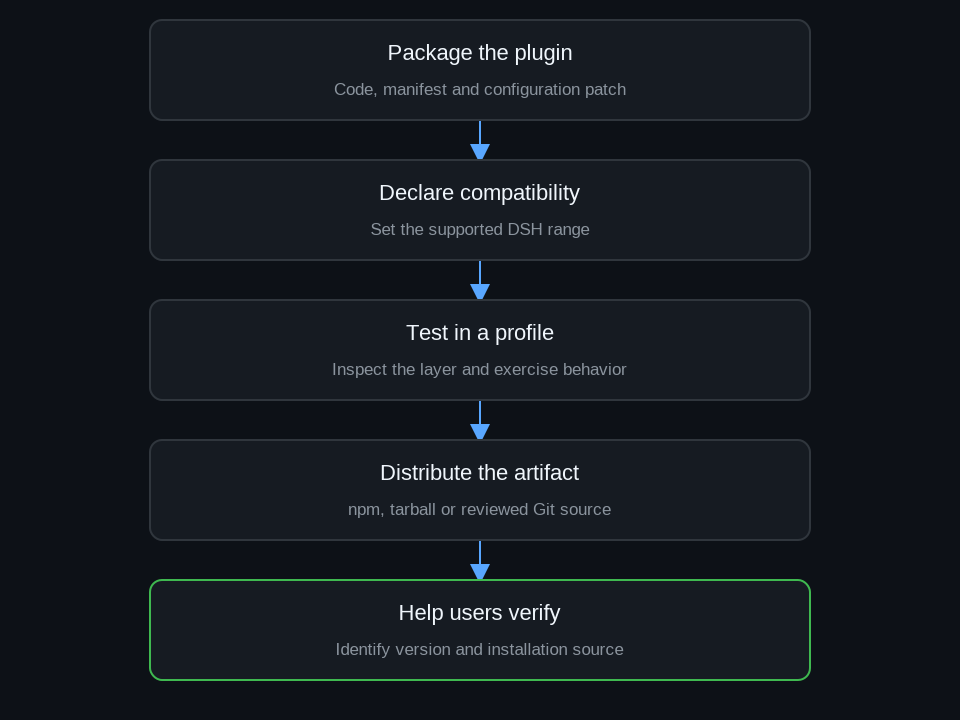
DeepSeek Harness: What files should the bundle contain?
The packaging guide's minimal hello-plugin example has package.json, cordis.patch.yml and index.js. The manifest includes the entry point and patch among its published files, and points dsh.bundle.patch at the patch:
{
  "name": "dsh-hello-plugin",
  "version": "0.1.0",
  "type": "module",
  "main": "index.js",
  "files": ["index.js", "cordis.patch.yml"],
  "dsh": { "bundle": { "patch": "./cordis.patch.yml" } }
}
Its patch inserts a row that references the installed package by name, rather than a relative source path:
- insert:
    - id: hello
      name: dsh-hello-plugin
The guide's sample index.js exports a name and an apply function. The sample demonstrates packaging and loading, not a complete business plugin. A bundle patch can also be an ordered list of files; relative plugin paths resolve beside the respective patch file. Ensure the actual files and built entry points needed by your package are present in the distributed artifact.
Declare the releases you support with an engines.dsh SemVer range. Installation and profile startup refuse a bundle when its range does not match the running DSH. Without that field, the guide says DSH checks the @deepseek-ai/dsh* peer dependency ranges instead. A compatibility declaration is useful only if it reflects versions you have actually assessed.
DeepSeek Harness: How can you test the bundle in a profile?
The guide tests a local checkout from the directory containing hello-plugin:
dsh plugin --profile demo add ./hello-plugin
dsh --profile demo --dump-config
dsh --profile demo
The first use initializes a base-backed profile if needed, links the checkout and adds its bundle to the profile's ordered list when dsh.bundle is present. The dump shows the bundle layer; booting exercises the actual composition. The guide also gives dsh plugin --profile demo remove dsh-hello-plugin to remove the dependency and layer.
- Build and inspect the artifact that recipients will install, including the entry points and patch named by the manifest.
- Install into a suitable test profile. Check the composed configuration and then start the profile; a dump alone does not establish runtime behavior.
- Exercise the plugin's intended function and its failure and cleanup paths. Verify the DSH versions represented by your compatibility claim.
- Test an installation from the distribution form you plan to offer, not only a linked checkout. A Git source and a prebuilt package have different build requirements.
- Document package name, release version, compatibility range, source and the steps recipients need. Provide a way to identify and remove the installed package.
The profile's patch is applied after bundle patches, followed by the home-level patch and explicit --patch overlays in argument order. Later layers win per row, and a patch replaces a row's complete config value rather than deep-merging individual keys. Users may override your bundle's rows without editing your package. Choose reasonable schema defaults and explain fields users need to retain when overriding a row. See configuration precedence for a closer look at composition.
DeepSeek Harness: Which distribution method should you use?
| Method | What the user receives | Author and user considerations |
|---|---|---|
| npm | Prebuilt package | Build the required output at publish time and include it in the artifact. |
| Tarball | Prebuilt archive from pnpm pack | Users can install the supplied archive; ensure it contains all required files. |
| Git | Source checkout | A TypeScript package needs a self-contained prepare build; the user may need to allow it. |
| Market index | A discovery entry pointing to npm or Git | The index is separate from the package and its claims are not verified by DSH. |
For Git, the guide gives dsh plugin --profile demo add github:you/hello-plugin as an example. A Git install fetches sources rather than built artifacts; a TypeScript package without the required lib/ output can fail to load. The author supplies a self-contained prepare script that does not depend on a sibling monorepo checkout. According to the guide, pnpm 10 and later requires an explicit allowance for a Git dependency's build before that script runs. The user copies the exact package key pnpm reports into the profile's pnpm-workspace.yaml under allowBuilds, then retries the add.
This allowance permits package code to execute on the installer's machine at install time, outside the agent sandbox. The guide recommends reviewing trusted source and pinning a commit, for example with a Git spec ending in #<sha>. Prebuilt npm and tarball distribution avoid that particular build allowance; they do not establish that the package code is trustworthy.
DeepSeek Harness: How do users discover and verify a release?
Users can install a package directly or discover a listed version through a configured market. A market card recommends a compatible version according to its release and prerelease rules. The confirmation shows the npm package and registry or the Git repository, commit and directory; the user confirms before the normal installation begins. The market supplies its own title, author, description and source claims. DSH checks index format but does not verify those claims.
Publish clear source links and version notes so users can compare the artifact they intend to install with the confirmation. If a team maintains a custom catalog, its JSON index and icons are hosted separately; see publishing a team market. Listing a release is not itself a publication step for the package.
DeepSeek Harness: What are the limits and safety boundaries?
A valid manifest, compatible version range or marketplace listing does not prove a plugin is safe. It is executable code that can request capabilities from the host. Review the source and dependencies, explain the plugin's intended behavior and access, and test in a suitable environment. Avoid putting real credentials in example manifests or configuration patches.
The sources describe a packaging and installation workflow, not a promise that every registry or Git host will accept a given release. They do not document a universal registry publication policy or guarantee that a build script is harmless. A linked checkout has its own dependency resolution considerations; the packaging guide explains shared DSH peer dependencies and should be consulted for the actual package design.
DeepSeek Harness: What do the terms mean?
- Bundle: an installable package declaring a configuration layer with
dsh.bundle. - Profile: a runnable composition listing bundles in order and applying its own patch.
- Patch: a configuration layer that inserts or overrides plugin rows.
engines.dsh: an optional SemVer compatibility range checked by DSH.prepare: the package build script discussed for Git installations; allowing it permits code execution at installation.
Frequently asked questions
Is a plain package automatically a bundle?
No. Without dsh.bundle it installs as a dependency but activates no bundle layer.
Why can a Git installation need a build allowance?
Git fetches source and a TypeScript package may need its prepare script; pnpm may require an explicit allowance.
Does a market listing publish the package?
No. The market index lists sources; the package must be distributed separately.
Sources
Every claim in this article was checked against the sources below. Community discussions are user reports, not official behavior.
This is an independent community article, not official DeepSeek documentation. Listing a plugin in the registry is not a security review.