DeepSeek Harness: Fix Unknown Prompt Variable Errors
An unknown prompt variable error means prompt assembly encountered a variable it could not resolve. Read the named section and registered-variable list, then locate the actual contribution before changing configuration or installing a workaround.
DeepSeek Harness: what does the error identify?
In discussion #11152, a user reports a turn failing with unknown prompt variable "{{cwd}}" in section "deployment:persona-suffix"; registered variables: provider, model. The three pieces are useful: the unresolved token, the section being rendered, and the names registered in that particular run. They do not by themselves identify the file that supplied the section.
The system-prompt reference describes named contributions and later interpolation of variable-like text. A section normally interpolates; a contribution explicitly marked interpolate: false preserves literal text. The package README says unresolved variables fail assembly rather than sending a malformed prompt. Therefore a failure in assembly should be investigated before treating it as a model response problem.
DeepSeek Harness: why can an old variable survive an upgrade?
A reply in #11152 reports that an earlier registration of cwd and its default persona suffix were removed and that a required runtime context named working-directory:current took over the working-directory contribution. The commenter identifies profile or home patches and preset rows as possible places where old text can survive, and describes a configuration editor writing a whole config object. This is a user investigation, not proof that every occurrence has that cause. Check the installed version and actual source of the named section.
The CLI reference describes bundle, profile, home and explicit patch layers. A later patch replaces a targeted row's entire config value rather than deep-merging its keys. That behavior makes it important to inspect the complete replacement when removing stale prompt text: changing one line carelessly could remove settings that should remain. The layer precedence guide explains the composition in more detail.
| Evidence | Useful interpretation | What remains unknown |
|---|---|---|
{{cwd}} is named | The renderer encountered that token | Which file supplied it |
deployment:persona-suffix is named | Inspect that contribution | Whether every profile uses the same text |
provider, model are listed | Those names were registered in the reported run | Whether your version has the same registrations |
| Error follows an upgrade | Compare retained overrides with current defaults | Whether the upgrade alone caused this case |
DeepSeek Harness: how can I trace and correct it?
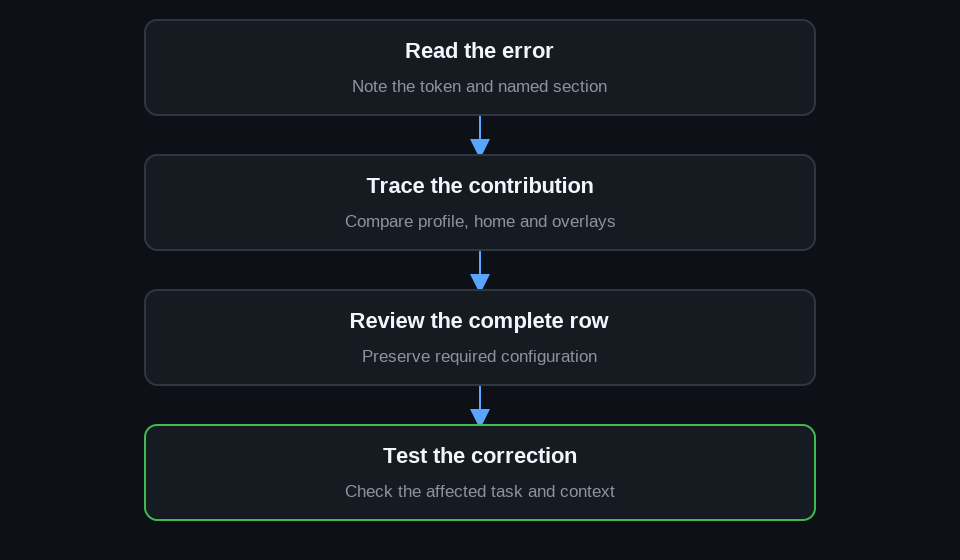
- Record the full error, installed version, selected profile and the operation that triggers it. Remove private prompt content, paths and credentials before sharing the evidence.
- Use the section name and exact token to inspect relevant profile and home patches and configured preset contributions. If an explicit overlay is supplied, include it in the comparison. A matching file is a candidate; verify that it applies to the selected profile and section.
- Compare the retained text with the documentation for the installed release and the current default. Decide whether the variable was intended to be substituted or displayed literally. Do not blindly substitute one registered variable for another:
providerandmodeldo not mean working directory. - Preserve a copy of the relevant configuration. Remove or revise the stale contribution only after checking the complete targeted row and other fields that must remain. If developing a plugin that deliberately emits literal variable-like text, the documented
interpolate: falseproperty is a separate design choice; it is not a general repair for an old persona. - Reload or restart as appropriate for the actual composition, then repeat the smallest affected task. Confirm that the error is gone and that the intended prompt context still appears where needed. If it persists, recheck later overlays and scoped contributions instead of piling on unrelated changes.
The CLI offers dsh --profile <name> --dump-config for inspecting composed configuration. Its reference cautions that expressions are unevaluated and that a dump can initialize missing profile files. It is a view of composition, not proof of the final runtime prompt. Review output for sensitive material before sharing it.
DeepSeek Harness: is a compatibility plugin the fix?
The #11152 commenter reports publishing a third-party shim that re-registers legacy names and testing it in a particular clean profile and runtime. The same reply says it does not repair the stale configuration and that unknown names outside the shim still fail. Treat that claim as a user report with the stated scope. The cited sources do not establish that the shim is an official, universally supported fix or that it will work with your installation.
Correcting the actual obsolete contribution addresses the source of the reported token. A temporary compatibility experiment, if chosen, requires reviewing the external code, version and origin, checking its effect in the intended profile, and keeping a rollback. Installing a plugin can execute code and change the composed application. A successful installation, a listing in a configuration dump, or one successful turn does not establish security or future compatibility.
The report's suggested removal of {{cwd}} is specific to that example. Another error may name a variable deliberately provided by a plugin that failed to load, a misspelled name, or a different section. Determine the source and intended meaning first; the error alone cannot tell which of those explanations applies.
DeepSeek Harness: what are the limits and safety boundaries?
Avoid pasting full prompt dumps, private workspace paths or secrets into an issue. A prompt can contain sensitive instructions and context even when the specific error seems harmless. Inspect and redact both configuration and diagnostics.
Removing text from a complete replacement can unintentionally remove other behavior. Keep a recoverable copy and review the full row. The prompt reference distinguishes sections from dynamic context; removing an obsolete section token does not independently prove that the current working directory is supplied in every custom composition. Verify the installed components and actual behavior. Likewise, interpolate: false preserves text literally; it does not supply a missing value.
DeepSeek Harness: what do the terms mean?
- Prompt section: a named, ordered contribution to the assembled system prompt.
- Variable: a registered value substituted into eligible variable-like text during rendering.
- Persona suffix: the named deployment section reported in the example,
deployment:persona-suffix. - Runtime context: a separate dynamic contribution to the model-visible context.
- Patch: a configuration layer that can replace a target row's complete configuration.
Frequently asked questions
What does the named section tell me?
It identifies the contribution being rendered, but does not by itself identify the file supplying it.
Can an old override survive an upgrade?
A community reply reports this in the cwd case; inspect the actual layers in your installation.
Does a shim repair the stale configuration?
The commenter says the reported shim registers legacy variables but does not repair the layer containing the old text.
Sources
Every claim in this article was checked against the sources below. Community discussions are user reports, not official behavior.
This is an independent community article, not official DeepSeek documentation. Listing a plugin in the registry is not a security review.