DeepSeek Harness Bash Sandbox Boundaries
DeepSeek Harness resolves a file-effect policy for each Bash execution, then a sandboxing executor wraps confined commands with a platform runner. The selected mode, actual backend and reported enforcement all matter.
DeepSeek Harness: where is the boundary applied?
The sandbox reference describes a process-sandbox service that wraps a subprocess argument vector with a file-effect policy. The Bash sandbox consumer uses that seam; local backends include Linux bwrap or Landlock, macOS Seatbelt and Windows ACL restricted tokens. An SSH backend can apply the policy in a remote execution world paired with the SSH filesystem and subprocess providers. Which backend is present depends on the composition and host.
The shell executor reference separates a shell request from the resolved execution specification. The tool layer resolves the session's policy and passes it to a sandbox-consuming executor. The provider returns wrapped arguments and enforcement facts, or rejects if a confined policy has no usable backend. The original command is not silently passed through unconfined in that case.
DeepSeek Harness: what do the modes mean?
| Mode | Documented file-effect policy | Important qualification |
|---|---|---|
read-only | Ask the backend to deny writes | POSIX runners allow required sinks such as /dev/null; Windows reports partial enforcement |
workspace-write | Permit writes under the workspace root and backend-defined temporary area | Actual enforcement depends on the backend |
danger-full-access | Bypass confinement | The consumer runs original arguments without calling ctx.sandbox |
The modes describe filesystem effects. Network isolation and process visibility are outside this vocabulary. In particular, a read-only file policy says nothing by itself about network access. Nor does allowing writes under a workspace mean every other operation is necessarily isolated: consult the backend's reported enforcement and limitations.
The sandbox reference distinguishes full enforcement, meaning the backend governs every file effect promised by its mode, from partial, meaning it governs only a subset. Older Landlock ABIs and the Windows ACL runner's hard-link, unconfined-read and AppContainer-ACL boundaries are documented partial cases. A caller requiring the absolute file-effect promise must reject or surface that distinction; a mode label alone is insufficient.
DeepSeek Harness: how is a per-call policy chosen?
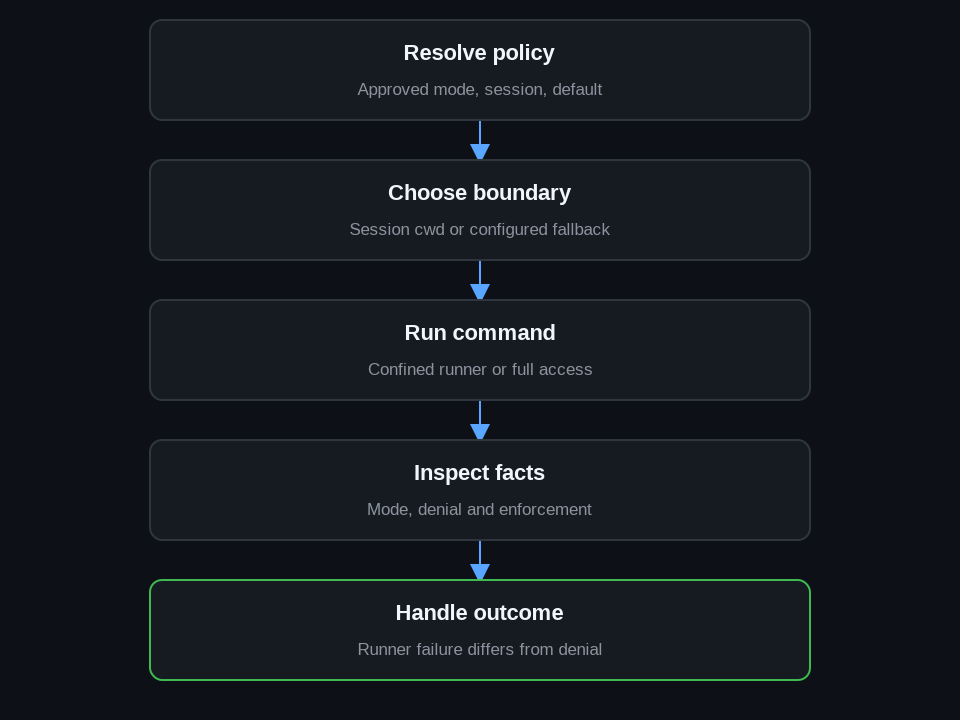
Policy resolution gives an approved explicit mode priority over the session's most recent sandbox/mode event, which in turn outranks the deployment default. An approved wider retry replaces only the mode for that call. Normal tool calls derive the workspace root from the session's immutable cwd; deployment configuration supplies the fallback for agentless calls and sessions without a cwd.
The resolver preserves the absolute spelling in the execution world. Enforcing providers canonicalize the root where the files actually exist, so a cwd containing symlink/.. is interpreted in the world where the paired subprocess runs. This is particularly relevant to remote execution: a local path spelling alone does not establish what a remote backend resolves. The session identity may also be carried so backends can maintain per-session state.
For a confined mode, the consumer calls ctx.sandbox.confine with the command arguments and resolved policy. The returned ConfinedArgv includes the replacement arguments, the enforcement fact and backend-specific classifiers. For full access, the documented consumer bypasses that service. These are per-call decisions, so separate sessions can use different policies without changing a global provider setting.
DeepSeek Harness: how should I review a Bash call?
- Identify the actual executor and session. The presence of a shell tool does not by itself prove that this execution uses a sandbox-consuming backend.
- Check the effective mode and workspace root relevant to the call, and whether the selected platform reports full or partial enforcement. Treat a configured default and an approved call-specific override as different inputs.
- Review the command's intended file and external effects. If a wider one-shot retry is requested, inspect its justification and decide whether the exact call warrants the wider mode.
- Read the result's sandbox facts and process outcome together. The shell reference distinguishes mode, denial, enforcement and runner failure from ordinary exit status, timeout and cancellation.
- If the result is unexpected, preserve sanitized diagnostics, reproduce only with an appropriate small operation, and check the actual backend and execution world before changing policy.
The shell reference says a model can request a strictly wider one-shot retry using sandbox_permissions and justification; ctx.approval must grant that exact call before execution. This is an approval decision about a specific retry, not an automatic repair for a broken backend. The precise tool schema and approval policy depend on the deployment.
DeepSeek Harness: how do denial and runner failure differ?
A denial means the confined command was blocked by the operating policy. A runner failure means the sandbox runner failed or refused its profile before the command could run. The provider supplies backend-specific denial signatures and structured runner-failure rules; the consumer checks runner-failure evidence first. Those rules require a nonzero exit and a matching fatal stderr signature, with an optional exit-code gate and informational-line exclusions. An exit status alone never proves a runner failure.
When a confined mode has no usable backend, ctx.sandbox can throw SANDBOX_UNAVAILABLE; a foreground executor propagates it. A selected runner refusing its profile reaches the same fail-closed foreground error. For a settled background process, the shell reference describes runnerFailed on its facts channel. An ordinary nonzero command exit is not automatically either of those conditions.
Foreground result fields also carry independent facts. The reference notes that a command can trap a timeout signal and exit zero: check timedOut, aborted, signal, and exitCode, not just the number. Background handles expose their own settlement and sandbox facts. Distinguishing these outcomes tells you whether to investigate the command, an access denial, the runner or an interruption.
DeepSeek Harness: what are the limits and safety boundaries?
A sandbox mode does not cover network isolation or process visibility. Windows and older Linux configurations have documented partial file-effect enforcement; check the actual backend rather than assuming a mode name guarantees complete enforcement. A successful command or verification run does not prove an environment is safe for untrusted code.
Full access bypasses confinement, so a wider retry increases the command's potential file effects. Approval is a separate control and does not change that boundary. Review the requested action, the workspace and the host's other protections before deciding. Logs and command output can contain private paths or credentials; sanitize them before sharing.
DeepSeek Harness: what do the terms mean?
- File-effect policy: per-call mode and root describing the intended filesystem boundary.
- Workspace root: the session cwd used as the ordinary
workspace-writeboundary. - Sandbox provider: the service that returns enforcing wrapped arguments or fails closed.
- Enforcement: the backend's reported completeness,
fullorpartial. - Denial: a file operation blocked during a confined execution.
- Runner failure: the sandbox runner failed before the requested command ran.
Frequently asked questions
Does read-only block network access?
The documented modes cover file effects, not network isolation.
What does full access do?
It bypasses confinement and runs the original command arguments.
Does a nonzero exit prove runner failure?
No. Runner failure needs the documented backend-specific evidence.
Sources
Every claim in this article was checked against the sources below. Community discussions are user reports, not official behavior.
This is an independent community article, not official DeepSeek documentation. Listing a plugin in the registry is not a security review.