How Do You Configure DeepSeek Harness Models?
Configure the DeepSeek API key in Settings → Models, and use a custom model API when you need to query a gateway's own catalog; the installed built-in catalog is not the same as live discovery.
Where should the DeepSeek API key go?
Start with the Web UI running, as described in the quickstart. Open Settings → Models, enter the API key in the DeepSeek card and save. The provider guide says changes take effect on the next request without restarting the server.
The saved key is write-only in the UI: the page receives a masked descriptor, not the plaintext. The guide says the credential is stored in $DSH_HOME/.credentials.yaml and settings retain a credential reference. Treat the host and that file as sensitive even though the browser does not redisplay the secret. Do not paste a real key into an issue, screenshot or example configuration.
A saved credential is not a successful model request. After saving, select the intended model and send a small test request. If it fails, separate credential, endpoint, protocol and connectivity checks; changing all four at once obscures the cause.
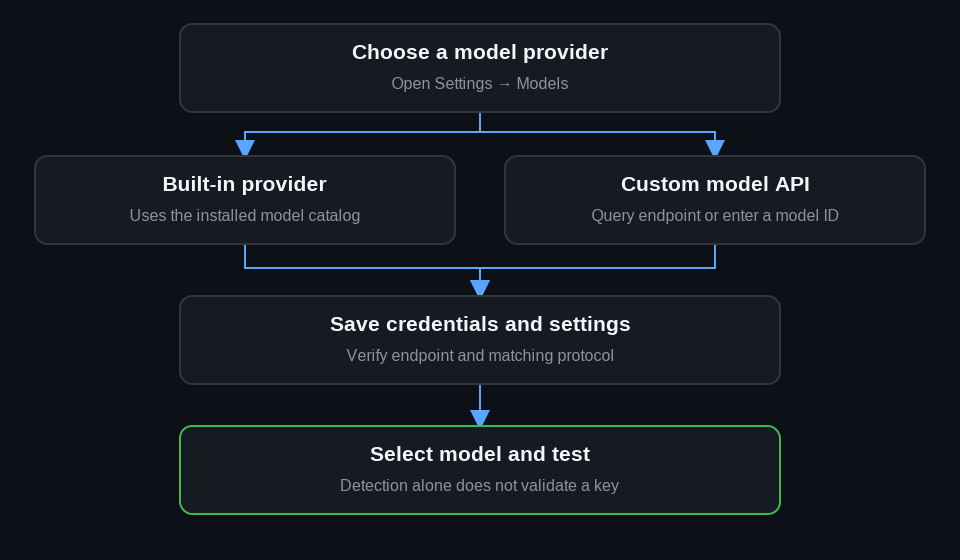
How do built-in and custom providers differ?
Choose Add model provider to add a built-in third-party provider, select its provider ID and save credentials as needed. The installed catalog supplies its endpoint, protocol and models. The guide lists examples such as anthropic, openai, moonshotai and zai. The credential indicator reports detection, not validation or a connectivity test. Leaving the field empty can use a saved credential or the listed environment fallback, where supported.
For a company gateway, relay, self-hosted server or provider missing from the installed catalog, switch to Custom model API. Supply a lowercase provider ID, base URL, API protocol, credential and at least one model. The protocol must match the endpoint: the documented choices are OpenAI Chat Completions, OpenAI Responses and Anthropic Messages. A provider uses one protocol; create separate providers when a gateway exposes two you need.
| Path | Model information | Best first check |
|---|---|---|
| DeepSeek card | DeepSeek adapter configuration | Key saved and intended model selected |
| Built-in third-party provider | Installed catalog | Provider ID and credential source |
| Custom model API | Endpoint discovery or manual model ID | Base URL, protocol and actual endpoint capabilities |
The custom provider ID is permanent in the documented workflow because requests, saved sessions, defaults and credential references use it. To rename it, add a new provider and remove the old one. Plan that change deliberately rather than assuming the display name and ID are interchangeable.
Why can the model list look outdated?
For built-in providers, the guide says discovery is answered from the installed catalog even if the API address points to a gateway. In discussion #6307, users report missing OpenRouter models; discussion #7660 proposes updating a catalog dependency and changing discovery. Those are community reports and proposals, not proof of the state of every build or that a proposed patch has shipped.
In a custom provider, Fetch available models queries the endpoint using the form's current address, protocol and key, or the saved key for an existing provider. Select the desired entries and add them; the guide says nothing is stored until the provider is saved or created. Discovery supports common response formats, not every endpoint. If it fails or is empty, add a valid model ID manually based on the provider's own documentation.
A listed or manually entered ID is not proof that the endpoint supports a particular context window, image input or reasoning behavior. The guide explicitly treats configured capabilities as assertions. Check the provider's documentation and test the capability you intend to use.
How do you configure and test a provider?
- Start the Web UI and add a workspace if needed. Open Settings → Models and choose the DeepSeek card, a built-in provider or Custom model API for your endpoint.
- Enter the credential through the UI or use the documented environment fallback for the selected provider. A green environment indicator means detected, not authenticated.
- For a custom API, verify the lowercase ID, exact base URL and matching protocol. Fetch models if the endpoint supports discovery, or enter a documented ID manually.
- Save, select the model and send a minimal test. The guide says selecting a model sets the default for new sessions; sessions that have already sent a request keep their logged model.
- If a saved default points to a deleted provider, select another model before submitting. If the model is missing, check which catalog path is in use before reinstalling or editing configuration.
If a request cannot connect, examine network and proxy configuration separately from the key. The proxy guide says DSH reads standard proxy variables at startup for its own outbound requests, with documented direct-connection exceptions. Restarting after changing startup environment variables is different from saving a model setting, which takes effect on the next request.
How do you separate discovery from an actual request?
Treat model discovery as a preliminary list, not the final verification step. For a custom provider, first check that the address and protocol describe the same service. Fetch its models using the current form values. If discovery succeeds, add the desired model and save the provider; if it does not, compare the endpoint's documented model IDs and enter one manually. In either case, select the saved model and make a minimal request. Record whether the failure happened during discovery, saving, selection or generation, because those stages can fail for different reasons.
For a built-in provider, pointing the address at a gateway does not turn the installed catalog into a live gateway list. The provider guide explicitly says to use a custom provider to discover the gateway's actual models. A reported missing model may therefore be a catalog mismatch, but it may also reflect the endpoint, credentials or a capability declaration. Avoid promising that switching providers will resolve every report. Check the exact endpoint response and the model ID you intend to use.
The model settings expose context window, maximum output tokens and input types. Those values influence how the integration treats a model, but entering a number or enabling images does not change the upstream service. For example, if a gateway does not actually accept images, a local declaration will not make it do so. Verify the provider's documentation before changing model capacity or input types, and use a small representative test after saving.
What should you check when credentials or networking fail?
Separate credential storage from the network path. If the page reports a credential environment variable, the guide says that observation does not validate it. Check that you selected the intended provider and that the service recognizes the credential without copying it into a public report. For a custom endpoint, check the URL and protocol pairing. A valid credential for one service may not be meaningful to another endpoint.
The proxy guide describes exceptions to proxying, including loopback and some model-written code paths. Therefore, a successful proxy test for one DSH outbound request does not prove that every process or destination follows the same route. If your environment requires a corporate certificate authority, use the documented CA approach and set startup environment before launching DSH. Record a sanitized failure stage and the relevant configuration choices; omit keys, proxy passwords and private addresses when those details are not needed.
A final comparison helps prevent a successful test from being attributed to the wrong route. Note the provider ID and selected model before submitting the request, then confirm that the observed result belongs to that session. If an older session has already recorded another model, the guide says it keeps that logged model. Create or select the appropriate session for your test and avoid sharing credentials while documenting the result.
What are the limits and safety boundaries?
Proxy URLs can contain credentials, and the proxy guide warns that commands run by DSH inherit those environment variables. Avoid putting passwords in proxy URLs where tools or retained command output could expose them. Do not disable certificate verification as a shortcut; consult the guide for the organization's CA configuration.
A successful detection badge does not test credentials. A successful model list does not prove a generation request or image input will work. Keep the credential, network, protocol, model ID and capability checks separate, and avoid sharing sensitive logs while troubleshooting. Configuration changes can take effect without a server restart, so confirm which provider and model are selected before sending sensitive content.
Glossary
- Provider: the configured route and authentication used to reach a model service.
- Provider ID: the persistent identifier used in requests and saved configuration.
- Base URL: the API endpoint address configured for a provider.
- Installed catalog: model and protocol information shipped with the built-in provider integration.
- Discovery: asking a custom endpoint for a model list; availability and response format vary.
Frequently asked questions
Does a detected API key mean authentication succeeded?
No. The indicator detects an environment credential; it does not validate it or test the connection.
Why is the built-in model list missing a model?
The guide says built-in providers use the installed catalog; community discussions report missing models in particular cases.
Can I add a model manually?
The provider guide says a custom model API can use a manually added model ID if discovery fails or returns an empty list.
Sources
Every claim in this article was checked against the sources below. Community discussions are user reports, not official behavior.
This is an independent community article, not official DeepSeek documentation. Listing a plugin in the registry is not a security review.