When Does DeepSeek Harness Compact Context?
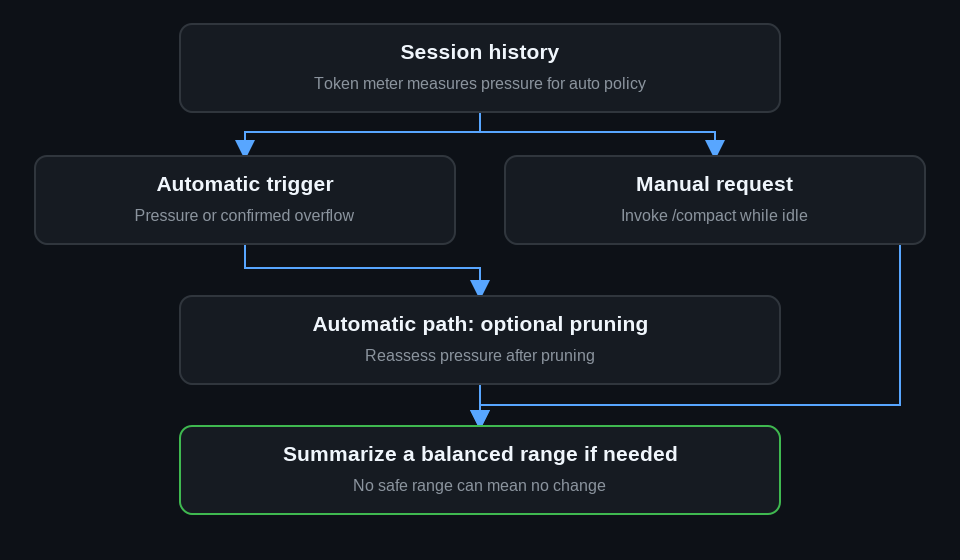
DeepSeek Harness compaction reduces model-visible history by replacing a selected older range with a summary; automatic pressure, overflow recovery and /compact have different triggers and do not guarantee every detail survives.
When does automatic compaction run?
Compaction is an optional capability, with a service, a backend and a user command. The compaction reference describes automatic triggers for pressure and confirmed context overflow. The basic backend documentation says the supplied base configuration enables that backend by default, but another composition can differ.
For the documented basic backend, the default pressure threshold is floor(min(W × 0.8, W − O − B)): W is the model context window, O the effective request output reserve, and B the extra headroom, defaulting to 65,536 tokens. The recent verbatim history budget defaults to 16% of W − O. Both policy and model-specific overrides can change these values. The formula is a threshold for this backend, not a universal percentage for every compaction implementation.
A confirmed context overflow follows a separate recovery path. The reference says that it can use a more aggressive reduction and returns a retry action only when the surface replacement generation has advanced. The basic backend documents a limit on overflow retries. If no safe range can be reduced or the summary fails, do not assume a retry will solve the request.
What does /compact keep and replace?
With the command component installed, entering /compact in the chat requests an immediate reduction between turns, even below the automatic threshold. The commands reference describes the user-command system.
/compact
The basic backend summarizes an older balanced range. Its normal pressure policy retains a recent tail verbatim, while the manual path selects a balanced range with a zero retention budget; confirmed overflow recovery also bypasses the normal retention policy. The boundary keeps tool calls paired with their results, but need not preserve an entire turn. A single indivisible oversized unit may leave no useful range to compact.
The result is a replacement on the model-visible surface: an older range is shadowed by a summary message. The compaction events record the selected range, summary and lifecycle in the durable log. Shadowing is not equivalent to deleting the underlying log, nor does it promise that every detail in the old range remains visible to the model. The summary is generated by a model and can omit or distort details; check important decisions after compaction.
Discussion #11217 reports that the native command does not accept a free-form summary focus and proposes adding one. That is a user report and feature request, not documentation of a supported argument. Use the bare command, and preserve critical facts in a durable project artifact before relying on a summary.
| Mechanism | Trigger | What to expect |
|---|---|---|
| Pressure | Measured pressure crosses the backend's threshold | Older balanced history may be summarized after optional pruning |
| Overflow recovery | Provider confirms context overflow | More aggressive reduction may enable a bounded retry |
/compact | User invokes it while the agent is idle | Manual reduction, even before the pressure threshold |
| Tool-result pruning | Optional component after a trigger | Oversized results may shrink without a summary call |
How should you read the token meter?
The token meter reference distinguishes totalTokens, current request-and-response pressure, from surfaceTokens, the sum of prices for the current model-visible surface nodes. They answer different questions and should not be added together as independent usage totals.
The measurement uses a matching recent provider usage anchor when its documented conditions hold; otherwise it estimates the full envelope and surface. A signed surface delta accounts for changes since the anchor. Image pricing can depend on the routed model when its adapter declares a visual price; otherwise the documented heuristic applies. Consequently a meter is useful for pressure decisions, but it is not a promise of exact future provider billing or a byte-for-byte transcript size.
How do you compact a working session responsibly?
- Before the conversation becomes large, record decisions, constraints, unfinished work and file locations in an appropriate project document. Do not put secrets in a document merely to preserve them.
- Wait until the agent is idle, then enter
/compactif the command component is available. The basic backend reports a busy state during an active turn or existing compaction. - Read the result and ask the agent to restate the critical constraints and next action. Compare that restatement with your durable notes; correct omissions explicitly.
- Continue with a small, verifiable step. If the request still overflows, inspect the model's actual context capacity, output reserve and large inputs instead of repeatedly assuming another summary will fix it.
- For deployment tuning, consult the backend documentation and validate configuration against the target model. A headroom that consumes a small model's entire window is invalid.
The optional pruner may reduce oversized tool output first; if that lowers pressure enough, the basic backend can skip summary generation. A successful pruning step can remain even if later summary work fails. Treat the reported outcome as evidence of what happened, not as a guarantee that all subsequent work used an unchanged surface.
How do you recognize an ineffective compaction attempt?
A reported attempt and a successful reduction are different things. The service can return no result when there is no effective range to reduce, and its documented manual error classes cover busy, cancellation, changed input, summary and persistence problems. If the agent is busy, wait for the current turn to finish. If the selected history changes during the attempt or the summary fails, inspect the reported outcome instead of assuming a replacement landed.
The range must respect tool-call and tool-result pairing. This prevents choosing an arbitrary cut through a pair, but it also means the engine cannot always carve a large item into the size you want. The basic backend rejects a summary that does not reduce its source. A conversation dominated by one indivisible input, a large fixed prompt or a tool definition may therefore still exceed capacity even after ordinary history is shortened. Consider reducing the input or choosing an appropriate model rather than repeatedly invoking the same command.
What should you carry forward after a summary?
Before compaction, capture the problem statement, accepted constraints, key decisions, paths and remaining work in a file that your team is willing to retain. Distinguish confirmed facts from hypotheses, and note any test failures that still need investigation. After compaction, compare the assistant's understanding against those notes. If a detail is missing, explicitly supply the corrected fact or point to the source document; do not assume that an older message remains model-visible because it still exists in the event log.
The meter is a snapshot at a consumed log revision, not a guarantee about an arbitrary future request. Different models can price images differently, and the output reserve changes the available budget. The basic backend also evaluates pressure when switching model routes; a smaller target can require a reduction before the new request. If the switch fails, inspect its reported cause and the target capacity rather than treating a previous model's meter as authoritative for the new route.
Keep the privacy distinction clear. A summary may retain sensitive details, while shadowed source events may remain in the durable log. Editing a summary is not a substitute for the deployment's retention or deletion process. Share a sanitized diagnostic when seeking help and consult the applicable storage policy before placing sensitive material in long-lived notes.
When reviewing a compacted session, also distinguish a summary request from an ordinary assistant answer. The backend documentation says the summarizer makes an additional model call and only returned text enters the checkpoint. That output is intended to preserve useful context, but it does not prove that every original tool result or decision survived. If a task requires exact data, retain and verify the original authoritative artifact separately before continuing.
What are the limits and safety boundaries?
Compaction cannot shrink the system prompt, tools or session prefix according to the basic backend documentation. It cannot split an indivisible oversized unit. It makes an additional model request for a summary, so it may consume time and tokens; the summary output is not a perfect archive.
The service uses a recorded lock and lifecycle events. Failure, cancellation, a changed selection or a busy session can prevent a replacement. Durable history and the current model-visible surface have different roles; do not use compaction as a privacy deletion feature. Verify your deployment's data-retention procedures separately.
Glossary
- Compaction: reducing model-visible history by summarizing and replacing a selected range.
- Surface: the ordered messages currently projected to the model, which can differ from the durable event log.
- Pressure: the token meter's measure of request-and-response context demand.
- Retention budget: the backend's budget for keeping recent history verbatim.
- Pruning: optional reduction of oversized tool results without necessarily making a summary request.
Frequently asked questions
Does /compact delete the session log?
No. It replaces a range on the model-visible surface; the durable log records compaction events.
Does /compact accept a focus instruction?
Discussion #11217 reports that the native command does not accept one and proposes adding support; verify your installed version.
Is the token meter an exact bill?
No. It measures request pressure and may use a provider usage anchor or an estimate.
Sources
Every claim in this article was checked against the sources below. Community discussions are user reports, not official behavior.
This is an independent community article, not official DeepSeek documentation. Listing a plugin in the registry is not a security review.