DeepSeek Harness Plugins for Clipping a Livestream VOD
No DeepSeek Harness plugin does "neon clipping" as one job — there is no N3on, Twitch, or Kick clipper in this registry — so what you install is a chain of generic parts: probe and cut, vertical reframe, subtitles, and video understanding, driven by an agent you describe the clip to.
A search for "clipping" on the DSH Plugin Registry returns one hit, and that plugin's description merely contains the phrase "left-clipped". What the registry holds is media plumbing: an FFmpeg wrapper that probes, cuts and re-encodes, a 9:16 tool that crops or pads to 1080×1920, subtitle transcribers, and video-understanding plugins that report what happens at a timestamp.
The registry also reports incomplete: true, with 23,047 candidates against 14,828 published at 2026-11-21T02:02:23Z: admission coverage is partial. Absence does not mean a plugin is broken, and presence does not mean it was reviewed — a listing is a structural manifest check.
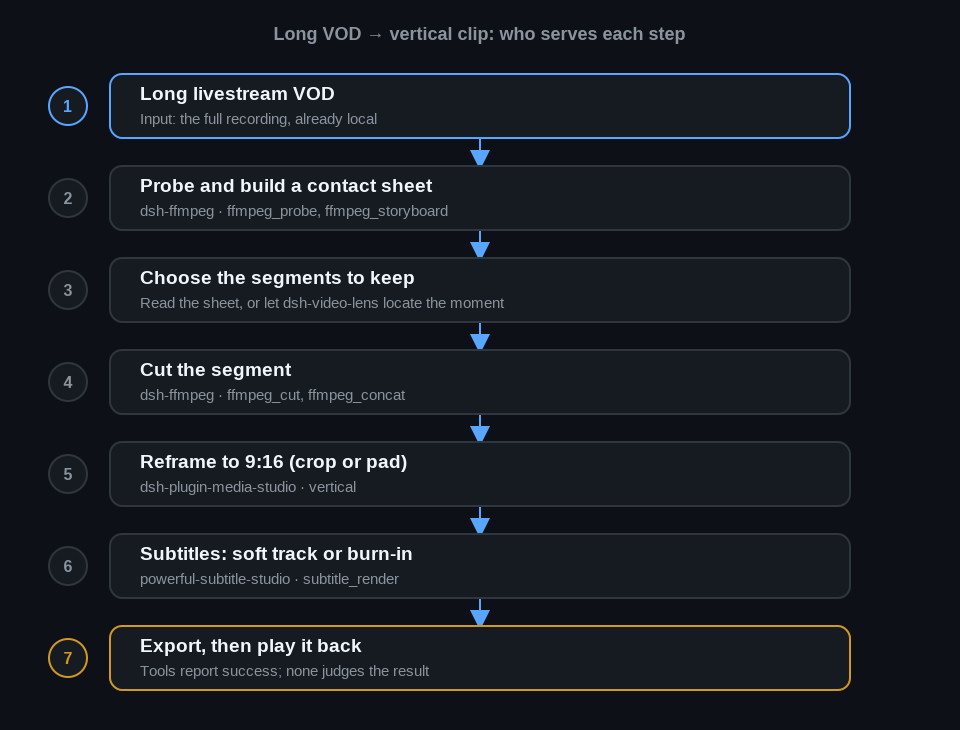
DeepSeek Harness: what does clipping a streamer VOD actually require?
A multi-hour VOD has to be inspected before anything is cut, then someone picks the moments worth keeping — the step no FFmpeg flag performs.
| Step | Needs | Goes wrong if skipped |
|---|---|---|
| Inspect the VOD | Probe for duration, resolution, tracks | Cutting from a guess |
| Find the moment | Storyboard, frames, or a transcript | Clips starting mid-sentence |
| Cut the segment | Stream copy or precise re-encode | Black frames, audio drift |
| Reframe to 9:16 | Crop or pad from the source ratio | Stretched or cropped-out subject |
| Subtitle | Transcription, SRT or burn-in | Muted viewers get nothing |
Reframing is where these tools earn their keep: cropping keeps the subject large and discards the scene, padding keeps everything and shrinks it into black bars. No plugin decides for you.
DeepSeek Harness: is there a plugin that does the whole job?
Not in this registry. The nearest thing to a purpose-built clipper is dsh-plugin-clip-factory, whose MCP server clips exposes status, probe, split, shorts (9:16) and list_clips — the clipping workflow in five tools. It is not listed here: its detail page returns 404 and it is absent from the API, though its repository carries the dsh-plugin topic and its root package.json declares dsh.bundle.patch pointing at a file that exists and is non-empty. dsh-plugin-clip-studio is in the same position, adding a yt-dlp download step.
DeepSeek Harness: which listed plugins serve each step?
Six listed plugins are relevant: five work on media, one is a viewer; each detail page says "Manifest verified".
dsh-ffmpeg (17 stars, MIT, updated 2026-11-20) does the mechanical work, wrapping local FFmpeg with tools including ffmpeg_health, ffmpeg_probe, ffmpeg_cut, ffmpeg_concat (2–20 inputs), ffmpeg_encode (presets include bilibili-1080p, vertical 1080p, web-720p), ffmpeg_subtitle (burns SRT or ASS), ffmpeg_frames (frames for a vision model, by every or times), ffmpeg_adjust (speed with audio sync, volume, mute, rotate) and ffmpeg_storyboard (one contact sheet; count 2–36, columns 1–6, width 160–640, 16:9 letterboxed). Install with dsh plugin --profile web add dsh-ffmpeg, or desktop. It needs local ffmpeg/ffprobe (via ffmpegPath/ffprobePath or DSH_FFMPEG_PATH/DSH_FFPROBE_PATH); timeoutMs defaults to 300000, clamped to 10 seconds–2 hours. It never overwrites, refuses an output path equal to the input, and passes argv arrays, never a shell.
dsh-video-lens (113 stars, MIT, updated 2026-09-19) is how a text-only agent finds the moment. video_probe, video_analyze and video_ask run FFmpeg scdet scene detection (FFmpeg 6.0 or newer; older builds sample uniformly at midpoints), take one frame per shot, optionally transcribe audio through an OpenAI-compatible /audio/transcriptions endpoint, and fuse it into evidence JSON with a vision model. video_ask answers time-anchored questions such as "at 3:20" or "第2分钟" with timestamps. It ships pointed at Qwen/Qwen3-VL-8B-Instruct on https://api.siliconflow.cn/v1, reading VIDEO_LENS_API_KEY and VIDEO_LENS_ASR_KEY. ASR is strictly additive: unset or failing, analysis completes with transcript: null. It never shells out, makes one outbound call per analysis, and does not download media.
powerful-subtitle-studio (1 star, MIT, updated 2026-11-20) handles captions, and its install package differs from the repository name: dsh plugin --profile desktop add powerful-subtitle-studio. Its tools are subtitle_transcribe (segments capped at 7 seconds), subtitle_frames, subtitle_compose and subtitle_render, which writes 视频名.语言.srt, attaches a soft track without re-encoding, or burns subtitles in — burning re-encodes. Recognition uses Alibaba Cloud Bailian paraformer-v2, keyed by settings or DASHSCOPE_API_KEY, stored at ~/.powerful-subtitle-studio/config.json; audio goes to Alibaba Cloud. FFmpeg is required, and the panel can fetch binaries from npmmirror into ~/.powerful-subtitle-studio/vendor — GPL-3.0-or-later, while the plugin is MIT.
dsh-plugin-media-studio (0 stars, MIT, updated 2026-11-11, Spanish-first docs) covers trim and reframe via mcp__media__status, mcp__media__probe, mcp__media__convert, mcp__media__trim, mcp__media__vertical, mcp__media__thumbnail and mcp__media__burn_subtitles. vertical gives 1080×1920 by crop (crop=floor(ih*9/16/2)*2:ih,scale=1080:1920,setsar=1) or pad (scale with force_original_aspect_ratio=decrease, then black padding); trim is -c copy or a precise libx264/aac re-encode. Config is <DSH_HOME>/media-studio/config.json with allowedPaths; DSH_MEDIA_MODE=read-only leaves only status and probe; six heavy operations per minute; a 7-minute timeout per process; an audit log at <DSH_HOME>/cache/media-studio/audit.jsonl.
dsh-directorx (12 stars, Apache-2.0, updated 2026-08-22) is the heavyweight option: 100+ directorx_* tools, 348 knowledge articles, 39 skills and 12 recipes, with editing, grading, mixing, subtitles and QC on local FFmpeg. It needs Node 22.19+, and its mock mode runs the chain without an API key.
dsh-shorts-wall (2 stars, MIT) is not a production tool: a docked vertical wall for YouTube Shorts and Bilibili, for watching the format you want to match.
| Plugin | Step it serves | Local ffmpeg? | API key? | Listed here? |
|---|---|---|---|---|
| dsh-ffmpeg | Probe, storyboard, cut, concat, encode, burn subtitles | Yes, plus ffprobe | No | Yes |
| dsh-video-lens | Finding the moment: scenes, frames, transcript, Q&A | FFmpeg 6.0+ | Vision; ASR optional | Yes |
| powerful-subtitle-studio | Transcribe and write, attach, or burn subtitles | Yes, downloadable | Alibaba Cloud Bailian | Yes |
| dsh-plugin-media-studio | Trim, 9:16 vertical, thumbnail, burn subtitles | Yes, plus ffprobe | No | Yes |
| dsh-directorx | Full production: edit, grade, mix, subtitle, QC | Yes | Only outside mock mode | Yes |
| dsh-shorts-wall | Watching the target format | No | No | Yes |
| dsh-plugin-clip-factory | Split and 9:16 shorts via MCP clips tools | Yes | No | No, GitHub only |
| dsh-plugin-clip-studio | yt-dlp download, clip, vertical, pipeline | Yes | No | No, GitHub only |
| dsh-reelsmaker | Generate a reel from narration lines | No | No | No, GitHub only |
| dsh-vidlens | Watch a video: metadata, chapters, sheets | No, needs Python | Depends on vidlens | No, GitHub only |
DeepSeek Harness: which clipping candidates does this registry not list?
Four repositories have a valid bundle manifest — root package.json declaring dsh.bundle.patch, the referenced file present and non-empty — and carry the dsh-plugin topic, yet none has a registry detail page. All four return 404 on /plugins/<owner>/<repo> and are absent from the API, so this post links GitHub only.
dsh-plugin-clip-factory (created 2026-11-11, 0 stars) is the closest match to clipping intent. allowedPaths lives in <DSH_HOME>/clip-factory/config.json; DSH_CLIPS_MODE=read-only blocks all writes; six heavy operations per minute; a 7-minute timeout; an audit log at <DSH_HOME>/cache/clip-factory/audit.jsonl; it never overwrites. dsh-plugin-clip-studio (created 2026-11-11, 0 stars) adds status, info, download, clip and pipeline with DSH_CLIP_STUDIO_MODE=read-only; the download step also changes the risk profile, since the plugin reaches the network for you.
dsh-reelsmaker (created 2026-09-04, 2 stars) generates rather than clips: make_reel turns 4–6 narration lines into a 1080×1920 reel using Microsoft Edge neural TTS and Remotion, with burned-in captions, no API key and no FFmpeg. Beat lengths are measured by counting MPEG frames, not estimated; the render is foreground, takes 30 seconds to 3 minutes, and offers one style. Its licence caveat matters: the code is MIT, but Remotion is not — free for individuals and companies of up to three people, larger companies need a paid licence.
dsh-vidlens (created 2026-10-25, 3 stars) has 18 vidlens_* tools for watching public video the way a person would: metadata, chapters, sampled sheets, transcripts, sound events. It needs a separate Python vidlens install, declares DSH >=0.2.1-rc.2 <0.3.0, and offers no whole-file download.
Read the gap as a statement about this registry's sweep, not a verdict on the plugin. An unlisted plugin costs you the manifest check and a detail page, not the obligation to read the source.
DeepSeek Harness: how do you chain them into one clip?
- Install:
dsh plugin --profile web add dsh-ffmpeg(ordesktop), thendsh plugin --profile desktop add powerful-subtitle-studio; restart and runffmpeg_health. - Probe first:
ffmpeg_probegives duration, resolution, frame rate and track layout. On a multi-hour file, cut a segment first — probe output is capped and can truncate at 4 MB. - Build a visual index.
ffmpeg_storyboardwithcount12–24 andcolumns4 gives one contact sheet whose cells carry sampling target times. The README is explicit that these are not frame timecodes and that uniform sampling is not shot detection; for a real cut point, follow up withffmpeg_probeandffmpeg_extract. - Or ask what happens when.
video_analyzereturns shot boundaries and, with ASR configured, a timestamped transcript;video_askanswers "where does the argument about X start", replacing scrubbing. - Cut.
ffmpeg_cuttakesstartandend; stream copy is fine when the boundary does not matter to the frame, re-encoding is for when it does.ffmpeg_concattakes 2–20 inputs and letterboxes different sizes onto one canvas. - Reframe.
mcp__media__verticalgives 1080×1920 bycroporpad: crop keeps the streamer large and discards the scene, pad keeps everything and leaves black bars. - Subtitle.
subtitle_transcribeyields segments of at most 7 seconds;subtitle_renderwrites an SRT, attaches a soft track, or burns text in — burning re-encodes. Cloud ASR means uploading the recording. - Verify by playing the file. Every tool here reports success for a file that is valid and editorially wrong.
DeepSeek Harness: what are the limits and safety rules?
A listing is a structural manifest check: not a security review, not an endorsement, not evidence that a plugin produces good clips. Treat every entry as a candidate you still have to read.
Three limits are specific here. First, clipping someone else's stream for payout is a rights question, not a plugin question; no tool here checks whether you may republish the footage, and the platform terms governing the VOD are outside anything documented here. Second, cloud steps move the media: powerful-subtitle-studio uploads audio to Alibaba Cloud, dsh-video-lens sends frames to your visionBaseUrl, clip-studio downloads from a URL. Third, output review is yours: dsh-ffmpeg protects the source, but cannot tell you the cut landed mid-sentence.
Read the write boundary before the first run. media-studio and clip-factory confine reads and writes to allowedPaths and offer a read-only mode (DSH_MEDIA_MODE=read-only, DSH_CLIPS_MODE=read-only) leaving only inspection tools. Start there, confirm the paths you meant, then enable writes.
The licence chain: dsh-ffmpeg, dsh-video-lens, media-studio, clip-factory, clip-studio and powerful-subtitle-studio are MIT; dsh-directorx is Apache-2.0. Two exceptions: powerful-subtitle-studio may fetch ffmpeg binaries that are GPL-3.0-or-later, and dsh-reelsmaker's MIT code depends on Remotion, free only for individuals and companies of up to three people.
DeepSeek Harness: glossary
- VOD: the recorded video of a livestream; clipping starts from the recording.
- Probe: reading a media file's metadata without decoding it all.
- Stream copy: remuxing without re-encoding; fast, but it cuts only on keyframes.
- Vertical / 9:16: the 1080×1920 shape used by Shorts, Reels and TikTok.
- Contact sheet: one image holding sampled frames with their times, for locating a moment visually.
- Scene detection: finding shot boundaries from frame differences;
scdetis FFmpeg's filter. - ASR: automatic speech recognition, turning audio into a timestamped transcript.
- Soft vs. burned subtitles: a soft track is a stream a player toggles and needs no re-encode; burned subtitles are drawn into the picture.
allowedPaths: the directories a media plugin may read from and write to.
Frequently asked questions
Is there a DeepSeek Harness plugin that clips livestreams automatically?
Not in this registry. There is no N3on, Twitch, or Kick clipper. What exists is a set of generic components — probe and cut, vertical reframe, subtitles, video understanding — that you chain with an agent, plus clipping plugins that the registry does not list yet.
Which listed plugin does the actual cutting?
dsh-ffmpeg, with ffmpeg_cut for segments, ffmpeg_concat for joining them, ffmpeg_encode for presets including vertical 1080p, and ffmpeg_storyboard for a timestamped contact sheet. dsh-plugin-media-studio offers trim and a 9:16 vertical tool.
Why do so many clipping plugins show no registry page?
The registry reports incomplete: true with 23,047 candidates against 14,828 published, so its admission coverage is partial. Repositories with a valid bundle manifest and the dsh-plugin topic can still be missing. The four plugins named here return a 404 detail page and are absent from the API, so this post links only their GitHub repositories.
Does a registry listing mean a clipping plugin is safe to install?
No. A listing means the root manifest passed a structural check. It is not a security review, an endorsement, or evidence about output quality, and the description text of a plugin is written by its author.
Sources
Every claim in this article was checked against the sources below. Community discussions are user reports, not official behavior.
This is an independent community article, not official DeepSeek documentation. Listing a plugin in the registry is not a security review.