DeepSeek Harness: Desktop Authentication Failure and 431
A DeepSeek Harness desktop Web authentication failed message can have more than one cause; two community reports describe accumulated local authentication cookies, including a directly observed HTTP 431, as one case to investigate.
DeepSeek Harness: What do the reports actually show?
In discussion #11010, a user reports Windows desktop version 0.2.1-rc.3 failing at startup with desktop welcome: Web authentication failed. They report recovery after removing 71 matching local authentication cookies. A later commenter reports a network log showing a large Cookie header and an HTTP 431 Request Header Fields Too Large response on a similar setup. These are user investigations, not an official diagnosis for every occurrence of the message.
Discussion #11102 reports similar cookie accumulation and the same visible startup error, but its author proposes a different immediate response path: truncated cookies leading to 401. The reports support checking cookie accumulation; they do not establish a single response code or cause on every installation. Capture your own evidence before acting.
DeepSeek Harness: Why might cookies accumulate?
Both reports describe a desktop Host using a changing local port, with dsh-auth- cookie names derived from the host and port. They report that cookies scoped to 127.0.0.1 can accumulate across launches because the port does not separate the cookie scope. A later request can carry many old cookies together. In #11010, the author connects the resulting large header with a server-side size limit; a commenter supplies a network-log observation of 431. Counts and sizes in these reports describe particular machines and versions, not a universal threshold.
One reported diagnostic complication is that the authentication exchange and the subsequent welcome request use different networking paths. In #11010, a commenter says the initial request without the Electron cookie jar returned 303 and Set-Cookie, while the later request with the jar received 431. A generic authentication failure can therefore conceal which request failed. It does not prove the account, proxy, clock, or cookie store is the cause on another machine.
| Observation | What it supports | What it does not prove |
|---|---|---|
| Generic welcome error | Startup could not complete | Cookie accumulation specifically |
| HTTP 431 on the local request | Request headers exceeded a limit on that path | Which header caused it without further evidence |
| Many matching local cookies | Similarity to the reports | That removal will fix every case |
303 followed by 431 | Different stages produced different outcomes | That all authentication problems are resolved |
DeepSeek Harness: How do I investigate?
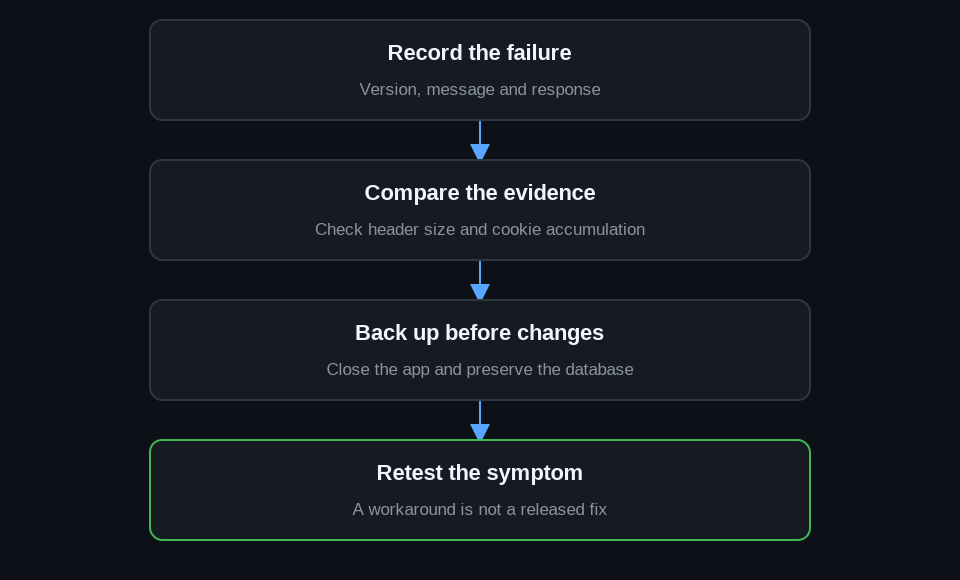
- Record the desktop version, operating system, exact message and timing. In the Windows example, #11010 locates crash logs under
%APPDATA%\@deepseek-ai\dsh-desktop\logs\; paths on other systems are not established by these reports. - Look for the actual local response code and header-size evidence if available. A commenter in #11010 reports a network-log capture; such logs may contain sensitive URLs or tokens, so review and redact them before sharing.
- Compare the environment and symptoms with both discussions. A generic failure alone is weaker evidence than a 431 and a large cookie header on the failing request. Do not assume the reported launch count is a diagnostic test.
- Check current project information for a fix applicable to your installed version. The reports contain proposed changes and local experiments; their proposals are not evidence that a fix has shipped for your build.
- If evidence points to the reported cookie case, consider the targeted recovery below. Record what you changed and retest once, rather than repeatedly changing plugins or clearing unrelated data.
DeepSeek Harness: What recovery did users report?
The #11010 author reports closing the desktop app completely, then deleting rows in the Windows Network/Cookies SQLite database where host_key='127.0.0.1' and the name matches dsh-auth-%. A commenter recommends backing up the cookie database and its journal first; the running Electron process can lock the database. The author reports the application started after this targeted deletion. This is a user-reported workaround for a matching case, not an official guaranteed repair.
Before editing a database, identify the correct installation and make a recoverable backup. Use an appropriate SQLite tool only if you understand the operation, check the selected rows before deletion, and preserve unrelated entries. Restart and compare the original symptom. If the evidence differs or the edit is outside your comfort level, preserve the logs and seek help instead. #11102 notes that resetting the whole user-data directory can discard local data; targeted cookie cleanup avoids intentionally deleting that entire directory, but still alters authentication state.
A commenter also proposes modifying the packaged application. That is an invasive, version-specific experiment, and the discussion says updates can overwrite it. The supplied reports do not establish it as a general fix; there is no need to patch application code merely because a generic error appears.
The #11010 network-log comment reports a Cookie header of about 16 KB on the failing request and a 431 response. Another commenter measured a different header length in a separate environment. Treat those figures as observations useful for comparison, not as a number of cookies at which every installation must fail. Other request headers also consume space.
The two discussions suggest fixes such as changing cookie naming or cleaning old entries, but a suggestion in a thread is not a release note. If a new version is available, check its own documented changes and test in your environment; do not infer from the existence of a proposed patch that it was included. Keep the original symptom and post-change result together so the evidence remains useful if the problem returns.
DeepSeek Harness: What are the limits and safety boundaries?
Do not paste cookies, tokens or unreviewed network logs into an issue. The sample request in #11010 contains a token-bearing URL. Remove secrets and private paths while retaining the response code, header size, version and relevant timing. A successful restart after cleanup shows the local symptom changed, not that the underlying accumulation has been corrected. Watch the project for an applicable release and report recurrence with sanitized evidence.
Avoid deleting the whole profile, disabling plugins or clearing configuration solely on this diagnosis. #11102 reports those plugin and patch changes did not resolve its case; that observation does not prove plugins cannot cause other startup failures. The two reports also disagree on immediate failure mechanics, so preserve the distinction between an observed 431 and an inferred 401.
DeepSeek Harness: Which terms matter?
- 431: an HTTP response indicating request header fields are too large.
- Cookie jar: the client's stored cookies that may be attached to requests.
- Host: the local service contacted by the desktop application.
- SQLite cookie database: the local store examined in the Windows report.
- Workaround: a user-reported way to change a symptom, not proof of a released fix.
Frequently asked questions
Does the error prove a cookie problem?
No. The discussions describe particular user reports, not every possible cause.
Is 431 the only reported response?
No. One report proposes a 401 path while another records 431.
Does cleanup fix the underlying bug?
A successful restart changes the symptom but does not establish a permanent fix.
Sources
Every claim in this article was checked against the sources below. Community discussions are user reports, not official behavior.
This is an independent community article, not official DeepSeek documentation. Listing a plugin in the registry is not a security review.