DeepSeek Harness: Desktop Profile Directory Errors
A desktop launch that fails while creating the profile directory needs a path investigation first: identify the actual failing path, restore its intended directory or link if appropriate, and distinguish the reported case from other startup failures.
DeepSeek Harness: what does the reported error show?
In discussion #10678, a user reports that desktop version 0.2.1-rc.2 on Windows exited without showing a window. The host log contained ENOENT from mkdir for C:\Users\<user>\.dsh\profiles\desktop, with DesktopProjectManager.withLock in the stack. The report describes a Harness home reached through a directory junction. After the user renamed the home directory away, startup failed; restoring the name restored startup in that reproduction.
This is a user report for a particular build and environment, not an official diagnosis of every silent exit. ENOENT says a path involved in the operation could not be found; the log alone does not establish whether a junction, missing parent, different configured home, or another path problem caused your own failure. The CLI reference describes profiles under $DSH_HOME/profiles/<name>; the architecture reference says desktop owns the reserved $DSH_HOME/profiles/desktop profile. Together they explain why the home path is relevant, but neither establishes that the CLI and desktop follow identical failure paths.
| Observation | Useful interpretation | Still unknown |
|---|---|---|
ENOENT on desktop profile creation | Investigate that path and its parents | Which component or link is missing |
| No window appears | Startup did not produce a usable window | Whether this particular error occurred |
| Restoring a renamed directory works | The report's reproduction supports a path issue | Whether your installation has the same cause |
| A renderer launch error | A different recorded symptom | Whether it shares the profile failure's cause |
DeepSeek Harness: where should you look for evidence?
The discussion reports host logs under %APPDATA%\@deepseek-ai\dsh-desktop\logs\ on the affected Windows system. Use that as a lead for a matching installation, not a promise that every platform or version stores logs there. Find the timestamp corresponding to the failed launch and read the operation, path, and stack together. The user's attachments include a separate Desktop renderer exited: launch-failed record; do not silently combine it with the repeated mkdir stack.
The CLI reference separately describes a Full diagnostics: path under $DSH_HOME/logs/ for required plugin activation failures. That report concerns CLI startup diagnostics and is not proof that a desktop failure occurring before profile creation writes the same report. If such a line exists in your case, follow the actual path printed; if it does not, do not assume the absence of that report means the desktop host had no error.
Record the desktop version, operating system, the exact error and operation, and the home path as configured for the affected process. Check whether the path in the log agrees with the path you expected. A drive letter or user-profile path copied from the discussion is an example from that user's machine, not a setting to reproduce.
DeepSeek Harness: how can you narrow down the missing path?
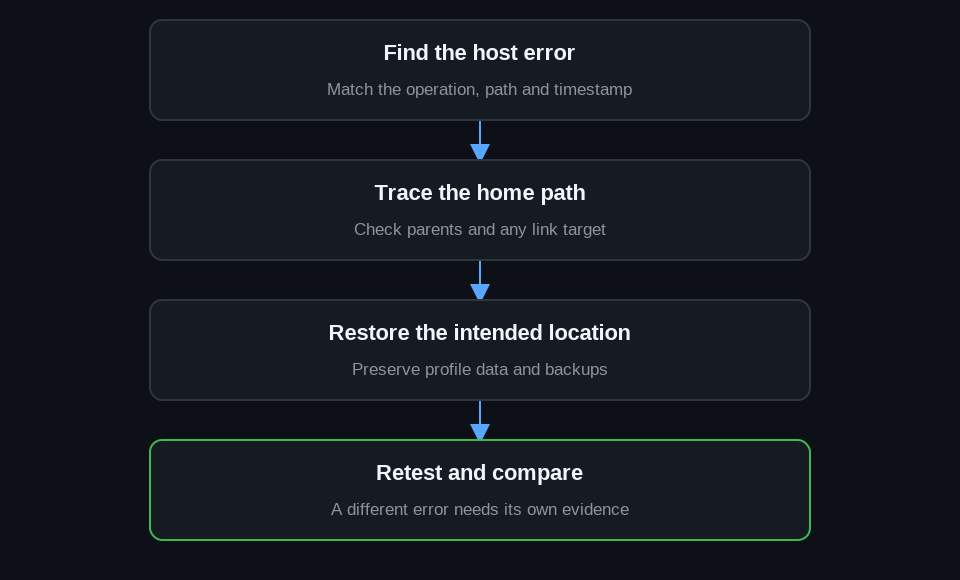
- Close the affected desktop application and preserve the relevant log. Note whether the error names
mkdirand the desktop profile path, or another operation and location. - Determine the intended Harness home for that launch. Trace each parent of the path in the error using your operating system's file tools. Check whether a directory was moved or renamed and whether a junction or symbolic link still points to an existing target.
- If you recognize a recent rename or move, identify the original location and its backup before changing anything. Restore the intended path only when you know which directory is the correct one; preserve its existing profile and data.
- Start the desktop again and compare the new log with the old one. Record whether a window appears and whether the same operation and path fail. A different error calls for a separate investigation.
- If the path is reachable but the error persists, share a sanitized minimal report with the version, path relationship, steps and new result. Include whether a link is involved, without exposing private usernames or project paths unnecessarily.
This is a diagnostic sequence, not a command to create an empty replacement profile. The user's successful restoration establishes a useful comparison in that report. A missing directory elsewhere, permissions failure, inaccessible drive or different desktop version may require different evidence.
DeepSeek Harness: what changes when the profile path is restored?
A profile is a named composition, rather than merely a display preference. The architecture reference says it contains a bundle list, out-of-tree installed plugins and a user patch. Desktop reserves its own profile and keeps package management separate from the npm CLI while sharing product data. Consequently, creating a new empty directory or selecting a different home can change which composition and data the application encounters. A successful launch under a new location would not show that the old installation was repaired.
The report's proposed startup validation, fallback directory and recovery screen are suggestions by the reporter, not documented behavior or confirmed fixes. The same report mentions a separate writer-lock timeout. It does not document a supported force-unlock operation; avoid removing lock files based solely on this path error, especially when another process may be active. A lock symptom and a missing-parent symptom require their own evidence.
If the home was intentionally moved, determine how the desktop installation is configured before altering its links or environment. A path may exist as a directory entry while its junction target is unavailable. Check both the entry and its destination, and keep the original state recoverable. If the old location was on an unavailable drive, restore access to the intended location through your normal system administration process rather than inventing a desktop-specific migration procedure.
DeepSeek Harness: what are the limits and safety boundaries?
Do not delete or reset the Harness home to test this hypothesis. It can contain profile configuration and installed dependencies. Renaming, moving, or changing a link can also make existing data appear absent, so first establish which path owns the data and whether other applications use it. A backup is useful only if its location and contents are known.
The discussion does not establish that reinstalling fixes the problem, that every ENOENT is a broken junction, or that a proposed recovery screen has shipped. Check current behavior for your installed version. Logs may contain usernames, paths and raw error details; review them before sharing. The CLI reference warns that plugin errors can contain credential or configuration values and are not automatically redacted.
DeepSeek Harness: what do the terms mean?
- Harness home: the root used for profile and other Harness data, represented as
$DSH_HOMEin the CLI reference. - Desktop profile: the reserved profile owned by the desktop application.
ENOENT: the missing-path error shown in the user'smkdirreport.- Junction: the Windows directory link described in that report; its target must be considered separately from the link entry.
- Host log: the desktop process log that recorded the reported early failure.
Frequently asked questions
Does every silent desktop exit mean the profile directory is missing?
No. The linked discussion reports one specific error on one Windows build; inspect your own logs.
Should I create a new empty home?
First identify and preserve the original data; a new location may use a different profile.
Is the proposed fallback an established fix?
No. The fallback and recovery screen are suggestions in the user report.
Sources
Every claim in this article was checked against the sources below. Community discussions are user reports, not official behavior.
This is an independent community article, not official DeepSeek documentation. Listing a plugin in the registry is not a security review.