DeepSeek Harness: Plan Mode vs. Workflows
DeepSeek Harness plan mode changes the guidance attached to an agent’s model requests; a workflow runs an orchestration script that can start subagents. They solve different problems and neither replaces separately configured execution controls.
DeepSeek Harness: what does each capability do?
The plan-mode reference describes per-agent collaboration state. When active, the optional plugin adds the deployment's plan:policy guidance to each model request. That guidance tells the model how to collaborate during planning; it is not a mechanism for forcing the model to obey. The agent loop does not require the plugin.
The workflow reference describes a different optional capability: an engine executes a model-written orchestration script which can start subagents. A workflow has a parent agent, a run, progress events and an eventual result. Its purpose is to coordinate work, rather than to select the planning guidance of every model request.
| Question | Plan mode | Workflow |
|---|---|---|
| Unit | Per-agent collaboration state | One orchestration run |
| Main effect | Adds deployment-owned prompt guidance | Executes a script that can start children |
| User interaction | Can present a plan for review | Run reports progress and a terminal outcome |
| Enforcement | Guidance is soft | Execution follows the calling Session's file policy |
| Required by the agent loop? | No | No |
The two capabilities can be used in a broader task, but neither term guarantees the presence of the other. An agent can plan without running a workflow; a workflow run is not itself evidence that a user approved a plan.
DeepSeek Harness: how does a plan reach review?
When command support is composed, /plan selects plan mode. /plan followed by a message selects it and submits that message for the next step; /plan off selects the inactive state. Availability depends on the plugin and command service being present, so do not assume the command exists in every deployment.
The plugin registers exit_plan_mode even when mode is inactive, keeping the request's tool catalog stable. Calling it outside plan mode fails. In plan mode the tool requires a complete Markdown plan beginning with a # heading and presents it through the user-questions interface. An approval returns { approved: true } and records a pending exit. It is applied at the next accepted in-turn pre-step, so plan guidance remains active for the rest of the current assistant tool batch.
Keeping planning is a failed tool call carrying the user's feedback: the model can revise and present again. Dismissing review returns { approved: false } and ends the turn, leaving plan mode active. A missing interaction channel or service reload during review also fails rather than silently granting an exit. These distinctions matter when debugging a review that did not lead to execution.
The mode is logged as plan/mode, while the client sees an active and possibly pending projection. A selection made after the final accepted pre-step of a turn may wait for a later turn. The reference warns that such a process-local pending selection can be lost if the process exits before another accepted pre-step. A selected state is therefore not always the state already used by the current request.
DeepSeek Harness: what actually runs in a workflow?
A workflow start request contains a script, meta, optional args and the parent agent. The ordinary workflow tool builds it from the model's call. The engine validates metadata before evaluating the script; name and description identify the run. Declared phases describe progress: their presence does not by itself impose an execution structure. The script can use the workflow facilities to start children, subject to the selected engine and its limits.
The documented PTC implementation runs the script and helpers in a managed Node process under the calling Session's file policy. One context has one workflow engine implementation; another configured implementation replaces it rather than becoming a second named provider. A deployment without this optional capability cannot be assumed to run the same script.
A live run resolves to completed, cancelled or error. The returned value is meaningful for completed; non-completed outcomes carry an error. Cancellation and disposal have separate roles: cancellation requests a stop, and the holder must dispose the run and wait for cleanup. The PTC engine has no overall elapsed deadline in the reference. The existence of a phase label or a partial observation is not the same as successful completion.
DeepSeek Harness: which should you choose for a task?
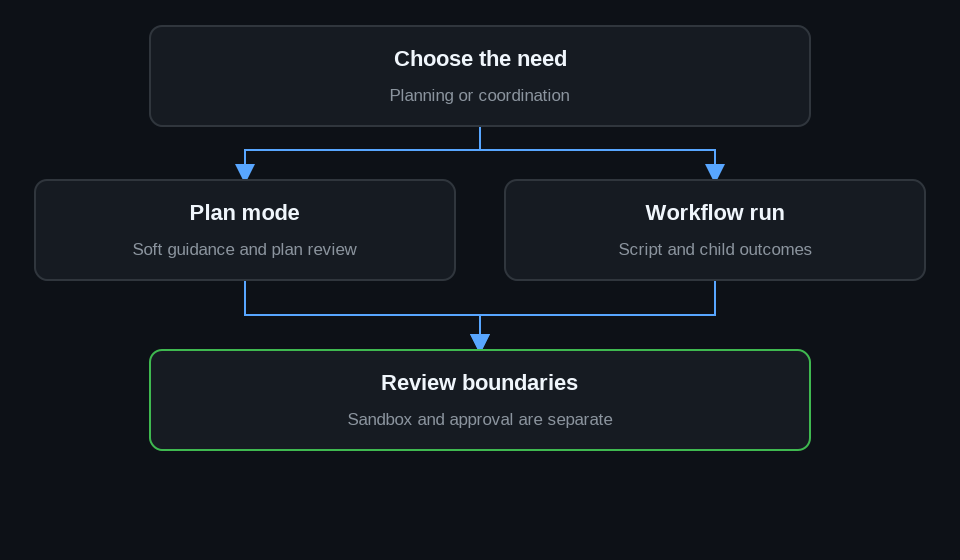
- Decide whether the immediate need is agreement on an approach or coordination of multiple work items. For the former, check that plan mode and the review channel are available. For the latter, check that a workflow engine and the appropriate subagent capability are composed.
- If planning is appropriate, select plan mode and describe the scope, desired deliverables and constraints. Read the submitted plan and supply corrections through the review interaction.
- Observe the review result. Approval schedules a transition; it does not mean the current tool batch instantly loses its plan guidance. Dismissal leaves planning active.
- If a workflow is appropriate, inspect the proposed division of work and inputs. Track actual run and child outcomes, not just declared phase names. A failed or cancelled run should not be treated as a completed result.
- Review the resulting changes or evidence against the original task. A plan is an intention, and a workflow result is an execution outcome; each needs its own review.
For example, a cross-module change may first benefit from a reviewed plan explaining interfaces and risks. A later workflow may coordinate investigations of independent modules. Conversely, a short design discussion may not need children at all. The architecture leaves that decision with the deployment and its user rather than automatically turning every plan into a workflow.
DeepSeek Harness: what are the limits and safety boundaries?
Plan mode is soft guidance. The reference explicitly separates it from sandbox and approval policy: these controls do not read or write plan state. Configure and evaluate them independently, particularly when a task can change files or invoke tools. Approval of a proposed plan should not be interpreted as proof that every subsequent action is confined or appropriate.
Workflow execution has its own file-policy boundary, but a configured engine is not a security guarantee. Review what the script and its children are asked to do, the policy in effect, and the results. The engine's ordinary per-item failure handling is also distinct from fatal errors such as invalid hook arguments or tripped caps, which stop the script rather than becoming an ordinary null result. A run's cancellation, interrupted record, and successful result should remain distinguishable in operational reports.
DeepSeek Harness: what do the terms mean?
- Plan mode: optional per-agent state that contributes deployment-owned guidance to model requests while active.
- Pending selection: a selected state awaiting application at an accepted pre-step; it is not necessarily the state used by the current request.
- Workflow: an optional orchestration run driven by a script and attributed to a parent agent.
- Phase: workflow progress vocabulary, not automatically an execution barrier.
- Subagent: a child started through the subagent capability, with lineage attributed to its parent.
- Sandbox and approval policy: separately configured controls; neither is implied by selecting plan mode.
Frequently asked questions
Does plan mode enforce restrictions?
No. Plan guidance is soft; sandbox and approval policies are configured separately.
Does a workflow imply plan approval?
No. A workflow is an orchestration run, not evidence that a plan was approved.
When does an approved exit take effect?
It is pending until the next accepted in-turn pre-step.
Sources
Every claim in this article was checked against the sources below. Community discussions are user reports, not official behavior.
This is an independent community article, not official DeepSeek documentation. Listing a plugin in the registry is not a security review.