Fix ERR_PNPM_UNEXPECTED_STORE in DeepSeek Harness
After updating DeepSeek Harness desktop, the Codex and Claude Code subagent plugins in the official plugin market fail every "Update" and "Uninstall" click with [ERR_PNPM_UNEXPECTED_STORE]. The cause is that pnpm resolves a store directory different from the one the profile's existing node_modules was linked from; pinning storeDir in pnpm-workspace.yaml restores both actions without reinstalling the plugins.
What is this error actually saying?
The full message looks roughly like this:
Uninstall failed: [ERR_PNPM_UNEXPECTED_STORE] Unexpected store location
The dependencies at "/Users/<you>/.dsh/profiles/desktop/node_modules"
are currently linked from the store at "<store A>".
pnpm now wants to use the store at "<store B>" to link dependencies.
The concrete values of <store A> and <store B> on your machine are where diagnosis starts. The message itself states exactly one thing: this node_modules was installed from one store, and this pnpm invocation wants to use another. It does not say which side is correct, nor which one to change.
The pnpm documentation describes ERR_PNPM_UNEXPECTED_STORE as a modules directory that is present but linked to a different store directory, and offers a single recommendation: if you intend to move to the new location, run pnpm install so pnpm reinstalls the dependencies from the new store.
The important part is that "just reinstall" is not a freely available button in this context. The plugin manager adds to and removes from an existing node_modules; it does not decide for you which store should win. You have to identify both sides first, then decide which one to pin.
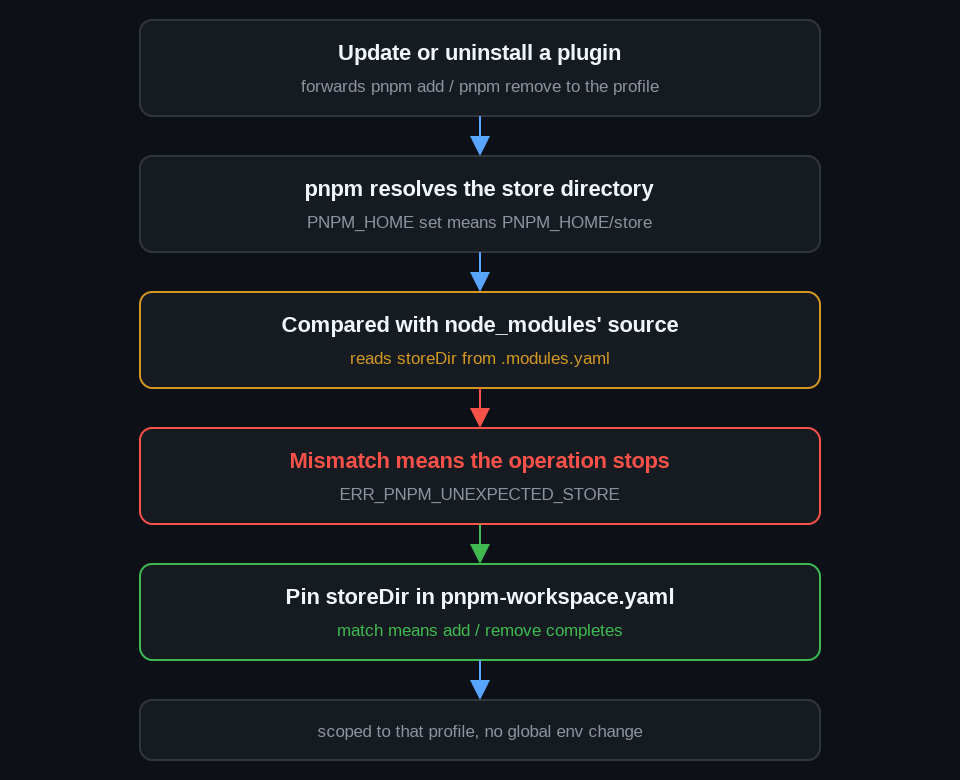
Why do only Update and Uninstall fail?
This is the easiest part to misread. A natural reaction is to assume the upgrade broke the plugin and to reinstall the Codex subagent. That is not what happened.
The DSH desktop plugin manager does not edit files directly. It translates each action into a pnpm command executed inside the profile directory. Installing a package becomes pnpm add; uninstalling one becomes pnpm remove. Both are incremental changes to an existing node_modules, and before writing anything pnpm must confirm that the store it intends to link from is the same store the current dependencies already link to. Otherwise the hard links would point at content that does not belong to those packages. On a mismatch it aborts immediately.
pnpm install takes a different path: it is allowed to rebuild node_modules, so the same store difference often slides past and the install succeeds. That asymmetry is exactly why "reinstalling fixed it, but Update still fails" happens, and why repeated reinstalls never resolve it.
| Action | pnpm behavior | On a store mismatch |
|---|---|---|
| Clicking Update | equivalent to pnpm add | fails immediately, nothing changes |
| Clicking Uninstall | equivalent to pnpm remove | fails immediately, nothing changes |
Running pnpm install | may rebuild node_modules | usually rebuilds and succeeds |
What the error blocks is not the plugin but that one pnpm call the plugin manager makes.
How is the store location computed?
pnpm follows an explicit priority order when choosing a store. The documentation for the storeDir setting lists it: if $PNPM_HOME is set, pnpm uses $PNPM_HOME/store; otherwise it falls back through $XDG_DATA_HOME/pnpm/store, then ~/AppData/Local/pnpm/store on Windows, ~/Library/pnpm/store on macOS, and ~/.local/share/pnpm/store on Linux.
That ordering is the hinge of the whole problem: $PNPM_HOME comes first and overrides the macOS default that looks so obviously correct.
Compare the two paths in the error and the pattern becomes visible:
store A (node_modules source): /Users/<you>/Library/pnpm/store/v11
store B (pnpm wants this now) : /Users/<you>/.pnpm-store/v11
B lands under ~/.pnpm-store, not ~/Library/pnpm/store. Working backwards through the priority order, that only happens when PNPM_HOME points somewhere outside ~/Library/pnpm. A common origin is an installer or a hand-written shell profile that sets PNPM_HOME to pnpm's binary directory (for example /usr/local/bin/pnpm) instead of its data directory.
pnpm does not validate whether that value makes sense; it concatenates strings. So "the dependencies were installed while the default resolved correctly" and "pnpm later derived a path from a wrong PNPM_HOME" become two facts separated in time. The provenance recorded in node_modules no longer matches the current derivation, and the mismatch surfaces on the next add or remove. This also explains why it appears specifically after upgrading DSH: the upgrade ships a different bundled pnpm, changing when and how the path is resolved.
How do I confirm which two stores are involved?
Before changing anything, extract the actual values on both sides. They are recorded in two places:
- Where the installed dependencies came from: a
storeDirfield inside the profile'snode_modules/.modules.yaml. - What pnpm wants now: let pnpm compute it rather than parsing the error text.
grep -m1 storeDir ~/.dsh/profiles/desktop/node_modules/.modules.yaml
That first command tells you which store installed the existing dependencies. Then let pnpm derive its own answer:
cd ~/.dsh/profiles/desktop && pnpm store path
The two outputs must be identical. If they differ, you have already reproduced the failure condition and do not need to provoke another error by clicking Uninstall.
One detail is easy to miss: pnpm store path depends on the current shell environment. If the terminal reports one thing while the DSH application behaves differently, the two are probably inheriting different PNPM_HOME values. Check with:
echo "PNPM_HOME=$PNPM_HOME"
If that value is a .../bin directory or the directory holding an executable, it should not be used as PNPM_HOME at all, because it sends pnpm looking for the store in the wrong place.
How do I tell environment drift from a broken plugin?
Three observations separate the cases quickly and save time spent in the wrong direction:
| What you observe | More likely cause |
|---|---|
| Every plugin fails with the same error | environment layer (store resolution), not one plugin |
Manual pnpm install succeeds | the difference is confined to incremental operations; the plugin files are intact |
| The error names two different store paths | this article's case; follow the steps below |
| Only one plugin fails while others work | more likely that plugin's own compatibility or build scripts |
If you land in the last row, this fix will not help. Look instead at the plugin's engines.dsh compatibility and at build-script approval via allowBuilds. When an install is rejected, DSH usually gives a more specific message, such as a peer dependency of a package not matching the current dsh version; that class of message has nothing to do with the store.
The timing of the failure is also informative. It fails immediately on click, not partway through a download. An immediate failure means pnpm aborted during the pre-flight compatibility check before touching the network, which all but rules out network conditions, registry mirrors and credentials, and points further at local store resolution.
Where should the fix be applied?
Do not change the global environment variable. This is the most important lesson from this investigation.
Correcting PNPM_HOME in ~/.zshrc does restore DSH. It also changes store resolution for every other repository on the machine. Any repo whose node_modules came from the old default store will then hit the identical error on its next pnpm add, trading one problem for a new one.
The right approach scopes the fix to this one profile: write storeDir into the profile's pnpm-workspace.yaml, pointing at the store the node_modules actually uses.
packages:
  - .

storeDir: /Users/<you>/Library/pnpm/store

nodeLinker: hoisted
autoInstallPeers: false
This block belongs in ~/.dsh/profiles/desktop/pnpm-workspace.yaml, and its purpose is to pin the source store of the existing node_modules so resolution cannot drift when PNPM_HOME changes. The packages, nodeLinker and autoInstallPeers keys are already in that file; add only the storeDir line rather than overwriting the file, since a duplicated key makes the YAML fail to parse.
Two points need stating:
- Prefer the parent directory of the store (
.../Library/pnpm/store); pnpm appends the version segment itself. A full path that already ends inv11also works, because pnpm detects that the last segment is already a version and does not append it twice. The parent form survives a pnpm major-version bump, so it is more durable. - Do not use
store-dirin.npmrc. With pnpm 11, project-level settings come frompnpm-workspace.yaml, andstore-dirin.npmrcdoes not participate in store resolution in this version. Writing it there appears to fix nothing and invites the belief that it did.
Verify immediately rather than waiting for the next click:
cd ~/.dsh/profiles/desktop
pnpm store path
The output should match the storeDir in .modules.yaml exactly.
Once the two agree, Update and Uninstall work again, because pnpm no longer believes it is writing into a different store.
What should I check after the fix?
The fix only means pnpm stops refusing the operation; it says nothing about the plugins themselves. Finish in this order:
- Confirm no dependency was changed by accident. If you ran
pnpm addorinstallwhile investigating, a version range inpackage.jsonmay have been rewritten (for example^0.2.8becoming0.2.8), andpnpm-lock.yamldrifts with it. Compare against a backup or usegit diff. - Confirm every declared dependency is present. Check each entry in
package.json'sdependenciesagainstnode_modules, especially@deepseek-ai/dsh-subagent-codexand@deepseek-ai/dsh-subagent-claude-code. - Click Uninstall again. The real acceptance test is returning to the plugin market and removing a plugin that is safe to remove, then seeing a success message instead of red text.
- Restart DSH so it reloads. The pnpm fix lives at the filesystem level, while bundles are read when the process starts. Restarting once after the change prevents stale in-memory state from masking the result.
One practical caveat: the plugin market page shows states such as installed, update available, or provided by DSH, but the public documentation does not spell out which pnpm command "Update" runs underneath. The add / remove mapping in this article comes from observing pnpm logs inside the profile directory, so it is an empirical finding rather than documented behavior. Where versions differ, trust the logs on your own machine.
Those logs are worth knowing about, because they are the most direct evidence available for this class of problem. Every plugin operation leaves behind an operation-* directory whose pnpm.log is the complete output of that pnpm call:
ls -lt ~/.dsh/profiles/desktop/.plugin-manager/logs | head
cat ~/.dsh/profiles/desktop/.plugin-manager/logs/operation-*/pnpm.log
Inside, lines with + under dependencies: were added and lines with - were removed, and the tail prints Done in ... using pnpm vX.Y.Z. That last line tells you which pnpm path the operation took and which pnpm version ran it, which also explains why behavior changes after a DSH upgrade: the bundled pnpm version moves with it, and store resolution rules evolve across versions.
What are the limits and safety boundaries?
- Do not widen permissions or delete
node_modulesto escape the error. Removing the whole directory leaves the profile in an uninstalled state, so subagent plugins and other extensions are unavailable until something reinstalls them. The downside far outweighs the benefit. - The directory named by
storeDirmust actually exist. Pointing at a nonexistent path does not "create it and work"; it produces a different error on the next install. - This fix changes no security property. It aligns a storage location only. It does not affect plugin provenance, signatures,
engines.dshcompatibility checks, or sandbox boundaries; whether a plugin is trustworthy still needs its own assessment. - Handle each machine separately.
storeDircontains an absolute path, so a different home directory or a different machine requires its own edit. Copy-pasting between machines will not work. - Do not treat it as general pnpm best practice. Pinning
storeDirhere is for compatibility with an already installednode_modules. For a repository starting from scratch, letting pnpm use its default derivation is simpler.
Glossary
- Store (content-addressable storage): the global directory where pnpm keeps package contents; files in
node_modulesare hard links back into it. storeDir: the pnpm setting naming the store location; this article pins it inpnpm-workspace.yaml.PNPM_HOME: the pnpm data-directory environment variable. When set, the store defaults to$PNPM_HOME/store, so it must name a data directory rather than the directory holding the executable.node_modules/.modules.yaml: pnpm's installation metadata, whosestoreDirfield records which store produced these dependencies.ERR_PNPM_UNEXPECTED_STORE: the error pnpm raises when the store a present modules directory links to differs from the store it is about to use.- Profile: the isolation unit for DSH configuration and dependencies; the desktop build keeps its default profile at
~/.dsh/profiles/desktop.
Frequently asked questions
Why do only Update and Uninstall fail, while reinstalling works?
Update and Uninstall run pnpm add or pnpm remove against an existing node_modules, which must match the intended store. pnpm install may rebuild node_modules instead.
Should I fix PNPM_HOME in my shell profile?
Avoid it. Changing it globally changes store resolution for every other repository on the machine. Pin storeDir in the DSH profile instead.
Does the fix require reinstalling the plugins?
No. Aligning storeDir with the recorded store lets pnpm accept the existing node_modules, so no reinstall is needed.
Why storeDir in pnpm-workspace.yaml and not .npmrc?
With pnpm 11, project-level settings come from pnpm-workspace.yaml; store-dir in .npmrc does not participate in store resolution.
Sources
Every claim in this article was checked against the sources below. Community discussions are user reports, not official behavior.
This is an independent community article, not official DeepSeek documentation. Listing a plugin in the registry is not a security review.