DeepSeek Harness: Comparing Config Dump Modes
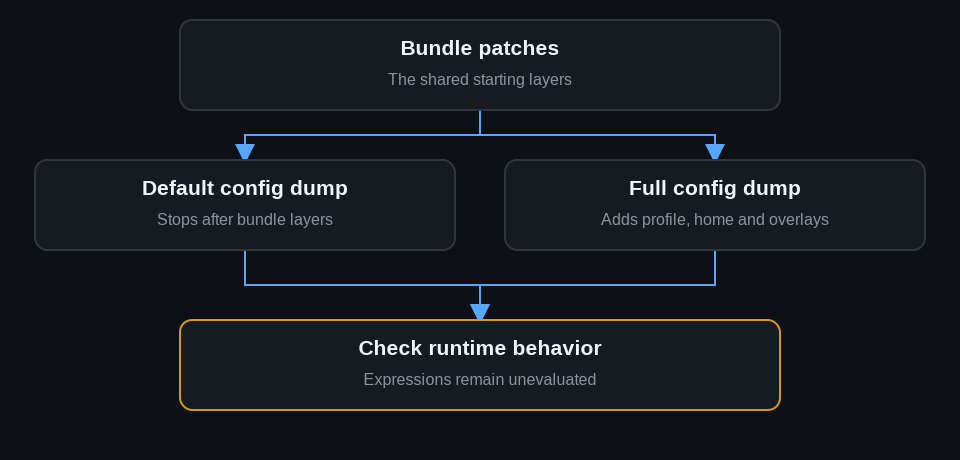
In DeepSeek Harness, --dump-default-config shows the selected profile's bundle layers, while --dump-config also applies the profile, home and explicitly supplied command-line patches. Both inspect the composed tree without booting it; neither evaluates application arguments or runtime expressions.
DeepSeek Harness: which layers does each dump show?
The CLI reference defines the two modes. A profile starts with the bundle patches listed in its manifest. The default dump stops there. The full config dump continues with the profile's cordis.patch.yml, the home-level $DSH_HOME/cordis.patch.yml, and the --patch files supplied for that invocation, in argument order. Later patches take precedence for a targeted row.
| Input or behavior | --dump-default-config | --dump-config |
|---|---|---|
| Bundle patches in manifest order | Included | Included |
| Profile and home patches | Excluded | Included |
Explicit --patch overlays | Not part of the result | Included in argument order |
| App arguments and runtime expression values | Not evaluated | Not evaluated |
| Profile initialization | May create missing profile files | May create missing profile files |
The installed profile and its bundle list are the starting point. The word “default” refers to those bundle layers in the selected profile, not to a universal configuration independent of the profile or installed version. Comparing the two views helps identify what user-managed layers changed. It does not show the actual values that every plugin will see at runtime.
DeepSeek Harness: how do I compare them?
- Identify the profile and the explicit patch files used by the invocation you want to investigate. The example below uses the shipped
webprofile and a hypothetical overlay path. - Run the bundle-only view and read the row comments. Keep the output somewhere appropriate for your environment; inspect it for sensitive values before sharing.
- Run the full view with the same profile and any applicable overlays. Compare the relevant rows and their source comments with the first output.
- Inspect stderr for unmatched patch targets. A patch aimed at the wrong row is not evidence that the intended change was applied.
- Check the affected plugin's schema and test the behavior separately. Both dumps stop before the app's runtime argument providers execute.
dsh --profile web --dump-default-config
dsh --profile web --patch ./extra.yml --dump-config
The second example only represents an invocation that actually supplies ./extra.yml; a file merely existing on disk does not make it part of the composition. If your normal startup uses no such overlay, omit that pair when comparing. Use the real profile and inputs for the situation under investigation.
DeepSeek Harness: how should I interpret the differences?
Both outputs include comments identifying the file supplying a row and overlays that changed it. A difference can result from the profile patch, the shared home patch, or one of the supplied overlays. Work through them in order, rather than assuming a changed value comes from the closest-looking file. Relative plugin names in inserted rows resolve beside the patch file that inserted them.
A patch replaces the targeted row's complete config value rather than deep-merging its individual keys. If a later layer supplies only one field, do not assume other fields from an earlier row survive. The plugin configuration guide explains a separate mechanism: a plugin's exported schema validates configuration and fills its declared defaults when the plugin loads. A schema default is not proof that an earlier patch's value was merged into a later one. Consult the actual plugin schema for required fields and defaults.
The two dumps are useful when an override seems absent. Compare the source comments and exact row identity, then check warnings on stderr. If the full tree differs as expected but behavior does not, investigate the runtime expression and plugin behavior rather than adding another patch immediately. The configuration layer guide explains the broader precedence model.
DeepSeek Harness: why is the result not the final runtime value?
The dumps leave !!js expressions unevaluated. They also never run application command-line providers and reject invocations carrying app arguments. For example, the CLI reference describes a Web port expression that reads a startup service; a dump containing that expression cannot tell you the final port supplied by the running app. Conversely, replacing the whole row with literal configuration can remove the expression that would otherwise read the app argument. The composed tree and the live value answer different questions.
The CLI also offers --dump-config-schema, which uses the same layers as the full config dump but produces a schema, not the configured values. The three dump modes are mutually exclusive. Schema projection has its own limitations and native validation remains necessary. Do not treat a schema dump as a third equivalent rendering of current values or as proof that a profile will boot successfully.
DeepSeek Harness: what are the limits and safety boundaries?
Although the dump does not boot the composed application, it can initialize missing profile files. In addition, the documented --from-default-profile option can replace a custom target profile, including its user patch and installed dependencies, and the dump modes accept it. Do not include that option when you only intend to inspect an existing profile. The dump flags reject the reserved desktop profile and application arguments; a rejected command should be corrected, not interpreted as a valid configuration result.
Configuration and diagnostics can contain sensitive values. Review output before sharing and avoid putting actual credentials in examples. A successful dump establishes the composition it inspected, not successful plugin startup, access policy suitability or safety of the resulting settings. After a deliberate change, verify the relevant behavior in an appropriate environment and keep a recovery path for user-managed files.
DeepSeek Harness: what do the terms mean?
- Bundle patch: configuration supplied by a bundle listed in the selected profile.
- Profile patch: the selected profile's own override layer.
- Home patch: a machine-local layer shared across profiles.
- Overlay: an explicit patch supplied to the invocation.
- Expression: a configuration value evaluated during runtime, not by these dumps.
Frequently asked questions
What does the default dump include?
Only the selected profile’s bundle layers.
Does the full dump evaluate runtime expressions?
No. Expressions remain unevaluated and app arguments are rejected.
Can a dump create files?
Yes. A dump can initialize missing profile files.
Sources
Every claim in this article was checked against the sources below. Community discussions are user reports, not official behavior.
This is an independent community article, not official DeepSeek documentation. Listing a plugin in the registry is not a security review.