DeepSeek Harness: Find Overrides Skipped After Upgrades
After a DeepSeek Harness upgrade, compare the composed configuration and unmatched-target diagnostics with your intended overrides, then test the affected behavior. A successful startup alone does not establish that an old patch still targets the intended row.
DeepSeek Harness: what can an upgrade leave behind?
In discussion #10860, a user reports that an upstream LLM plugin was split or renamed during a 0.1.x to 0.2.0 upgrade. An existing cordis.patch.yml entry no longer matched. The reporter says the service and UI started, but a real request later revealed that the provider configuration had reverted to defaults. The environment was reported as 0.2.0-rc.2 with custom patches across several profiles.
The report describes a warning about the unmatched entry, and asks for more visible diagnostics, dump annotations and optional strict mode. Those are proposals in a user report, not features to assume exist. The current CLI reference specifically documents that configuration dumps report unmatched patch targets on stderr. This gives an operator a concrete place to look, while the older incident explains why a normal-looking UI is insufficient evidence.
DeepSeek Harness: which layers should I compare?
The launcher composes bundle patches in manifest order, then the profile patch, the home patch and any explicit command-line patches. Later layers win per row; a matching patch replaces the entire target row's config rather than deep-merging individual keys. A patch can also insert a row. A missing target and a later replacement are distinct explanations for an unexpected result.
| Evidence | What it helps answer | Limitation |
|---|---|---|
| Patch source and row identifier | What did the operator intend to override? | A file's presence does not prove a match |
| Dump stderr | Which targets were reported unmatched? | Inspect the actual command and selected layers |
| Dump output and source comments | What composed rows and overlays are shown? | Runtime expressions remain unevaluated |
| Representative request | Does the affected behavior work? | One request cannot cover every configuration path |
The plugin configuration guide describes schema validation and defaults. A valid config can still be different from the operator's intended config. In particular, schema defaults are not evidence that an old patch matched a renamed row. Compare intended settings against the new plugin's documented schema before changing a target.
DeepSeek Harness: how do I inspect the composed result?
-
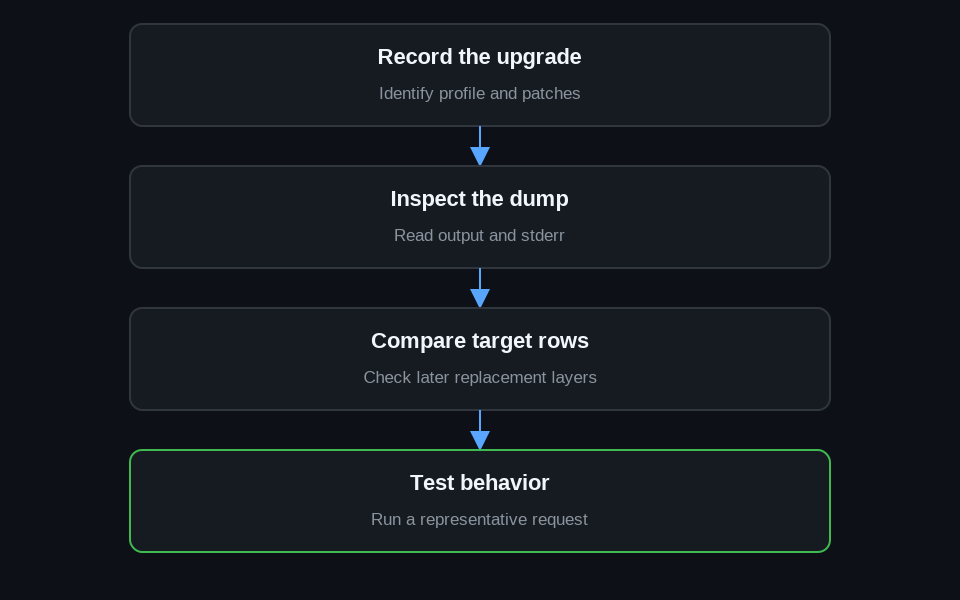
Identify the affected profile, its previous expected behavior and all patch files actually supplied at startup. Preserve the existing configuration and record the versions being compared.
-
Run a dump for the selected profile. The CLI reference gives this example:
dsh --profile web --dump-config -
Read both standard output and standard error. Output comments name the file supplying each row and overlays that changed it; unmatched patch targets are reported on stderr. Compare the target identifiers and full resulting configuration with the pre-upgrade expectation.
-
If the deployment uses a command-line overlay, include that same overlay in the comparison. The documented form is
dsh --profile web --patch ./extra.yml --dump-config. Substitute the actual profile and existing patch path; this example does not create an overlay. -
Check the updated plugin documentation and schema, correct a confirmed stale target and preserve all fields required in the replacement. Re-dump with the same inputs, inspect diagnostics again and run a representative request.
The dump initializes missing profile files. It prints the composed tree without booting the application, leaves !!js expressions unevaluated and does not run app command-line providers. It rejects app arguments. Consequently, it is useful for composition but cannot alone prove the runtime value after an application argument is resolved. Do not add app flags to a dump invocation and expect it to simulate a normal launch.
DeepSeek Harness: how do I distinguish a skipped patch from a later override?
Start with stderr: an unmatched-target warning points toward a patch that could not find its intended row. Then compare its identifier with the rows supplied by the new bundle. A plugin rename or split is one possibility illustrated by the report; confirm the actual installed version and configuration instead of assuming every upgrade makes the same change.
If there is no unmatched warning, inspect the source comments and later layers. A home patch applies after a profile patch, and a supplied --patch applies later still. A later matching row may replace an earlier complete config. Because replacement is not a key-by-key merge, a partial replacement can also remove settings the operator expected to retain. The separate configuration layer guide explains that ordering.
Finally, use a real request that exercises the changed provider or feature. The discussion's failure became visible only when a request used the reverted provider configuration. A successful startup and an apparently correct dump answer different questions; a runtime expression or application argument can still affect the actual result.
A useful upgrade record ties the exact profile, patch inputs, dump diagnostics and request result together. That makes the comparison reproducible when several profiles or shared home overrides are involved.
DeepSeek Harness: what are the limits and safety boundaries?
The user report does not prove every warning is invisible, that every unmatched patch silently changes behavior, or that a requested strict mode exists. The CLI documentation describes current dump behavior; compare it with the installed version's help and output. Never treat a proposed diagnostic as an available flag without verifying it.
Configuration dumps and logged plugin errors can contain sensitive values. Review output before sharing and keep a recoverable copy of user-managed configuration before edits. The CLI reference notes that raw diagnostic errors are not redacted. Schema validation checks structure and declared constraints; it does not prove a provider, credential or resulting access policy is appropriate.
DeepSeek Harness: what do the terms mean?
- Patch target: the configuration row an overlay attempts to change.
- Unmatched target: an entry whose intended row was not found during composition.
- Bundle: a package supplying a configuration layer and code.
- Dump: an unevaluated view of the composed configuration without starting the application.
- Schema: a plugin's declared configuration shape, defaults and constraints.
Frequently asked questions
Does successful startup prove every patch matched?
No. A user reported an unmatched override even though the service started.
Where does the dump report unmatched targets?
The CLI reference says unmatched patch targets are reported on stderr.
Does a dump resolve application arguments?
No. It leaves expressions unevaluated and does not run application argument providers.
Sources
Every claim in this article was checked against the sources below. Community discussions are user reports, not official behavior.
This is an independent community article, not official DeepSeek documentation. Listing a plugin in the registry is not a security review.