DeepSeek Harness: Find Startup Diagnostics
When a required plugin fails to activate, find the final Full diagnostics: line on stderr; it points to a unique startup report under the Harness home logs directory, or the full report is printed on stderr if writing fails.
DeepSeek Harness: where is the report?
The CLI behavior reference says a required plugin activation failure prints failed plugins with their original stacks, followed by pending plugins and missing services. The final Full diagnostics: line names the report actually written for that failure. Its filename has the form startup-<timestamp>-<uuid>.log, directly under $DSH_HOME/logs/; the default is ~/.dsh/logs/.
Use the printed path when possible: it identifies this attempt, while old reports are neither overwritten nor automatically deleted. If the configured home differs from the default, searching only the default directory may miss the report. The path appears only after a successful write.
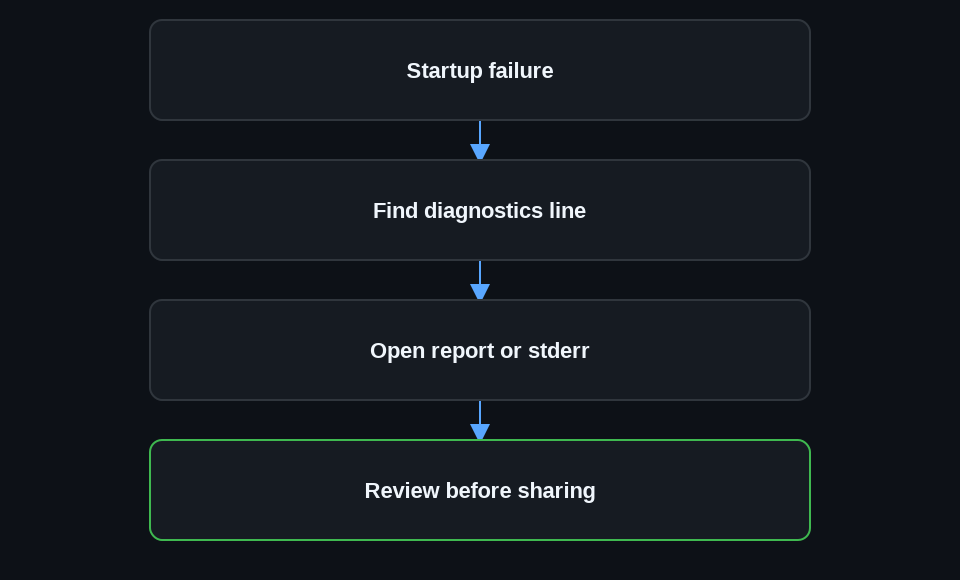
DeepSeek Harness: what should I do after a failure?
- Preserve the startup stderr and find
Full diagnostics:. Open the exact file named there, rather than selecting an arbitrary older report. - If no path appears, read stderr for a report-writing error. When the logs directory or file cannot be written, the CLI prints the write error and the full report to stderr; the exit code remains 1.
- Record the profile, versions, platform, original failure and affected plugin names from the report. Compare pending plugins and missing services with the first failure rather than treating every pending row as an independent root cause.
- Check whether a recent configuration change could be relevant. The plugin configuration guide explains that Cordis validates plugin configuration using its exported schema while loading and fills declared defaults. Invalid configuration can fail loading.
- Before sharing, inspect the report and remove credentials, sensitive configuration and private paths. Preserve enough of the error and stack to make the failure understandable.
The CLI reports configuration parse, schema, resolution, and plugin boot failures as nonzero exits, but the special report behavior above is documented specifically for required plugin activation failures. Optional-only activation warnings retain normal output without creating a report. Do not assume every startup error produces this file.
| Observation | What the reference says | Next step |
|---|---|---|
Full diagnostics: and a path | The file was written successfully | Open that exact report |
| Write error on stderr | Full report is also printed there | Preserve the stderr report |
| Optional-only warnings | No diagnostic report is created for these alone | Inspect normal warning output |
| Nonzero startup with no report | Failure may be outside the report trigger | Read the original error and stage |
DeepSeek Harness: what is in the full report?
The report includes DSH and Node versions, platform, profile, root configuration path, inactive plugin modules and states, original errors, and startup warning/error arguments. It also includes import errors without a Fiber. Node inspection preserves nested causes, aggregate members, circular references, non-enumerable and Symbol properties, without depth, string, or array limits. Custom inspectors are disabled; accessors are described without evaluating them. The collector includes asynchronous failure cleanup and stops when boot settles.
This detail can explain a stack or dependency chain that the brief terminal summary does not convey. It does not independently collect environment variables or configuration contents. However, a raw plugin error can itself include configuration or credential values. The report is not redacted. It can contain private information even when the collector did not separately gather a configuration file.
DeepSeek Harness: how does configuration validation help?
A plugin can export a Config schema; Cordis checks values during loading and supplies defaults defined in that schema. A type or required-field error can therefore surface during startup. Compare the actual error with the relevant plugin's declared fields and your recent configuration change; do not assume a pending plugin itself caused the first failure. The configuration guide's schema examples illustrate validation, not a universal repair for all startup failures.
If investigating the effective composition, configuration layer precedence describes bundle, profile, home, and command-line patches. Those layers can affect which plugin and values are loaded. Avoid repeatedly replacing a profile or changing unrelated settings before saving the evidence: the diagnostic report is a snapshot of the failed attempt, and subsequent attempts can produce different reports.
Compare attempts without losing the evidence
Each successful report write uses a unique name, so multiple attempts can coexist. Associate each file with the command, profile, time, and configuration state that produced it. When comparing an earlier failure with a later attempt, look for changes in the original errors and missing services, not just the number of pending rows. The CLI explicitly finishes writing the report and stderr before exiting with code 1 for a required activation failure, even when plugin handles remain open. That makes the printed path a useful starting point for the completed report, but it does not identify the cause for you.
A configuration schema describes accepted values and defaults, but the report records the actual failure observed during this boot. Match the two pieces of evidence before making a change; validation errors and missing runtime services call for different investigation.
DeepSeek Harness: what are the limits and safety boundaries?
On POSIX, newly created directories and files request modes 0700 and 0600, respectively. The reference does not describe those requested modes as redaction or a guarantee about every host's access controls. The report header warns readers to review it before sharing. Remove secrets and private identifiers from both the file and any copied stderr; avoid publishing a raw log merely because it was created in a restricted directory.
A complete report supplies evidence, not an automatic diagnosis. Missing services and pending plugins may reflect downstream effects, and the log can contain more than one error. Retain the original locally where appropriate, share a reviewed copy, and distinguish a documented behavior from your own inference about its cause.
DeepSeek Harness: what do the terms mean?
- Required plugin activation failure: the documented trigger for the full startup report.
- Pending plugin: an inactive plugin listed with other startup diagnostics.
- DSH home: the home directory whose
logs/directory holds successful report writes. - Schema validation: checking a plugin's configuration against its exported schema during load.
- Stderr: the stream carrying startup errors and, when report writing fails, the full report.
Frequently asked questions
Where is the startup report?
The Full diagnostics line gives the written path under $DSH_HOME/logs/.
What if the report cannot be written?
The write error and full report are printed to stderr.
Are report values redacted?
No. Review errors for credentials and sensitive values before sharing.
Sources
Every claim in this article was checked against the sources below. Community discussions are user reports, not official behavior.
This is an independent community article, not official DeepSeek documentation. Listing a plugin in the registry is not a security review.