DeepSeek Harness: Generate Plugin Config JSON Schema
Use dsh --profile web --dump-config-schema to project the selected DeepSeek Harness composition into JSON Schema, then inspect diagnostics and x-cordis completeness before relying on the result.
DeepSeek Harness: what does the command generate?
The CLI reference defines --dump-config-schema. A successful composition writes one pretty-printed JSON Schema 2020-12 document to stdout. Its root describes the parsed entry list shown by --dump-config; $defs.patchList describes profile, home and command-line overlays separately. Keep the document's $defs when validating a patch fragment, because references can depend on them.
The schema uses the same bundle, profile, home and argument patch layers as --dump-config. It describes declarations in the selected tree, including disabled rows, rather than every plugin that might exist elsewhere. It is a regenerated, pre-stable reference, not a versioned persisted catalog. Regenerate after changing DSH or plugins; follow $ref and configRef instead of hard-coding definition names or order.
| Output or status | Meaning | Practical consequence |
|---|---|---|
| Root schema | Parsed composed entry list | Use it for the appropriate tree representation |
$defs.patchList | Overlay fragment shape | Retain $defs when validating a fragment |
x-cordis.complete | Collector completeness indicator | Inspect diagnostics and entry statuses |
| Exit 1 with JSON | Projection or collection may be partial | Valid JSON does not mean complete coverage |
DeepSeek Harness: how do you produce and inspect it?
-
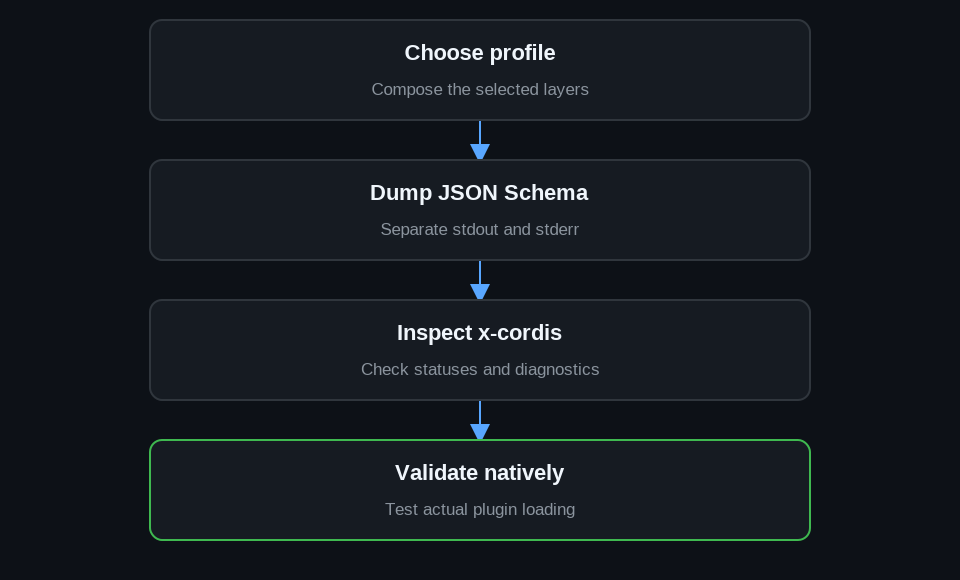
Choose the profile whose plugin composition you want to describe. For the shipped web profile, run:
dsh --profile web --dump-config-schema -
Capture stdout as JSON and stderr separately using your shell or automation environment. Check the process status even if stdout parses successfully.
-
Inspect root
x-cordis: it containsprofile,complete,entries,diagnosticsandpatchSchema. Each entry records a traversalpath,namewhen available,status, andconfigRef, with an optionalid. -
Follow references to the relevant plugin's projected Config. Check diagnostics and
partial,unsupportedorerrorentries before treating the output as sufficient for your use. -
Compare with
dsh --profile web --dump-configwhen you need source-labelled warnings for unmatched targets. Use the same profile and overlays; schema-dump warnings do not carry layer labels.
The three dump flags are mutually exclusive, reject application arguments and reject the reserved desktop profile. Schema dumping accepts repeatable --patch <path> and --from-default-profile like the other composition modes. The latter replaces a custom target profile with a fresh template and can delete its previous directory and user patch; do not use it as a harmless inspection switch. Dump preparation can initialize missing profile files.
DeepSeek Harness: where do the fields and defaults come from?
The plugin configuration guide tells authors to export a Config type and same-named Schemastery schema. Cordis uses the schema to validate input and fill declared defaults while loading. The dump projects supported fields, descriptions, defaults and constraints from those native declarations. Ordinary fields are inline; shared Configs and recursion can use $ref.
JSON Schema defaults are annotations; a JSON Schema validator does not thereby insert them. Native plugin loading still supplies defaults according to the actual schema. Unions project as anyOf, while native execution selects its first successful branch. Metadata such as secret, credential-ref, ms and volatile appears in x-cordis; it should not be interpreted as a new reference-object input type.
A Config absent from a plugin means its fields are unknown to this projection, not that configuration is forbidden. A group or include carrier can have status: "absent" while configRef points to the Loader structure. Unknown plugin names remain open. A name resolving to different Config definitions uses a union and produces an ambiguity diagnostic.
DeepSeek Harness: why can valid JSON still be incomplete?
Preparation, patch parsing, composition or resolution-setup failures exit nonzero without a schema. Collection and projection failures can retain partial output and exit 1, including omitted non-JSON annotations and partial projections. Root complete is false for error diagnostics, partial, unsupported or error entries, and ambiguous definitions for one plugin name. Examine both stderr and the JSON annotation rather than relying on syntax alone.
Callbacks, unsupported regular-expression semantics and other constraints that cannot be projected are marked partial. Some defaults and annotations cannot be represented as JSON and are omitted with limitations. Native validation remains necessary. The schema handles !!js scalars as inert { "__jsExpr": "..." } markers, without evaluating their results; runtime-generated trees and plugin startup checks are outside the reference. Even complete: true cannot guarantee successful boot.
Disabled rows and children have special validation rules. A disabled entry can omit required Config unless group: true forces activation, while supplied Config values are still validated. Children of a disabled group or include without group: true are not validated because the Loader never creates them. The CLI reference documents further cases; use it when building a validator rather than assuming every row is active.
DeepSeek Harness: what are the execution and sharing limits?
Collection imports trusted modules and can invoke Config getters and lazy builders. It does not apply plugins, execute transform callbacks or evaluate configuration expressions, but imports may block or retain handles; automated callers should enforce an external timeout. Ordinary import or builder stdout is routed to stderr, while direct file-descriptor writes are not intercepted. Treat a plugin module as code even in a dump workflow.
The document emits schema declarations rather than actual configured values, but declared defaults and raw plugin errors can contain sensitive data. Review both outputs before sharing. Schema validity is not a security assessment and does not replace native validation or a representative runtime test.
How are discovery paths interpreted?
The collector appends /config/<index> for group children and /include/<index> for included children. Include discovery paths are not JSON pointers into the root dump. Malformed inspected rows receive positioned errors without discarding valid siblings, and an entry may omit name if no literal name exists. Include composition failures leave its children unavailable; do not treat an unpatched tree as the final result.
DeepSeek Harness: what do the terms mean?
- Schemastery: the native schema system used for plugin Config declarations.
- Projection: the JSON Schema representation of supported native declarations.
$defs: reusable schema definitions referenced by the document.x-cordis: DSH annotations for entries, completeness, diagnostics and metadata.- Partial: a documented limitation requiring attention and native validation.
Frequently asked questions
What does the schema describe?
It describes the selected composed entry list; $defs.patchList describes overlays.
Can valid JSON accompany exit code 1?
Yes. Collection or projection failures can retain partial output and exit 1.
Does complete guarantee startup?
No. Runtime-generated trees and plugin startup checks are outside this reference.
Sources
Every claim in this article was checked against the sources below. Community discussions are user reports, not official behavior.
This is an independent community article, not official DeepSeek documentation. Listing a plugin in the registry is not a security review.