Install DeepSeek Harness Codex or Claude Subagents
Install the optional Codex or Claude Code bundle into the DeepSeek Harness profile that will delegate the work, then verify the provider's own tool and native authentication requirements. Each external delegation is a fresh, unattended execution, not a continuable local child session.
DeepSeek Harness: which bundle should I install?
The CLI reference documents separate optional packages. Choose the provider required by the task, or add both:
dsh plugin --profile <name> add @deepseek-ai/dsh-subagent-codex
dsh plugin --profile <name> add @deepseek-ai/dsh-subagent-claude-code
Replace <name> with the actual profile. The profile option precedes the forwarded pnpm command, and pnpm must be on the path. The same reference documents adding both packages in one invocation and removing either independently. A successful package operation changes the profile's disk state; restart the profile after bundle membership changes.
| Consideration | Codex | Claude Code |
|---|---|---|
| Package | @deepseek-ai/dsh-subagent-codex | @deepseek-ai/dsh-subagent-claude-code |
| Provider-specific tool | subagent_codex | subagent_claude_code |
| Default permission mode | never | dontAsk |
| Execution | Fresh Codex thread and turn | Fresh Claude Code query |
| Follow-up or resume | Not supported for external activation | Not supported for external activation |
DeepSeek Harness: what happens after installation?
The Codex provider documentation and Claude Code provider documentation say their bundle layers register the provider and expose a global provider-specific tool. A later patch can disable the tool row, and a preset's same-named tool can shadow it. The native process starts on delegation, not merely because the bundle was installed.
The CLI reference also describes a copied preset that must enable a matching tool row. That differs from the provider pages' global-tool description. Treat this as a version-sensitive documentation discrepancy: inspect the documentation and composed configuration for the installed release, and verify which tool is actually available instead of assuming either exposure model applies to every version.
DeepSeek Harness: how do I prepare and verify a delegation?
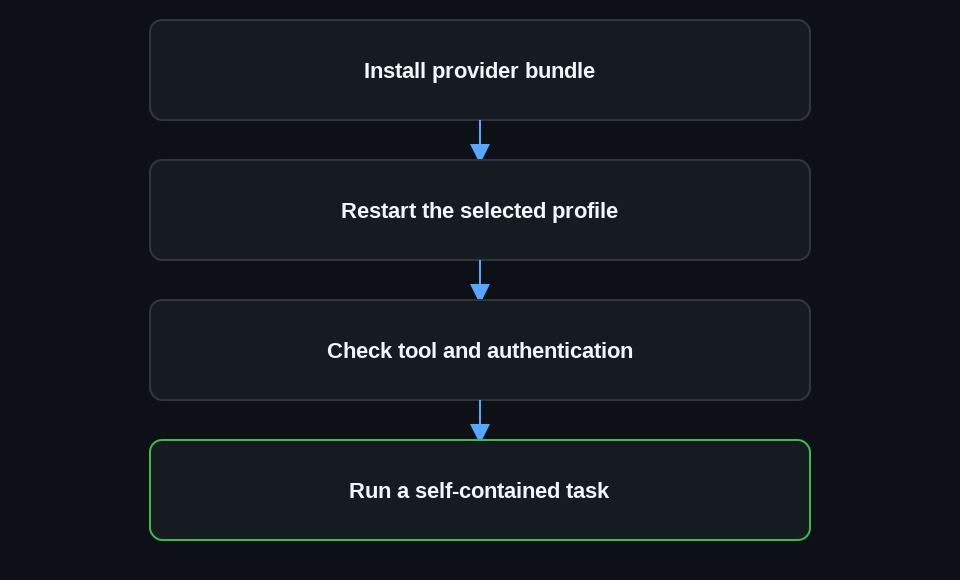
- Select the profile used by the parent session and install the desired package with the command above. Check package-manager output and restart that profile after the bundle change.
- Check the installed release's provider documentation and the active composition. Confirm that the matching tool is exposed, not disabled or shadowed. The Web or Desktop Plugins page also offers an official provider entry; follow its restart instruction if it requests one.
- Prepare the provider's native authentication and settings for the selected environment. The providers remove credential-shaped ambient variables before the explicit
envoverlay; the provider pages say an API key intended for the child must be supplied there. Do not put real credentials into a shared example or log. - Submit a small, self-contained text task in an appropriate workspace. Inspect the returned child identity and eventual result or diagnostic. The external activation cannot accept follow-up input or resume; send a new self-contained task if further work is needed.
- Review the result and any workspace changes independently. The parent receives the answer or a safe diagnostic; the product's reasoning, tool activity, raw stderr and workspace diffs do not enter the parent session as a complete transcript.
DeepSeek Harness: how do permission and failure behavior differ?
Codex defaults to never: no approval prompt, with the native sandbox setting omitted from the provider's request. The provider also documents approve-for-me and an explicit mode that bypasses approvals and sandbox enforcement. Claude Code defaults to dontAsk, denying operations not already authorized rather than asking. Its documented alternatives include acceptEdits, auto, plan and bypassPermissions; the last bypasses permission checks. Read the provider-specific descriptions before changing modes. Neither unattended operation nor any mode name establishes that a task is safe.
Both provider pages describe native settings and authentication as authoritative. Claude Code reads normal user, project and local settings relative to the child directory. Codex uses native configuration and authentication. The providers use their selected packaged payload rather than falling back to a host CLI. An unsupported platform, missing optional dependencies or missing payload can leave a provider dormant until the first delegation fails. Consult the relevant provider log and diagnostic without exposing secrets.
What should the first test establish?
Use a task whose expected output can be reviewed without relying on a follow-up conversation. Both provider pages describe a child id after task acceptance and a result delivered to the parent when execution completes. Acceptance does not mean the task has already completed. Record the outcome and inspect the workspace separately if the task could have changed files. The absence of a workspace diff in the parent notice does not establish that no files changed.
If the provider is visible but delegation fails, separate exposure from startup. The provider pages describe failures at the Codex initialization boundary or Claude Code query startup when the selected payload or optional dependencies are unavailable. The exposed diagnostic is intentionally limited; consult the provider's host-side logging where appropriate, and remove credentials and private paths before sharing. Installing a separate host executable is not the documented fallback for these packaged providers.
When changing provider configuration, preserve the native permission distinction. Codex's default does not ask for approval, while Claude Code's default denies operations not already authorized. These are not interchangeable promises about every possible operation. Configuration and authentication remain product-specific, and explicit environment values can supply credentials to the child. Read the installed version's provider documentation for the supported settings rather than extrapolating from the parent Agent's policy.
DeepSeek Harness: what are the limits and safety boundaries?
The subagent reference distinguishes local children from external executions: external entries cannot open a local child Session or accept follow-ups. Installation alone does not validate credentials, authorize a task, confirm the tool is visible or establish safe execution. Use a workspace appropriate to the delegated task and inspect the changes made there. Native settings and the chosen permission mode can affect what the external process is allowed to do.
The supplied references do not prescribe a universal login command, a guaranteed supported platform list for every release, or a way to recover a complete external tool transcript from the parent session. Follow the provider documentation for the installed version and avoid inferring these capabilities from an installed package.
DeepSeek Harness: what do the terms mean?
- Provider: a backend registered to perform a child execution.
- Bundle: an installable package contributing a profile configuration layer.
- External activation: one execution managed outside a continuable local child session.
- Permission mode: provider configuration controlling unattended native permission behavior.
- Parent session: the session that requests delegation and receives its result.
Frequently asked questions
Can an external child accept follow-ups?
No. External activations are one-shot and do not support continuation.
Does installation verify authentication?
No. Native authentication and provider setup must be checked separately.
Does the parent session contain the complete external transcript?
No. The provider pages describe a result or diagnostic, not all tool activity and raw stderr.
Sources
Every claim in this article was checked against the sources below. Community discussions are user reports, not official behavior.
This is an independent community article, not official DeepSeek documentation. Listing a plugin in the registry is not a security review.