How Do You Install DeepSeek Harness Plugins?
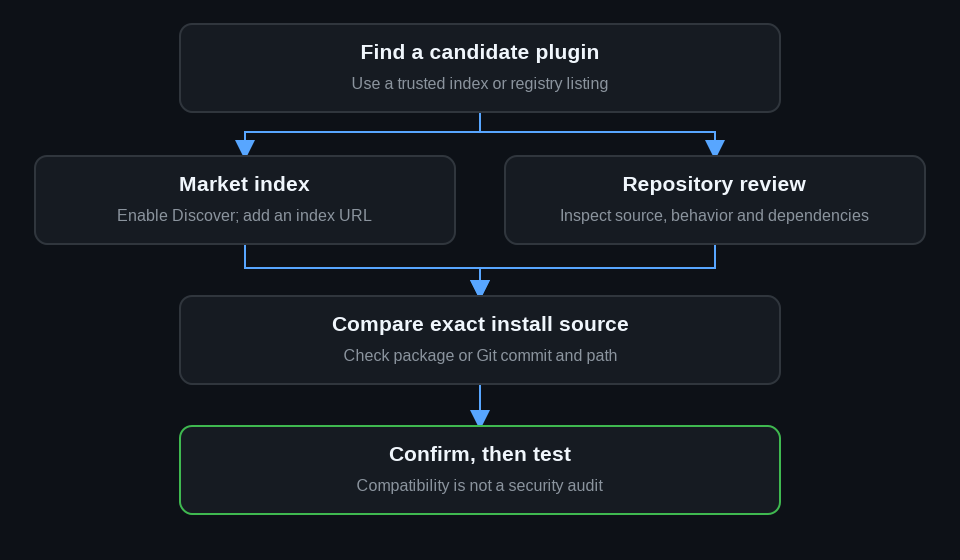
Find a DeepSeek Harness plugin through a trusted marketplace index, inspect the exact source and version, and confirm installation only after reviewing what the plugin can do.
What is the plugin marketplace?
The plugin market guide describes a JSON index listing installable DSH bundles, versions and presentation metadata. DSH does not include an index source by default. Enable the experimental Custom Plugin Market bundle, then add an index URL in the Discover tab of the Plugins page. Indexes belong to the current profile.
A market is a discovery and installation mechanism. Its title, author, description, icon and source claims come from the market; DSH checks the index format, but does not verify those claims. Use a source you trust and independently inspect the package or repository shown in the installation confirmation.
The DSH Plugin Registry lists GitHub repositories tagged dsh-plugin whose root manifests have been structurally verified. A listing or structural verification does not mean a plugin is safe or endorsed. A repository discovery listing is also not automatically an index source configured in your DSH profile; follow the marketplace guide to add an appropriate index.
How does discovery select a version?
The guide says search matches names, authors, keywords and localized titles, descriptions, categories and tags. Filters and sorting use market-declared metadata. A card recommends the highest compatible non-prerelease version; if the plugin lists no non-prerelease versions, it recommends the highest compatible prerelease. Open the plugin page to inspect the listed versions and their compatibility, including older or prerelease versions accepted by DSH.
Install opens a confirmation that shows the version's source: npm package and registry, or Git repository, commit and directory. Confirmation starts the normal installation with compatibility and registry checks. Nothing is installed before confirmation. These checks are useful for selecting a compatible artifact, but they do not audit its behavior or verify a market author's claims.
| Evidence | Useful for | Does not establish |
|---|---|---|
| Index format accepted | DSH can parse the listed structure | Plugin identity or safety |
| Compatible version | Version satisfies DSH's compatibility checks | That its code is trustworthy |
| Git commit and directory | Identifying the exact source to review | That another branch or release is identical |
| Registry listing | Finding a candidate repository | Endorsement or a security review |
How do you install a plugin step by step?
- Open Plugins, choose More beside experimental plugins, and enable Custom Plugin Market. The Discover tab appears; disabling the bundle removes it again, according to the guide.
- In Discover, choose Add index source and enter a trusted index URL. The documented URL must use
http:orhttps:and cannot contain credentials or a fragment. Prefer HTTPS over networks you do not control: an HTTP index can be modified in transit, including its install specs. - Search for the capability you need and open the candidate. Check the version list and compatibility with your running DSH. Use Manage index sources to see each source's most recent error if discovery fails.
- Inspect the installation confirmation's npm registry and package, or Git repository, commit and directory. Compare those exact identifiers with the code and publisher you intend to trust. Cancel if anything differs or is unclear.
- Confirm only after review, then test the intended behavior in a suitable environment. Record the source and version so that an upgrade can be reviewed again.
The marketplace guide does not provide a universal index URL. Do not substitute a repository homepage for an index file unless the publisher explicitly documents it as one. For local plugin development, the first plugin tutorial describes a separate source-based workflow; do not confuse it with marketplace installation.
What should you inspect before trusting a plugin?
A DSH plugin can register capabilities through its context. The first plugin tutorial demonstrates an apply(ctx) function, while the Cordis primer describes services, dependencies, events and lifecycle effects. That flexibility makes source review relevant: check the exact version's entry point, dependencies, network destinations, file access and configuration requested. A description alone does not establish what the code does.
Compare the publisher and repository with the source shown at confirmation. Read release notes and maintenance history as signals, not guarantees. For a Git source, review the indicated commit and subdirectory, not just the default branch. For npm, check the package and registry shown; a familiar name alone is not identity verification. If you cannot inspect or accept the requested access, postpone installation.
After installation, exercise only the intended feature first and observe its results. Keep a record of the installed version and your review. New versions can change dependencies or behavior, so repeat the review for the exact update rather than transferring trust indefinitely from an older version.
How do you compare a source with the advertised plugin?
Start with the capability you actually need. An index can make a candidate easy to find, but the market controls its displayed title and description. Follow the source shown in the confirmation and check whether that artifact implements the advertised behavior. For a Git source, the repository name is only the beginning: check the commit and any subdirectory, because the code in a default branch can differ from the version being installed. For npm, check both the package name and the displayed registry.
Read the code and its dependency declarations at that exact version where available. Look for file and network operations, configuration that asks for credentials, and dependencies that are involved in loading or execution. A plugin may reasonably need such capabilities, but their presence should match your task and the trust you place in its source. If the installation confirmation points somewhere unexpected, stop and resolve the discrepancy before confirming. Compatibility information cannot resolve an identity mismatch.
The Cordis primer describes services obtained through context keys and dependencies declared through inject. The first-plugin tutorial illustrates how an apply function registers functionality. Those references explain why the plugin's effect may extend beyond the text shown on its card: review what it registers and how it uses the services it requests. Lifecycle cleanup is useful to understand, but it is not a substitute for deciding whether the code should run in the first place.
How should you evaluate changes after installation?
Keep a small record of the index, package or repository, exact version and the feature you intended to use. Test the feature with non-sensitive inputs first, then inspect whether its outputs and side effects match the documented purpose. If the plugin requests access that was not expected, pause and reassess the source and configuration. The point of the first test is to learn whether the reviewed artifact behaves as intended in your environment; it cannot prove the absence of all unwanted behavior.
When an update appears, examine the new exact source rather than assuming the previously reviewed version covers it. A market may offer an older compatible version or a prerelease in the version list, but the guide's compatibility selection does not make the choice a security judgment. Compare release information and changed dependencies, decide whether the update is necessary, and repeat the minimal test. If the index reports an error, use the source-management view to investigate it without assuming that a temporary failure makes another, unreviewed index equivalent.
A practical review can be recorded in four lines: the requested feature, the exact source and version, the capabilities you inspected, and the result of a small test. Record unresolved questions as well. This makes an update review more useful than a simple “installed successfully” note, especially when another maintainer later needs to compare a new commit or package version.
What are the limits and safety boundaries?
An HTTPS index protects transport to the named host; it does not prove the host or its content is trustworthy. A structurally valid index, compatibility check or registry listing is not a malware scan. Likewise, a sandbox or approval preset should not be treated as a complete audit of plugin behavior; see permission presets.
The marketplace guide states that sources are scoped to a profile and that market metadata is third-party content. If an index is unavailable, inspect the error and source URL; do not disable security controls merely to make discovery work. Keep secrets out of review notes and support reports. Use the smallest practical test environment when evaluating an unfamiliar plugin.
Glossary
- Market index: a JSON document describing plugins and installable versions.
- Bundle: an installable DSH package listed by the market.
- Profile: the configuration scope to which an index source belongs.
- Compatibility: whether DSH accepts a version for the current environment, not a security endorsement.
- Cordis: the plugin framework underlying Harness services, dependencies and lifecycle effects.
Frequently asked questions
Does a marketplace listing mean a plugin is safe?
No. Market metadata is third-party content, and format checks do not verify its claims or audit code.
Does DSH include a market index by default?
The guide says DSH does not include an index source by default; add a trusted source to the current profile.
What should I verify before installation?
Review the exact package and registry or Git repository, commit and directory shown in the confirmation, along with the plugin's behavior.
Sources
Every claim in this article was checked against the sources below. Community discussions are user reports, not official behavior.
This is an independent community article, not official DeepSeek documentation. Listing a plugin in the registry is not a security review.