DeepSeek Harness: Long Commands and Background Jobs
In DeepSeek Harness, a long-running shell process is not automatically the same thing as a background job. The shell executor produces a process handle; a job-enabled consumer can register that handle with the separate jobs runtime, which supplies an ID, ownership, output access and lifecycle controls.
DeepSeek Harness: where does a command become a job?
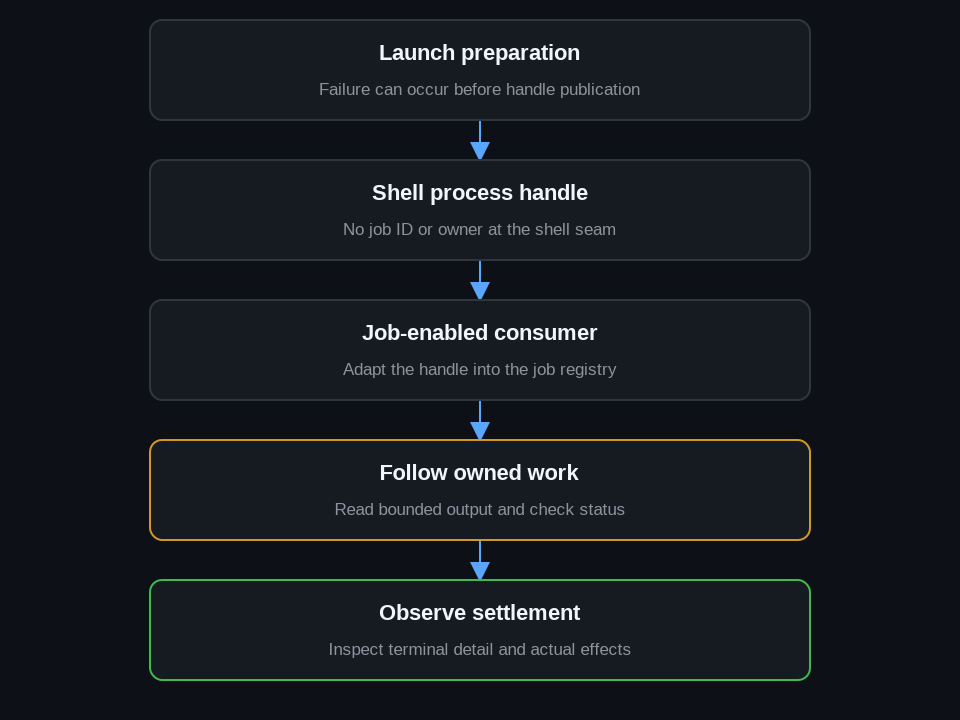
The shell reference places command execution behind ctx.shell. Its start() operation prepares a launch asynchronously and returns a ShellProcess handle. That handle itself has no job ID or owner. Preparation failure or cancellation can reject before the handle is published.
The Bash consumer adapts the process handle into ctx.jobs.start() hooks. The separate jobs reference describes the generic registry that then owns identity, ownership and lifecycle. This distinction matters because a shell service can exist without a composed job registry, and a job can represent a producer other than a shell process.
| Observation | What it tells you | What it does not tell you |
|---|---|---|
| A shell process handle | Launch preparation published a handle | A job ID was registered |
| A job ID | The registry has identified managed work | The process has completed successfully |
running or stopping | Work has not reached a terminal job state | That all output is already available |
completed, killed, or failed | The job has settled | That its output or side effects are acceptable |
| Output text | Some retained output was read | That no earlier output was dropped |
The job registry uses IDs in a kind-prefixed namespace, but access control relies on owner authorization, not keeping an ID secret. An owned job's session is relevant when inspecting or stopping it. The runtime also permits unowned jobs, so the behavior of the specific producer and deployment matters.
DeepSeek Harness: when does the Bash tool use a job?
The tool catalog describes a job-enabled one-shot Bash tool with run_in_background; its description also covers moving work to the background on timeout. The available schema depends on composition: the foreground-only form does not expose the background field when a job registry is absent or background execution is disabled. Inspect the actual offered tool rather than assuming that every shell call supports jobs.
This tool-level behavior must not be confused with the lower-level shell executor's timeout policy. The shell request's onExpiry defaults to kill; the resolved spec can instead specify other documented expiry behavior. A tool consumer may adapt that seam differently. A long command, a timeout and a background job are therefore related but distinct facts: a command may be explicitly started in the background, the job-enabled tool may background it on timeout, or another consumer may use the executor's own policy.
For a foreground result, timedOut, aborted, signal and exitCode are separate fields. A process can trap a timeout signal and exit with code zero, so the exit code alone is not enough to declare an uninterrupted success. The documented first-cause classification makes timeout and caller abort mutually exclusive, even when they race before process close. Read the entire result rather than collapsing these fields into one status.
DeepSeek Harness: how should I follow a background command?
- Check the deployment's offered Bash and job-control schemas. Confirm that background execution is available before relying on
run_in_backgroundor automatic backgrounding. - Start the intended command with the appropriate working directory and permissions. If a job ID is returned, record it together with its owning session; it identifies work to follow, not a successful result.
- Use the offered
job_outputcontrol to collect output and check the reported state. Continue observing until the job settles or you deliberately stop it. Available controls depend on the actual composition. - If cancellation is needed, use the offered
job_killcontrol and then observe the resulting terminal state. A stopping transition is not the same as a settled job. - Inspect the final status, detail, output completeness and the actual effects of the command. A terminal state does not independently validate the files, service or other result that the command produced.
The jobs runtime describes running, stopping, completed, killed and failed as separate statuses. It publishes job/registered and job/settled records in the original owner session for owned jobs; their shared jobId pairs them. These records describe registry commits, not exact operating-system process boundaries or CPU time. A missing settlement record should be treated as incomplete evidence, not as a fabricated successful finish.
DeepSeek Harness: what happens to output?
Each job has a bounded output ring. Pull sources are pumped into it, and producers can also append output. The registry performs a final drain before settlement closes the stream. The model's consuming read uses a registry-kept cursor, while observers can read at absolute offsets without disturbing that cursor. The channels include stdout, stderr, and log; the reference says producer narration in log reaches observers, not the model's consuming read.
Bounded retention means the beginning of output may be evicted. A reader whose requested offset is older than the retained window receives a lossy read rather than an error. JobView.output exposes total and earliest offsets and may list spillPaths for complete-stream files kept by pull sources. A reported spill path can help locate fuller output when available, but the reference does not promise that every producer has one. Do not treat a retained tail as the complete output by default.
At the lower shell layer, reads from a ShellProcess remain valid after settlement, and done resolves when the process settles without rejecting. A subprocess provider rejection is represented as a killed process with an error on stderr. These handle facts and the job registry's status are related through the adapter, but neither should be replaced by an assumption based only on the other layer's label.
DeepSeek Harness: what happens when a session or service ends?
The shell reference says subprocess-service disposal kills running processes and waits for done, whereas an executor-only reload leaves them running. That is a lifecycle boundary, not a promise that a background command survives every restart. The jobs runtime also uses the owning session to fence access and resolve lifecycle cleanup. Consult the producer and actual deployment when deciding whether work will remain observable across a particular shutdown.
A job result can be visible even after the producing process settles, but output retention is bounded and settlement trims the ring to its settled cap. If retaining evidence matters, collect it using the supported controls while it is available and follow your environment's data-handling rules. Do not invent an on-disk location or assume a registry ID alone recreates a lost process after restart.
DeepSeek Harness: what are the limits and safety boundaries?
Background execution changes how work is observed; it does not make the command safe, grant extra permissions, or remove the need to review side effects. Check the selected sandbox and approval policy for the actual call. The shell reference distinguishes a sandbox runner failure from a normal process result: foreground execution can throw SANDBOX_UNAVAILABLE, while a settled background process reports runnerFailed in its facts. Do not silently retry a denied operation with wider access.
Output and spill files may contain sensitive data. Restrict access and inspect them before sharing. Job ownership is an authorization boundary, not a substitute for reviewing the command; a valid ID is not proof of permission. The reference does not guarantee that every installation offers a job registry, all controls, unlimited output or durable jobs across process restarts.
DeepSeek Harness: what do the terms mean?
- Shell process handle: the executor's access path to a launched process and its output.
- Job registry: the service that manages generic job identity, ownership, output and lifecycle.
- Owner: the session used to fence access to an owned job.
- Settlement: the transition to a terminal job outcome.
- Output ring: bounded retained job output with absolute offsets.
- Lossy read: a read whose requested earlier output is no longer retained.
Frequently asked questions
Is every long command a background job?
No. Job registration depends on the consumer and composed jobs runtime.
Does a job ID mean the command succeeded?
No. Follow the job to a terminal state and inspect its output and effects.
Is all job output retained forever?
No. The output ring is bounded and older output can be dropped; some sources may provide spill paths.
Sources
Every claim in this article was checked against the sources below. Community discussions are user reports, not official behavior.
This is an independent community article, not official DeepSeek documentation. Listing a plugin in the registry is not a security review.