DeepSeek Harness: MCP HTTP Session 404 Diagnosis
A 404 from an MCP tool call can mean a stateful HTTP session was invalidated, but 404 alone does not prove that diagnosis. In a reported client version, the failed call was not replayed and later calls continued using the stale session until the connection was reloaded.
DeepSeek Harness: what did the report observe?
In discussion #10783, a user described the official @deepseek-ai/dsh-mcp-client connected to stateful Streamable HTTP servers with reconnection enabled. After the server invalidated a session, a tool call returned SdkHttpError with HTTP 404. A later explicit call still sent the old Mcp-Session-Id and received another 404. The reporter used @modelcontextprotocol/client 2.2.0 and also reproduced the behavior while loading the official client directly, without the third-party management plugin that was installed in the original environment.
The first failed call was not automatically replayed. The two failing calls in the mocked reproduction were separate explicit invocations. That distinction matters for tools that change data: an error response does not by itself prove whether an upstream side effect occurred, and repeating an operation without checking can create another effect.
| Observation | Interpretation to investigate | What it does not prove |
|---|---|---|
| Initial discovery succeeds | A connection and tool list existed at that time | The same session remains valid later |
| Tool call returns 404 | The server returned an HTTP error | Session expiry is the only possible cause |
| Later call uses the old session ID | Recovery may not have replaced the transport | The first call had no side effect |
| Tools remain listed | Registrations are still present | Calls to those tools work |
| Reload restores calls | A fresh connection changed the symptom | The underlying expiry issue is permanently fixed |
DeepSeek Harness: how does HTTP MCP differ from a local child?
The memory MCP guide says DeepSeek Harness can start a configured stdio command or connect to a Streamable HTTP URL, discover tools and expose them as mcp__<serverName>__<tool>. For stdio, the plugin lifecycle starts and stops the child; for HTTP, the upstream service must already be running. DSH does not supervise a separate HTTP service. The guide's memory configurations are interoperability examples, not endorsement or evidence that every MCP server behaves the same way.
The guide documents automatic reconnection with backoff and tool resynchronization for a crashed MCP child, with initial discovery occurring asynchronously. That example cannot be assumed to describe every HTTP error path. In the discussion's selected answer, the investigator explains that the supervisor responds to a transport generation ending; the reported HTTP 404 was an error response while the transport remained open. In that environment the close-triggered recovery did not start, and the stale session remained in use. This explains the report, not every possible 404.
DeepSeek Harness: how can I distinguish this from another 404?
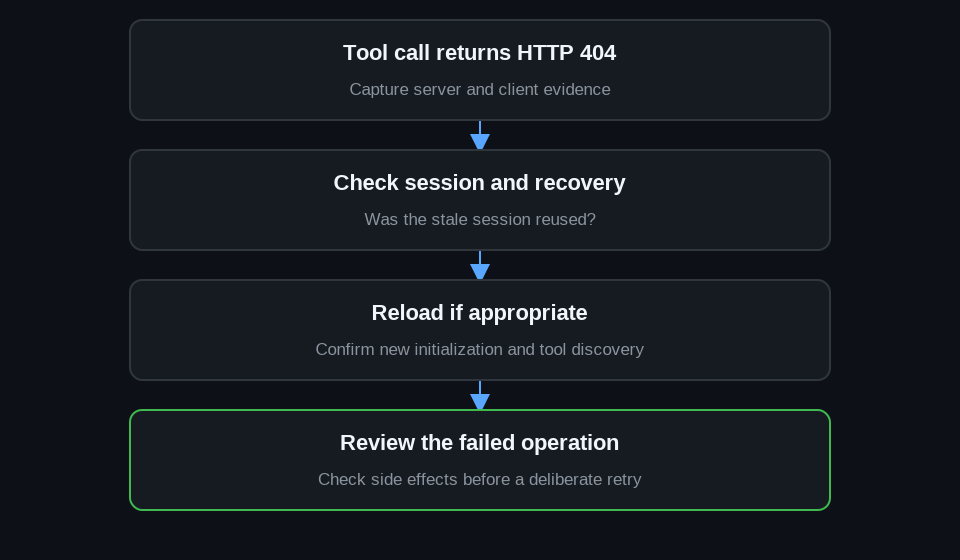
- Identify the server, transport, DSH client and installed SDK versions. Confirm that the server uses stateful Streamable HTTP and that its logs identify an expired or invalidated session. Avoid publishing credentials or session identifiers.
- Record whether initialization and tool discovery previously succeeded. Check when the failure began and whether the server restarted, expired the session or returned a different error first.
- Correlate one failed tool request with server-side evidence. A wrong endpoint, proxy routing problem or another server condition can also return 404; the status alone is insufficient.
- Where appropriate, make a separate low-impact test call after the configured backoff and observe whether a new initialization and tool discovery occur. Use redacted traces; do not treat a separate invocation as an automatic retry.
- If the evidence matches the report, follow the deployment's supported plugin reload or restart procedure. The reporter said reloading the MCP plugin or restarting DSH Web temporarily restored the connection. Confirm discovery and use an appropriate harmless call before returning to work.
The report's mocked sequence showed initialization, an initialized notification, successful tools/list, then two explicit tools/call requests with the old session and 404 responses. Its mock also returned 405 to a standalone GET; that is a detail of the reproduction, not a general prerequisite for this failure. The key evidence is the missing fresh initialization and reuse of the stale session, not the status code in isolation.
DeepSeek Harness: should the failed operation be retried?
First determine what the server actually did. The report's expected recovery returns an error for the current invocation and establishes a fresh session for future explicit calls; it deliberately does not automatically replay the failed call because tools may have side effects. The discussion proposes retiring the stale transport, initializing a new session and resynchronizing registrations, with concurrent failures coalesced into one recovery attempt. These are proposed behaviors, not a promise that the installed version already has them.
After a reload, inspect the result or external system for evidence of the original effect. If it already occurred, repeating it may duplicate work. If the outcome is uncertain, use the server's own reconciliation or idempotency mechanism when available and decide with the operator who owns the action. For a read-only diagnostic call, choose a query that does not expose sensitive content and verify that it addresses the intended server.
The selected answer also notes that exhausting the supervisor's reconnect budget can unregister tools, whereas in the reported 404 case tools stayed registered while calls failed. Both missing tools and listed-but-failing tools deserve investigation, but they are different observations. The guide says a crashed child's reconnect budget eventually stops retries and removes its tools; do not infer the exact HTTP case from that child-process description.
The report's reconnect configuration included enabled: true, initialDelayMs: 500, maxDelayMs: 30000 and maxAttempts: 10. Those values document the reproduction; they are not a recommended fix or a universal default. The important observation is that waiting for this backoff did not create a new initialization after the 404. Changing delay values without establishing which event triggers recovery would not test the reported mechanism.
A server restart and a client reload address different parts of the system. The HTTP service must already be running, while the client connection owns its current transport and discovered registrations. A client reload may establish a fresh session, as the reporter observed, but it does not prove that the server's expiry policy or data state changed. Record which side was restarted and whether tool discovery completed afterwards.
For a team handoff, describe the sequence without including the actual session identifier: successful initialization, a server-confirmed invalidation, the failed call, the presence or absence of a new initialization, and the result of a separate test call. Include both client and SDK versions. This makes the report reproducible without presenting a private session token as diagnostic evidence.
DeepSeek Harness: what are the limits and safety boundaries?
A registered tool, enabled reconnect setting, or successful reload does not prove the server is trustworthy or that future calls will succeed. HTTP endpoints, authentication, persistence and server lifecycle are responsibilities of the upstream service and deployment. Confirm versions and configuration before applying a report-specific workaround; later releases may behave differently.
Treat URLs, headers, session identifiers, payloads and tool results as potentially sensitive. Redact diagnostics before sharing. Avoid repeatedly invoking operations with side effects to test reconnection. A restart can interrupt other work and should follow the local operating procedure.
A controlled reproduction should use a server and tool whose effects are understood. Start with successful discovery, invalidate the test session through the server's supported procedure, and capture the next call and subsequent connection activity. If a fresh initialization occurs, the old report may no longer describe your version. If the endpoint itself is wrong, correct the routing first; a 404 on an initial request differs from one after a previously established session expires. Do not invalidate a production session merely to reproduce a community report.
DeepSeek Harness: what do these terms mean?
- Streamable HTTP: the HTTP transport used in the reported MCP connection.
- MCP session ID: an identifier used to associate requests with a stateful server session.
- Transport generation: the client's current connection and transport lifecycle.
- Tool discovery: obtaining the server's tools and registering them for use.
- Explicit retry: a new, deliberate invocation, distinct from automatically replaying a failed call.
Frequently asked questions
Does every MCP 404 mean a session expired?
No. Check server logs, transport and request routing to establish the cause.
Does enabling reconnect guarantee recovery from this 404?
No. The reported client kept the transport open and reused the stale session.
Should a failed tool call be replayed automatically?
The report recommends returning the error because a call can have side effects; check the outcome before a deliberate retry.
Sources
Every claim in this article was checked against the sources below. Community discussions are user reports, not official behavior.
This is an independent community article, not official DeepSeek documentation. Listing a plugin in the registry is not a security review.