How DeepSeek Harness Names MCP Tools
DeepSeek Harness exposes discovered MCP tools to the agent as mcp__<serverName>__<tool>. The configured server name and the upstream tool name both matter; a listed name alone does not establish that a call will succeed.
DeepSeek Harness: what does the name contain?
The memory MCP guide documents the model-facing pattern mcp__<serverName>__<tool>. The first part identifies the MCP bridge, the middle part comes from the configured server name, and the final part is the discovered tool's name. For a conceptual server named my-memory and a discovered tool named search, the corresponding spelling would be mcp__my-memory__search. That example illustrates the pattern; it is not a promise that a particular server offers a tool named search.
The guide's example row separately sets id: memory-my-server, name: '@deepseek-ai/dsh-mcp-client', and config.serverName: my-memory. Those fields have different purposes. The Cordis row ID identifies a configuration entry, the package name selects the client plugin, and serverName forms part of exposed MCP tool names. Changing an entry ID is not the same operation as changing the server name. Choose unique IDs and server names as the guide recommends.
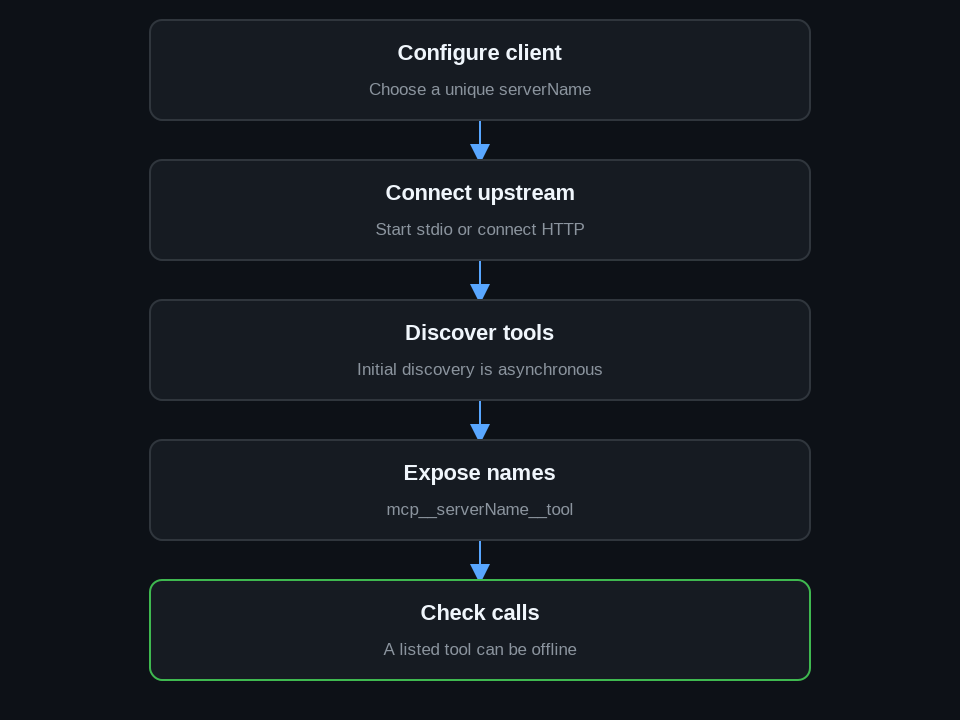
DeepSeek Harness: how does a tool become visible?
The guide says DSH reads the selected Cordis overlay, starts a configured stdio command or connects to a Streamable HTTP URL, discovers the server's tools, and exposes their names through the MCP client. For stdio, the client starts and stops the child with its plugin lifecycle. For HTTP, the upstream service must already be running. The guide's three memory configurations are off by default; leaving out the overlay does not start any of those servers.
The tools reference describes the broader registry. It holds definitions and constructs the model-facing schemas from an allowlist of name, description and parameters. Host execution and presentation callbacks are not sent as part of that projection. A name is therefore an identifier for a registered capability, not its complete contract. Examine the description and parameter schema actually offered to the agent before relying on it.
| Layer | Example or role | What it answers |
|---|---|---|
| Configuration row | id: memory-my-server | Which plugin entry is configured? |
| Client plugin | @deepseek-ai/dsh-mcp-client | Which plugin connects to MCP? |
| Server name | my-memory | Which namespace appears in the tool name? |
| Discovered tool | A name supplied by the server | Which operation is offered? |
| Model-facing name | mcp__my-memory__search in the illustrative example | Which namespaced tool can be selected? |
The upstream server controls which tools it advertises. DSH does not download the server, initialize its database, select its model or embedding provider, create a cloud account, migrate its data, or supervise a separate HTTP service. A configured row cannot substitute for the server's prerequisites.
DeepSeek Harness: how do I verify the right tool?
- Choose a server and follow its own installation, authentication and storage instructions. The guide provides interoperability examples; it does not endorse their vendors or promise continued support.
- Inspect the chosen overlay and its
serverName. Ensure the row ID and server name are unique in the intended composition, and verify the transport and upstream endpoint or command. - Start the intended profile with the overlay or merge the entry into an appropriate existing user patch, following the guide. Preserve unrelated patches rather than replacing an existing patch file wholesale.
- Wait for discovery. The guide explicitly says initial discovery is asynchronous, so the expected
mcp__...tools may not appear immediately. - Inspect the actual names, descriptions and parameters. Run a small task appropriate to the server, and check both the selected tool and its result. For memory, the guide proposes writing a unique value, opening a new session in the same host, recalling it, then using it while keeping the same provider storage scope.
A fresh DSH session is required for that memory validation; a host restart is not. Successful recall establishes the tested path for that value and storage scope, not the correctness or privacy of every subsequent operation. Use a non-sensitive test value and follow the upstream provider's retention practices.
DeepSeek Harness: why might a named tool be unavailable?
Discovery happens after the connection begins, so an immediate absence can be a timing issue. It can also indicate an incorrect overlay, inactive client, unavailable HTTP service, failed stdio command or unmet provider prerequisite. These are distinct possibilities, not a definitive diagnosis. Check the selected profile and startup or connection diagnostics before changing names.
A previously discovered stdio child can crash. The guide describes automatic reconnection with backoff and a tool re-sync. During an outage, tools remain listed while calls fail; once the reconnection budget is exhausted they are unregistered, and reconnection stops until reload or restart. Consequently, a name in a list during a temporary outage is not proof that the provider can execute the call. After recovery, check the actual advertised schema again rather than assuming an upstream server's tool inventory never changes.
If the name is visible but a call fails, inspect its arguments and the provider's own error. The tools reference distinguishes registered schemas and execution; registration is a trusted same-process contract, while argument and output validation have their own error paths. A model choosing a tool is not evidence that its arguments match what the server currently expects.
DeepSeek Harness: what are the limits and safety boundaries?
The guide says the stdio bridge removes ambient variables whose names usually identify credentials and all DSH_* variables before launching the child, while other ambient variables remain inherited. An optional secret needed by a server can be supplied through its row's config.env instead of placing the secret directly in YAML. This filtering is not a promise that every sensitive value is removed, and the upstream command and service still need review.
A descriptive name, successful discovery or a reference configuration does not make a third-party tool safe. Check the provider's permissions, data handling and deployment requirements before using real data. HTTP services have their own authentication and availability boundaries. Tool calls can change external state, so use the least sensitive suitable test and examine results without treating a successful test as an ongoing security guarantee.
DeepSeek Harness: what do the terms mean?
- MCP: the protocol used by the external server and client to expose tools.
serverName: configured namespace inserted into each exposed MCP tool name.- Tool name: the upstream operation's name, combined with the MCP namespace.
- Discovery: obtaining the server's advertised tools after connecting.
- Stdio: a transport in which the client launches and communicates with a child process.
- Streamable HTTP: a transport that connects to an already running upstream service.
Frequently asked questions
What is the naming pattern?
Discovered tools use mcp__<serverName>__<tool>.
Is the row ID the server name?
No. The row ID and config.serverName have different roles.
Does a listed tool always work?
No. During a reconnecting outage it can remain listed while calls fail.
Sources
Every claim in this article was checked against the sources below. Community discussions are user reports, not official behavior.
This is an independent community article, not official DeepSeek documentation. Listing a plugin in the registry is not a security review.