DeepSeek Harness: Missing Attachment Transport Errors
A DeepSeek Harness transport error can have a local cause: one user reported that a missing image in retained session history was wrapped as TRANSPORT before any model request reached the network. Check the evidence before changing provider settings or abandoning the conversation.
DeepSeek Harness: what did the report actually observe?
Discussion #10842 describes desktop 0.2.1-rc.2 on Windows 11 using the official DeepSeek provider. The reporter found that a session with a missing image object failed on subsequent messages. The visible failure was DeepSeek Messages transport failed, with code TRANSPORT; the reported history contained five retries followed by an error ending the turn. The reporter said the first failure arrived before a network round trip.
That is a useful diagnostic pattern, not a definition of every transport error. A network, proxy, provider, or other problem can still produce a transport failure. Conversely, the fact that one session fails does not by itself prove an image is missing. Record the version, provider, affected session, error and timing, then compare them with the report. Do not remove an image object to reproduce the issue in a real conversation.
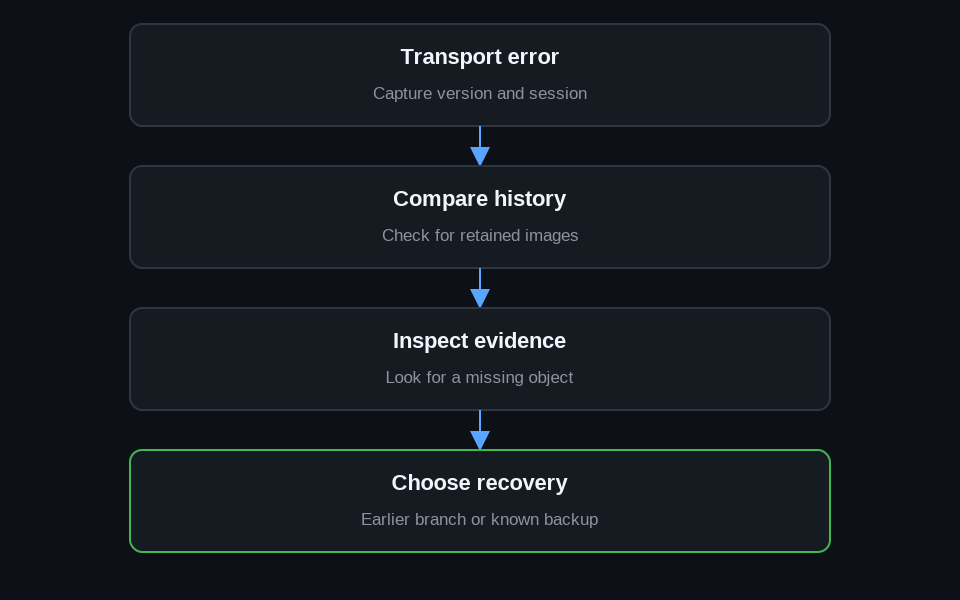
DeepSeek Harness: how can a missing image become a transport error?
The reporter traced the DeepSeek adapter's image preparation. Retained image references are resolved before the request; when the local object is missing, the attachment layer raises ATTACHMENT_NOT_FOUND. According to the report, the adapter's catch-all wraps an error that is not already an LLM error as TRANSPORT. A retry policy then treats that classification as retryable. Retrying does not restore missing bytes.
| Observation | What it suggests | What it does not establish |
|---|---|---|
Error says TRANSPORT | The adapter reported a transport-class failure | A network request necessarily occurred |
| Five retries in the report | That reported setup retried the failure | Every version or policy has the same retry count |
| One history references a missing image | A local input may prevent preparation | All images or all sessions are damaged |
| A fresh conversation works | Compare inputs and history | The original attachment is recovered |
The report gives a content-addressed object location under $DSH_HOME/attachments/v1/objects/, with the first two hash characters forming a directory. The reference in the history and the object bytes are separate things: preserving the journal without its corresponding object may leave an unresolved reference. This is the reporter's account of that version, not an invitation to edit the store manually.
DeepSeek Harness: how should I investigate the failure?
- Preserve the conversation and capture the error, version, affected provider and whether the failure occurs immediately or after a request. Keep sensitive history and credentials out of anything shared.
- Compare a small text-only request in a separate conversation, using the same provider and model where practical. Note whether the issue follows the provider or stays with the original history; this comparison narrows possibilities but does not prove a cause.
- Review whether the affected history contains images and whether attachment storage was moved, cleaned, restored or incompletely synchronized. Do not delete files as a test. If a trustworthy backup exists, use your established restore procedure and verify that it corresponds to the missing object.
- If provider configuration is suspect, consult the model guide. Settings → Model is where the DeepSeek key is entered; changes take effect on the next request. A missing local image is not repaired by replacing a key.
- If an earlier completed turn exists before the first missing image, consider the message-level branch described below. Preserve the original while comparing the child conversation.
A comparison should change as few things as practical. For example, a different model and a different conversation at once cannot tell you whether the old history or provider configuration mattered. A successful separate text-only request only shows that this particular request succeeded; it does not validate every file referenced by the original session.
DeepSeek Harness: can I recover the conversation?
The accepted answer in the discussion describes branching at the last assistant reply of a completed turn before the first missing image appeared. Hover the reply footer and choose the message-level branch action. Continue in the child, copy across any later text needed, and attach fresh copies of the images. The reply says intermediate assistant messages within a turn do not offer that button.
The position of the cut matters. The answer distinguishes the message-level action from the sidebar's Fork session action, which uses the latest completed turn and may include the broken reference. The responder checked synthetic history against a published session package and found the earlier prefix excluded the image, while a later fork retained it. That was a session-store check, not an end-to-end desktop and provider test. Test the resulting child in your own environment.
Branching retains only the selected prefix. It does not recover missing bytes or automatically carry later messages across. If the first image was already in the first turn, the responder notes that there may be no usable earlier branch point. In that case a new conversation with the essential context and fresh attachments may be necessary; keep the original available for reference rather than assuming it has been repaired.
DeepSeek Harness: what are the limits and safety boundaries?
The report describes a particular release candidate and a proposed change to error handling. It does not establish the status of a fix in your installed version, nor that five retries are universal. Check current release information and the actual error chain. The provider guide documents model configuration, not attachment-store repair, so it cannot confirm that a session is recoverable.
Treat session exports, logs, images and backups as potentially sensitive. Review what is shared and avoid including API keys or unrelated conversation content. An error label is a starting point for investigation, not a guarantee that changing network settings or restoring arbitrary files is appropriate. Use only a backup you can identify as the correct data and follow the recovery procedure for your environment.
DeepSeek Harness: what do the terms mean?
- Attachment reference: an identifier in conversation history that points to image content.
- Object: the stored bytes corresponding to that content-addressed identifier.
- Transport error: the adapter's failure classification; the report shows it can obscure a local preparation failure.
- Retry: another attempt after a failure; it cannot recreate missing data on its own.
- Branch: a new conversation based on a selected earlier history prefix.
Frequently asked questions
Does TRANSPORT prove a network failure?
No. The cited user report describes a missing local image wrapped as a transport error.
Does branching recover the missing image?
No. It selects an earlier history prefix; missing images need a fresh copy or an appropriate recovery.
Why branch before the first missing image?
A later branch can retain the broken attachment reference.
Sources
Every claim in this article was checked against the sources below. Community discussions are user reports, not official behavior.
This is an independent community article, not official DeepSeek documentation. Listing a plugin in the registry is not a security review.