DeepSeek Harness: Organize Tasks with a Workflow
Use a DeepSeek Harness workflow when a multi-step task needs a script to coordinate several subagents and return a single result. Define the work and failure handling explicitly: phase labels report progress, but they do not execute the steps for you.
DeepSeek Harness: When is a workflow useful?
The workflow reference describes an optional capability for running a model-written orchestration script that starts subagents. The package guide recommends it for work that decomposes into many independent pieces, such as an audit across files, when the model explicitly requests orchestration. For one or two delegations, a plain subagent call may be more appropriate.
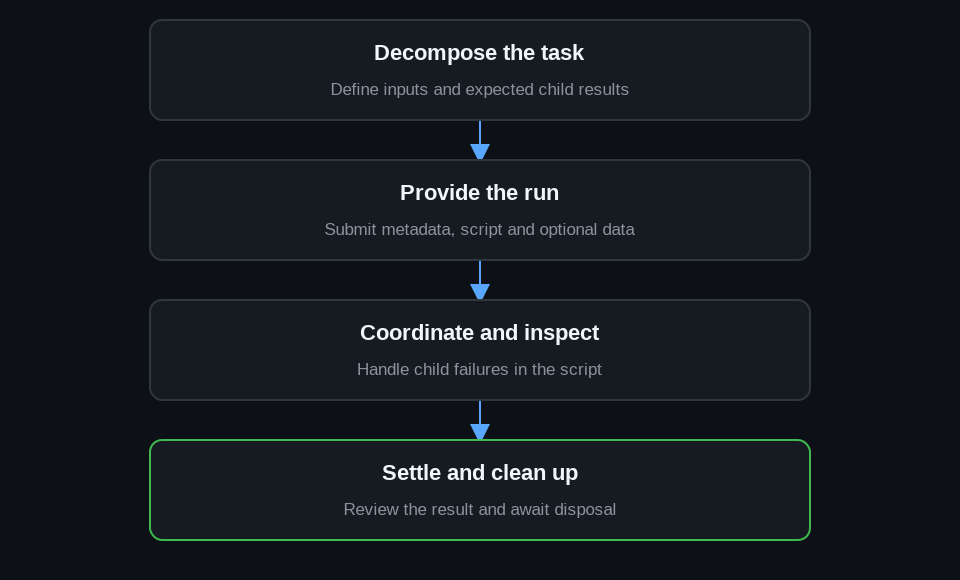
A workflow is not inherently a saved checklist or a background job. It runs a supplied JavaScript body in the configured engine. The model-facing workflow tool submits meta, script, and optional args; the parent turn waits for the run to settle and receives one final outcome. The workflow capability is optional, so its availability depends on the installed composition.
DeepSeek Harness: What goes into a run?
| Part | Purpose | Boundary |
|---|---|---|
meta | Identity and optional progress vocabulary | Plain JSON; validated before execution |
script | JavaScript orchestration body | Top-level await; returns a JSON value |
args | Optional data available to the script | Plain JSON, not evaluated as code |
agent() | Start a child for a task | Every child is attributed to the parent agent |
phase() and log() | Describe progress to observers | A phase declaration does not create execution order |
parallel() and pipeline() | Combine work in the script | Fatal workflow errors are rethrown |
meta requires name and description; phases is optional. Calls to phase() can match declared phase titles for observers, but the actual order and dependencies are expressed in the script. Treating a label as a scheduler could leave essential work unperformed. The engine checks the identity data before running the body.
DeepSeek Harness: How can I organize the work?
- Split the task into independently reviewable child assignments. Give each child a clear input and expected result. Identify any steps that depend on earlier results and decide what should happen if a child fails.
- Confirm that the workflow tool and an engine are available. The tool is a consumer; the engine is the execution provider. The subsystem permits one engine implementation per context, not a named registry of simultaneous engines.
- Supply
metawith a short name and description, and provide optional JSONargsif the script needs input. Put the orchestration in the JavaScriptscript, rather than treating metadata as executable code. - Start independent work with the documented hooks, combine results, handle missing child results explicitly, and return a JSON value. Use phases and logs to communicate progress, not to create dependencies.
- Inspect the final outcome and verify the substantive work. A completed orchestration only tells you that its script completed; it does not independently establish the correctness or safety of each child result.
The package guide gives this small script body as an illustration of independent reviews:
const reviews = await parallel([
  () => agent('Review src/a.ts for correctness'),
  () => agent('Review src/b.ts for correctness'),
])
return { reviewed: reviews.length }
This returns a count of result slots, not a guarantee that both reviews succeeded. An ordinary child failure can produce null, so a real script should inspect each result before claiming success. The file names are illustrative task inputs, not required repository paths. The example is the script body, not a complete tool call; the meta block is supplied separately.
DeepSeek Harness: How are failures and cleanup handled?
The programmatic engine accepts a parent Agent and may accept a cancellation signal. A malformed meta block or script is rejected before a live run exists. During a run, misuse such as invalid hook arguments, unsupported options, or a tripped cap is fatal: parallel() and pipeline() rethrow those errors rather than converting them to ordinary missing results. Ordinary child failures can yield null, leaving the script to decide whether to retry, report partial work, or stop.
A live run resolves a result with completed, cancelled, or error. For programmatic consumers, the result promise does not reject for a script failure; the caller must inspect the stop reason. A non-completed run has an error and the tool consumer reports it as an error instead of presenting partial output as success. A script returning no value yields null, so distinguish that completed result from a child failure by context.
The holder must dispose a programmatic run on every path. Disposal cancels as needed and awaits script and child cleanup under provider contracts. The PTC engine has no overall elapsed deadline, and cleanup has no independent workflow deadline. Observers receive snapshots rather than the live run, so a progress listener does not acquire cancellation or disposal authority.
Before writing the final return value, define what constitutes an acceptable child result and what the parent must do with a missing one. An array's length can count a failed slot as readily as a successful review. For dependent work, pass the earlier result explicitly and make the decision to continue visible in the script. The phase display is useful to a person watching the run, but it does not retry a task, persist an intermediate value, or implement a dependency. Verify the returned findings against the task's requirements before using them.
DeepSeek Harness: What are the limits and safety boundaries?
The package documents foreground collection only: background start and polling are deferred. Scripts, child progress, and intermediate values are not journaled for resume after process restart. Saved and nested workflows, as well as a cross-child token budget vocabulary, are also deferred. A progress record is not a checkpoint from which a script can continue.
The PTC implementation uses the calling session's file policy. That fact does not make a workflow or its child tasks safe. Review requested operations and the permissions of the actual composition, and avoid putting secrets in prompts or returned records unnecessarily. The tools reference describes the execution pipeline; tool registration and a valid schema do not guarantee a trustworthy result.
DeepSeek Harness: What do these terms mean?
- Workflow engine: the optional service that executes a workflow run.
- Parent: the live Agent to which every child started by the run is attributed.
- Phase: progress vocabulary for observers, not an execution dependency.
- Fatal error: a workflow contract or infrastructure error that combinators rethrow.
- Disposal: the holder's awaited cleanup of a run and its owned work.
Frequently asked questions
Do phase labels schedule work?
No. The script defines execution order and dependencies.
Can a workflow resume after a process restart?
The documented implementation does not journal scripts or intermediate values for resume.
What does a child failure return?
An ordinary child failure can yield null; fatal workflow errors are rethrown.
Sources
Every claim in this article was checked against the sources below. Community discussions are user reports, not official behavior.
This is an independent community article, not official DeepSeek documentation. Listing a plugin in the registry is not a security review.