DeepSeek Harness: Pass Environment to stdio MCP
DeepSeek Harness filters credential-shaped variables from the environment inherited by a stdio MCP child. To supply a required variable, explicitly map it in the client's config.env from the Harness launch environment; then check the connection and a harmless tool call without exposing the value.
DeepSeek Harness: why does the server not see my variable?
The memory MCP guide explains that the stdio bridge starts a local child process and removes ambient variables whose names commonly indicate credentials, together with all DSH_* variables. Other ambient variables remain inherited. The MCP client reference specifies the name filter: /KEY|PASSWORD|SECRET|TOKEN/i. Explicit env entries are merged over this filtered environment, so they can deliberately supply values the filter removed.
This distinction explains a common surprise. A variable can be present when the Harness process starts but absent from the child. The application does not automatically forward every launch variable just because the server needs it. Conversely, the filter is name-based: a confidential value stored under an unrelated name could still be inherited. Inspect the server and its environment requirements; filtering does not establish that a third-party executable is trustworthy.
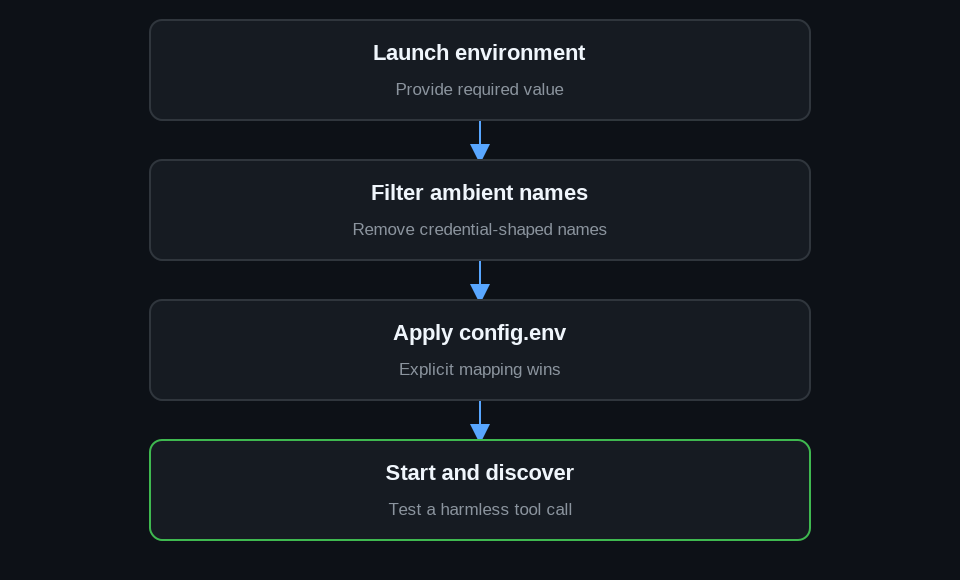
DeepSeek Harness: what does the mapping look like?
The client reference provides this minimal entry. It is an example of the documented configuration shape, not a recommendation to install or trust the illustrated server:
- id: mcp-github
  name: '@deepseek-ai/dsh-mcp-client'
  config:
    serverName: github
    transport: stdio
    command: npx
    args: ['-y', '@modelcontextprotocol/server-github']
    env:
      GITHUB_TOKEN: !!js process.env.GITHUB_TOKEN
The key under env is the variable name the child receives. The expression reads the value from the DSH process environment; it does not put the secret value directly in the YAML. serverName supplies the namespace for discovered tools, while command and args identify the process to start. Use the variable name and launch command specified by the actual server, not a guess based on this example. A configuration entry is not an entire overlay by itself: integrate it into the relevant composition using the deployment's documented patch structure.
| Item | Purpose | What it does not prove |
|---|---|---|
| Launch environment | Supplies a value to the expression | That the filtered child inherits it automatically |
config.env | Explicitly adds or overrides a child variable | That the server accepts the value |
serverName | Namespaces discovered tools | That the server is authenticated |
| Credential service | Resolves credential references for consumers that use it | Automatic injection into an arbitrary MCP child's environment |
The credentials reference describes a separate service: its consumers resolve named references, and the local provider can draw from several layers. It specifically describes LLM adapters resolving credentials per model request. The cited MCP example reads process.env; the sources do not establish that an MCP env entry automatically resolves a credential stored in that service, nor that rotating it updates a running child. Arrange the launch environment accordingly and check the lifecycle of your deployment.
DeepSeek Harness: how should I configure and check it?
- Consult the chosen server's own instructions for its executable, required variable names and permitted credential scope. Install or provision the server separately; the memory guide states that DSH does not download it for you.
- Supply the required value to the environment of the process that launches DSH, using your normal secret-handling mechanism. Do not paste a real value into the patch or a shared shell transcript.
- Add the server's required mapping under the client's
config.env, following the documented expression form. Preserve the other fields and unrelated configuration. Check that the server name is unique within its registration scope. - Load the changed composition or restart as appropriate to your profile. Confirm that the process launches and the expected
mcp__<serverName>__<tool>tools are discovered. A tool's visible name can be normalized for some upstream names, according to the client reference. - Run a harmless operation appropriate to the server. If it fails, examine a sanitized diagnostic and distinguish a missing process, connection failure, missing tool, and server-side authorization error. Avoid printing the credential to prove it was passed.
The memory guide's separate example supplies MEMORY_FILE_PATH in the same env map, using an expression and a fallback. That setting is a storage path, not a credential, and illustrates that env can pass ordinary server configuration too. A provider can have additional setup or data-scope requirements; supplying an environment variable does not perform those steps.
DeepSeek Harness: what should I check when it still fails?
First verify that the DSH process actually received the launch value. A variable set in a different terminal or after a long-running process started is not evidence about that process's environment. Check the selected profile and the entry that is actually loaded. If the variable name in config.env differs from the name the server expects, the server may start without the required setting even though the configuration is syntactically valid.
Next separate discovery from use. The client reference says an initial connection failure is logged and, by default, the Harness can start without the server's tools. failOnStartupError: true rejects plugin activation on initial connection or synchronization failure, although the host's policy can still permit an optional entry to fail without aborting the whole application. A missing tool is therefore not sufficient evidence of a wrong credential; check process installation, configuration and connection diagnostics too.
After a connection drops, the client can retry with backoff. During an outage previously listed tools can fail, and an exhausted retry budget removes them until reload or restart. A server that connects but returns an authorization error calls for a different investigation from one that never starts. Sanitized output, the exact stage of failure and the profile used are more useful than publishing the environment value.
DeepSeek Harness: what are the limits and safety boundaries?
An explicit mapping gives the child the value: the external process and its own dependencies can use it. Restrict the credential to the access the server needs, inspect the server's data handling, and avoid placing real secrets in example files, logs or issue reports. Other inherited variables may also contain sensitive data despite the name filter. A successful connection or a listed tool is not a security review.
The example is for stdio. Streamable HTTP uses a URL and configured headers, and has a different lifecycle: its service must already run. Do not assume that child-process environment behavior configures an independent HTTP server. A changed secret may require refreshing or restarting the affected process; the cited sources do not promise automatic refresh for an already spawned MCP child.
DeepSeek Harness: what do the terms mean?
- Stdio: transport between the client and a local child process over standard streams.
- Ambient environment: variables inherited from the process launching DSH before filtering.
config.env: explicit variables merged over that filtered child environment.- Credential reference: a name resolved by the separate credentials service when a consumer uses it.
- Discovery: retrieving and registering the server's available tools.
Frequently asked questions
Are all launch variables inherited by the MCP child?
No. Credential-shaped names and DSH_* are filtered before explicit env is merged.
Should the secret be written directly in YAML?
The guide advises mapping the environment variable instead of putting the secret in YAML.
Does the credentials service automatically inject every MCP secret?
The cited sources do not establish automatic injection into arbitrary MCP children.
Sources
Every claim in this article was checked against the sources below. Community discussions are user reports, not official behavior.
This is an independent community article, not official DeepSeek documentation. Listing a plugin in the registry is not a security review.