DeepSeek Harness: Permission Presets and Available Tools
A DeepSeek Harness permission preset changes the session's sandbox mode and approval policy; it does not itself choose an agent's tool list. Tool registration, scoped visibility, and execution policy are separate checks.
DeepSeek Harness: what does a preset actually change?
The permission preset reference describes a named pair of controls. The default configured workspace-write preset pairs the workspace-write sandbox with ask; danger-full-access pairs that sandbox mode with never. Deployments can configure a different table. Selecting a preset writes the changed controls through their own setters; it does not install a tool or select an agent profile.
This distinction answers the practical question: changing Permissions need not add or remove a tool schema. It can change what happens when an already visible tool runs, because the sandbox and approval services govern different aspects of execution. The preset service itself owns neither enforcement mechanism. The optional Auto review integration adds its own admission and enforcement; its availability depends on composition.
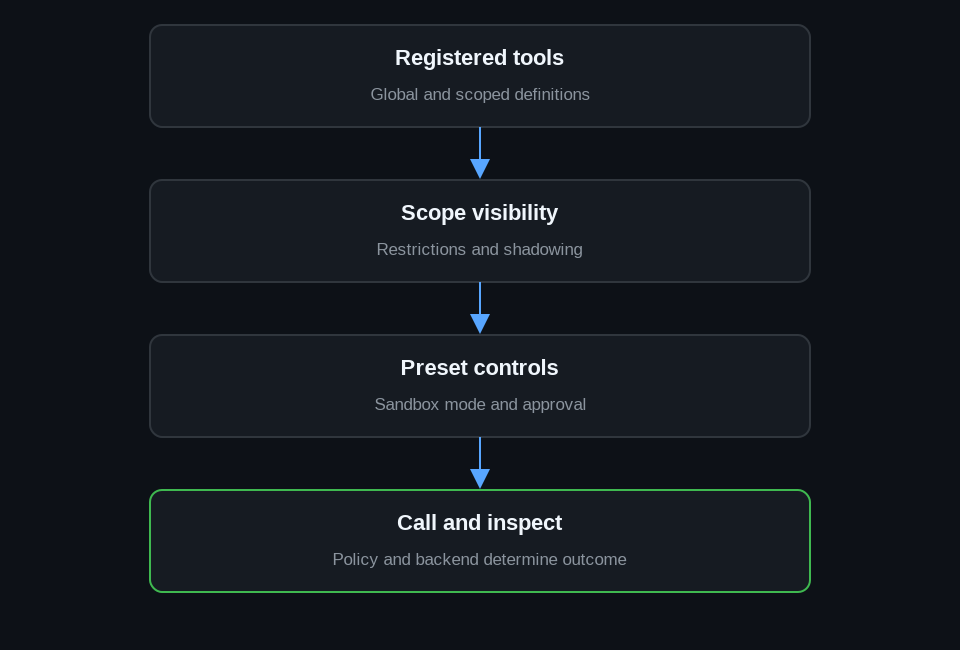
| Layer | What it controls | What its presence does not prove |
|---|---|---|
| Tool registry | Registered definitions and scoped visibility | That a call will succeed |
| Preset | A sandbox and approval pair | That a tool was installed or hidden |
| Sandbox | File effects under the selected backend | That all network or process activity is confined |
| Approval | Outcomes of requests for approval | That every operation requests approval |
DeepSeek Harness: where does the tool list come from?
The tools reference describes registered ToolDefinition objects. A definition includes a model-facing schema and an execution function, among other host-side fields. The registry produces model-facing schemas with an explicit allowlist: name, description and parameters. Execution callbacks, output declarations, timeout metadata and UI presenters are not sent as tool schemas.
Tools can be registered globally or in an agent scope. A scoped registration can shadow a global definition with the same name. Scoped ToolRestriction filters inherited tools with allow and/or deny; multiple restrictions intersect. A scope's own registrations remain exempt, and the reserved transport has separate handling. An allow-list excludes inherited names not listed; a deny-only filter permits other inherited names, including later registrations. Thus the list visible to one agent need not equal another's, even within the same process.
The registry's visibility resolver feeds presentation, lookup and dispatch. A catalog describing a possible tool does not establish that its plugin is mounted in this profile or visible in the current scope. Conversely, a visible schema is a description of a callable interface, not evidence that the implementation or its dependencies will succeed. Diagnose those stages independently.
DeepSeek Harness: can a visible tool still be denied?
Yes. A call must pass the execution pipeline and the policies used by the implementation. A sandbox can restrict file effects of a subprocess or a sandbox-enforcing filesystem backend. Approval is a separate request and decision path. Under ask, a configured answerer handles a request; under never, a request reaching the approval service is rejected without asking an answerer. never does not mean every tool call is automatically rejected: a call that never requests approval follows its own applicable controls.
The preset package reference makes the ownership explicit: sandbox, approval and Auto integration own execution. A changed sandbox can change a command's result while the model continues to see the same tool. A failed call can also reflect invalid arguments, missing dependencies, a backend error, or another guard; do not infer its cause solely from the selected preset.
The preset name is also an imperfect shorthand for state. custom is a derived display value for a pair that matches no available preset; it is not a selectable configured preset. The live auto option exists only while its integration is registered, and has its own fixed pair and admission. Removing a preset service leaves the last selected enforcement values in effect, according to its package reference.
DeepSeek Harness: how do you investigate a missing or failing tool?
- Record the session, agent and active profile, and state whether the tool is absent from the model-facing list or present but failing. Those symptoms lead to different checks.
- For a missing tool, check that its plugin and dependencies are mounted and registered, then inspect the agent's scope, any same-name shadow and inherited
allowordenyrestrictions. A permission preset switch does not replace those checks. - For a visible tool, inspect its documented parameters and the actual error. The tools reference distinguishes argument validation from dispatch and execution; correct the specific failure rather than repeatedly switching presets.
- Inspect the effective sandbox mode, approval policy and actual backend. If the call requested approval, identify whether an answerer was available and what decision was returned. Do not assume
askguarantees a human prompt. - If a different mode is necessary for the task, assess its effects before changing it, then retry the smallest relevant operation. Compare the result and the current settings, and remove sensitive arguments or output before sharing diagnostics.
When the optional command registry is composed, the package documents /permission for reporting the current preset and available entries, and a preset argument for switching. It is not promised in every client. A settings defaultPreset affects future fresh sessions; later settings changes do not rewrite existing sessions, and resumed seeds retain their effective permissions. Check the actual session instead of assuming a new default changed it.
DeepSeek Harness: what are the limits and safety boundaries?
Permission names are not proofs of safety. danger-full-access bypasses sandbox confinement, while never rejects approval requests that reach the service. These statements can both be true: an operation may execute without making such a request. Sandboxes have backend-specific boundaries and limitations; their documented modes concern file effects, not a universal network restriction.
Tool visibility also does not establish trust in a plugin, model output or requested action. Read the actual call and its consequences. An approval decision covers the request being considered, and a successful call says nothing about future calls. Review external code and protect data the tool can read, even when writes are limited.
The sources do not define a universal mapping from each permission preset to a list of tools. A deployment can compose additional restrictions or policies, so inspect that deployment's behavior rather than promising identical visibility everywhere. See the preset comparison for the separate control values.
DeepSeek Harness: what do the terms mean?
- Preset: a named sandbox-mode and approval-policy bundle.
- Tool schema: the model-facing name, description and argument contract.
- Scope: the agent-associated layer used to resolve registrations and inherited restrictions.
- Approval answerer: an integration that decides a particular approval request.
custom: the derived label for effective controls that match no available preset.
Frequently asked questions
Does switching presets install tools?
No. Presets select sandbox and approval values; tool registration and visibility are separate.
Does never reject every tool call?
No. It rejects approval requests that reach the approval service; other calls follow their applicable controls.
What does custom mean?
The effective pair does not match an available preset; custom is a derived display value.
Sources
Every claim in this article was checked against the sources below. Community discussions are user reports, not official behavior.
This is an independent community article, not official DeepSeek documentation. Listing a plugin in the registry is not a security review.