DeepSeek Harness: pnpm Blocks Git Plugin Builds
When a source-distributed Git plugin fails because pnpm blocks prepare, inspect the package and copy pnpm's exact allowBuilds key into the target profile's pnpm-workspace.yaml, then retry the same installation. Allowing a build runs package-controlled code, so decide whether to trust it first.
DeepSeek Harness: what does the failure mean?
The CLI reference explains that Git-hosted plugins distributed as source build through a prepare script during installation. With pnpm 10 or later, the first add can fail because that script is blocked until the consumer explicitly permits it. pnpm prints an allowBuilds hint and DSH points to the target profile's pnpm-workspace.yaml.
This is a build-script decision, not proof that the Git address, profile, or plugin source is invalid. Equally, not every failed installation has this cause. Look for the actual pnpm message before changing policy. A network failure, an unavailable package or a script that runs and fails needs its own evidence. Preserve a sanitized copy of the original diagnostic so the retry can be compared with it.
DeepSeek Harness: which profile receives the change?
dsh plugin --profile <name> <args...> forwards the package-manager arguments to pnpm with the profile directory as its working directory. The profile is under $DSH_HOME/profiles/<name> according to the packaging guide. Thus the relevant pnpm-workspace.yaml is the one belonging to the profile used in the failed command, not an arbitrary workspace file in the plugin source checkout.
| Situation | Documented consequence |
|---|---|
Git source package needs prepare and pnpm blocks it | Inspect the hint and decide whether to allow the printed key |
| Built tarball or local checkout | The CLI reference says allowBuilds is not needed for this case |
| Installed package declares a DSH bundle | Its patch can enter the profile's bundle list |
| Installed package has no bundle declaration | It remains a dependency and does not become a bundle layer |
The package manager must be available on PATH. If the profile is missing, the CLI can initialize it before invoking pnpm. A successful package operation updates the profile manifest's bundle list according to installed packages and their declarations; installing a package and loading a working plugin are separate observations.
DeepSeek Harness: how do I resolve the specific warning?
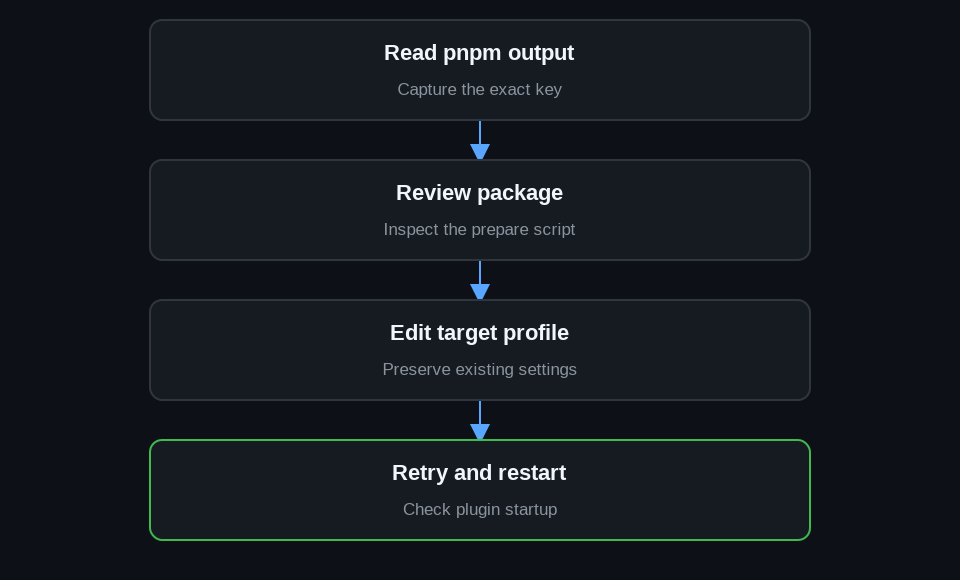
- Record the profile, package spec and exact
allowBuildskey printed by the failed operation. The CLI reference shows this Git installation form:
dsh plugin --profile tui add github:deepseek-harness/turtle-ui
- Inspect the package source and its
preparescript, including what it runs and which dependencies it obtains. Make an independent trust decision before authorizing execution. Do not apply a broad permission to unrelated packages just to suppress a warning. - Open the target profile's
pnpm-workspace.yaml, preserve existing settings, and add the key exactly as pnpm printed it. The reference directs users to copy the output key; it does not provide a universal key that can safely be substituted for every Git package. - Rerun the same
dsh plugin --profile ... add ...operation. Read the new output: permission to run the script does not guarantee the script itself completes successfully. - After a successful bundle membership change, restart the affected running profile. Check startup diagnostics and the behavior the plugin is expected to supply. Keep the previous configuration and diagnostic so you can understand or reverse the change if needed.
The CLI reference requires --profile before the forwarded pnpm arguments. The profile name used in the example is illustrative; choose the profile you actually intend to modify. Do not create a guessed allowlist entry if the error output is missing or differs from the documented case. Instead, identify the precise failure and pnpm version first.
DeepSeek Harness: how does installation relate to activation?
The packaging guide distinguishes a bundle manifest from a profile manifest. A bundle declares the patch it contributes; a profile lists bundles in order. The CLI reference says a dependency with dsh.bundle.patch enters the layer stack when the package operation succeeds. A plain dependency without that declaration is retained but produces a warning instead of becoming a bundle.
An already running profile retains the bundle set selected at its start. After adding, removing or updating a bundle, restart the profile to pick up membership changes. This is different from editing an ordinary patch where the composition may support hot reload. On the next start, inspect whether the expected row loads and whether required services are available. A successful pnpm exit does not establish that plugin initialization or its later behavior succeeded.
A built tarball and a local checkout can avoid the specific allowBuilds step described in the CLI reference, but choosing an artifact still requires assessing its origin and contents. The packaging tutorial's local hello-plugin example demonstrates a bundle with a declared patch; it does not make all archives or checkouts equivalent to that example. Use the distribution method supported by the publisher and check which version you are actually installing.
How does a local checkout resolve?
The CLI reference anchors relative package specifications to the invoking directory before forwarding them to pnpm. Thus an add . issued from a plugin checkout targets that checkout, even though pnpm runs with the profile as its working directory. This helps identify the source of the installed package; it does not establish the trustworthiness of the checkout. Inspect its manifest and files and confirm your invoking directory before choosing that route. Keep a record of the exact package specification and profile so the installation can be investigated later.
DeepSeek Harness: what are the limits and safety boundaries?
A prepare script is executable package code. Allowing it is a decision to run that code in the package manager's installation context; the allowBuilds entry is not a security certification. Review the exact package and script, the source revision and expected dependencies before permitting it. Avoid sharing logs that contain credentials, private repository URLs or local paths.
The cited CLI reference does not document one universal printed key or a global bypass that applies to all pnpm versions and Git dependencies. Do not invent either. If the warning differs, consult the output and the documentation for the installed pnpm release. If permission is granted and the build still fails, investigate the script's own error rather than widening the permission again.
DeepSeek Harness: what do the terms mean?
prepare: a package lifecycle script used by the documented source-distributed Git plugin to build during installation.allowBuilds: pnpm's explicit build permission referenced in the diagnostic.- Profile: the directory and manifest describing a runnable bundle composition.
- Bundle: an installable package that declares a DSH configuration patch.
- Manifest: package metadata declaring either the bundle contribution or the profile's bundle list.
Frequently asked questions
Does every installation failure mean prepare was blocked?
No. Inspect the pnpm diagnostic before changing build permissions.
Which file receives the permission?
Use pnpm-workspace.yaml in the profile targeted by the failed command.
Does allowing a build certify the package?
No. It permits package code to run; assess the source independently.
Sources
Every claim in this article was checked against the sources below. Community discussions are user reports, not official behavior.
This is an independent community article, not official DeepSeek documentation. Listing a plugin in the registry is not a security review.