DeepSeek Harness: Public URL and Trusted Host
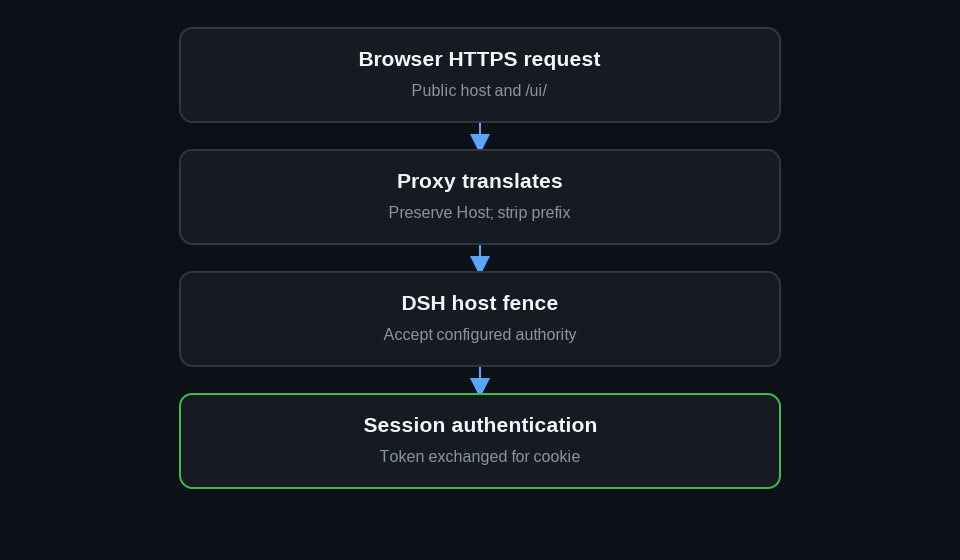
Publish DeepSeek Harness behind a reverse proxy by advertising the browser URL with --public-url, allowing its authority with --trusted-host, and configuring the proxy to preserve the host and translate the mount path.
DeepSeek Harness: What does each setting actually do?
The Web profile normally listens on loopback, so a browser on another machine needs a route to it. The public deployment guide separates three responsibilities: the proxy owns the external connection, DSH advertises the URL, and the Connection layer decides which browser authority it accepts. The web-server reference describes the HTTP carrier and its separate authentication layer.
| Component | Responsibility | Does not establish |
|---|---|---|
--public-url | Advertises the browser-facing root and optional mount | Trust or authentication |
--trusted-host | Adds an accepted browser authority | A public route or TLS |
| Reverse proxy | Terminates or forwards the connection and translates paths | DSH user authentication |
| Startup token and signed cookie | Authenticate the browser session | Network isolation of the listener |
For example, the documented command is:
dsh --profile web --public-url https://app.example/ui/ --trusted-host app.example
Replace the example hostname with the actual browser-facing authority. --public-url accepts HTTP or HTTPS roots and normalizes the trailing slash. It supplies the printed and opened startup URL, DSH_WEB_URL, and the Web GUI URL in agent runtime context. The backend still serves origin-root routes; the flag does not teach it about /ui/.
DeepSeek Harness: How should the proxy handle requests?
- Keep the backend listener reachable only from the trusted proxy or network. Neither the advertised URL nor the host fence protects the listening port itself.
- Preserve the browser-visible
Hostheader when forwarding. Replacing it with the backend address changes the authority the fence sees. - Strip the external prefix before forwarding. For example,
/ui/api/...must reach the backend as/api/.... Forward WebSocket upgrades with theirUpgradeandConnectionheaders as well. - Redirect the bare mount
/uito/ui/. Only the slash-terminated entry exchanges the startup token for a session cookie. A browser with that cookie can obtain the document from that entry or/ui/index.html. - Rewrite the backend cookie path to the external mount. If the backend uses plain HTTP, add
Secureon the HTTPS-facing proxy; if the backend itself serves TLS, its cookie already has that attribute. - Open the advertised URL and check an API request and a WebSocket connection. Keep the full startup URL private: it contains a process credential.
This checklist is a contract for the proxy, not a complete configuration for a particular proxy product. Its exact directives depend on that product. Check the browser's network panel and proxy logs without copying the token or cookie into a public issue. The distinction between the external request and the request received by the listener makes path and authority errors easier to isolate.
DeepSeek Harness: Why can a correct URL still produce 403?
The host fence accepts loopback, the listener's bound address, and authorities explicitly named by --trusted-host. Advertising https://app.example/ui/ alone does not add app.example to that set. A proxy can forward traffic correctly while every API call is rejected because the browser-visible authority is not trusted.
Compare the actual browser URL, the Host forwarded by the proxy, and the configured trusted authority. An entry without a port matches any port, which can help with tunnels that change ports. Add only authorities intended for the deployment. TLS termination does not change the host check, and a certificate identifies the server to the browser; it does not identify the browser to DSH.
A 403 is evidence to investigate, not proof that this particular check failed. The web-server reference also describes a 403 for traversal outside the frontend distribution root. Record the requested path and which layer returned the response. Check the mount rewrite and authentication flow as well as authority; do not blindly add unrelated hosts or change a security setting because the status code looks familiar.
DeepSeek Harness: Where should TLS terminate?
The public guide supports TLS at the proxy, at the listener, or at both. HTTPS at the proxy protects the browser-to-proxy segment; whether the next segment is encrypted depends on the listener. A browser-facing HTTP URL exposes the startup token in plaintext. A private backend network is a deployment responsibility, not a consequence of the URL flag.
For native listener TLS, the guide documents --tls-cert and --tls-key with a full certificate chain and an unencrypted PEM private key. Paths resolve relative to the process working directory. The listener reads them once; replace the files and reload the listener or restart the process to pick up a certificate change. Invalid or missing material prevents startup instead of silently falling back to HTTP. The certificate must match the hostname or IP used by the browser and be trusted by that browser.
How can you test the full request path?
Start at the browser-visible URL and follow one request through each layer. Note the browser authority and external path, then compare them with the Host and path received at the backend. For a mounted deployment, a correct external /ui/api/... request must become a backend /api/... request. If the backend receives the prefix unchanged, the advertised URL can still look correct while routes fail. If the proxy rewrites the host, the backend can see a different authority from the one the browser used. These are two independent observations, so record both.
Next check the entry and cookie exchange. The guide distinguishes /ui/ from the bare /ui because the backend cannot reconstruct a prefix stripped by the proxy. Verify the browser reaches the slash-terminated entry, then check whether subsequent requests carry the cookie at the rewritten path. Use the browser's own tools without sharing credential values. If the page is served but a later API request is rejected, preserve the exact status and path: the failure can occur after the document was delivered.
Finally check the WebSocket upgrade. Forwarding ordinary requests alone does not meet the guide's requirements. A diagnostic comparison should state whether document loading, an API request and the upgrade each succeeded, and whether the listener or proxy produced the response. These observations narrow the chain without asserting that a single symptom has only one possible cause. Repeat the same checks after each configuration change so the before-and-after evidence remains comparable.
How do multiple network segments affect the decision?
A TLS proxy and a TLS listener protect different segments. A valid browser-to-proxy certificate does not, by itself, describe how the proxy reaches the backend. Conversely, native TLS at the listener does not configure the browser-facing proxy or its cookie rewrite. Draw the actual network path, identify who can reach each listener, and choose the appropriate control for each segment. If the proxy and backend are on the same host, loopback is useful for restricting reachability, but access control for the host remains an operational responsibility.
The WebServer carrier rejects an unspecified bind address rather than listening on every interface. The Web profile defaults to loopback, and a concrete non-loopback address can serve the network associated with that interface. Changing that address has a different effect from adding a trusted browser authority. Keep these choices visible in deployment notes so a future operator does not confuse an announcement, a host check, and an actual listening socket.
DeepSeek Harness: What are the limits and safety boundaries?
The startup link contains a credential. Share it only with intended users, keep it out of public tickets, and do not mistake a working TLS connection for access control. The proxy must protect both the URL and cookies while maintaining the required host, path, and upgrade behavior. Cookie scope matters when several applications share a hostname: rewriting the path is part of the deployment, not a cosmetic change.
If a page loads but API calls fail, identify the failing path and response before changing settings. If only the bare mount fails, verify the slash redirect and token exchange. If a TLS listener fails to start, inspect the certificate and key rather than assuming fallback. The official documentation does not specify one universal proxy configuration, so test the complete chain in your own environment. For a broader overview, see the FAQ.
DeepSeek Harness: What do these terms mean?
- Authority: the host and optional port used by the browser and checked by the host fence.
- Mount prefix: the external path, such as
/ui/, removed before requests reach origin-root backend routes. - Startup token: the process credential in the printed URL, exchanged at the entry for a signed browser session cookie.
- TLS termination: the point at which an HTTPS connection is decrypted; a separate proxy-to-listener connection may have different protection.
- Host fence: the check that restricts accepted browser authorities; it is separate from browser authentication.
Frequently asked questions
Does the public URL trust the host?
No. The public URL advertises the address; the host must be accepted separately.
Does TLS authenticate the browser to DSH?
No. TLS identifies the server to the browser; DSH uses its startup token and signed session cookie.
Does every 403 prove a host mismatch?
No. Check the failing path and responding layer; other documented conditions can also return 403.
Sources
Every claim in this article was checked against the sources below. Community discussions are user reports, not official behavior.
This is an independent community article, not official DeepSeek documentation. Listing a plugin in the registry is not a security review.