DeepSeek Harness: Why Restart After a Plugin Update?
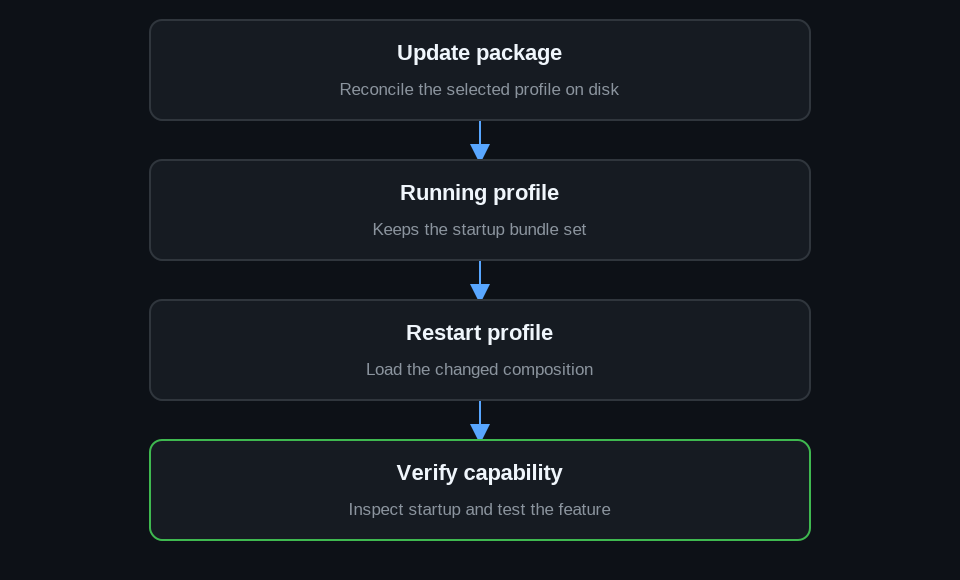
A plugin bundle update changes the selected profile on disk, but a running DeepSeek Harness profile keeps the bundle set chosen at startup. Restart that profile to load the changed bundle composition, then verify the capability you need.
DeepSeek Harness: What changes when a bundle is updated?
The CLI reference describes two separate moments. A successful dsh plugin operation updates installed dependencies and reconciles the profile manifest's dsh.profile.bundles list. The running profile retains its startup bundle set. Adding, removing, or updating a bundle therefore requires restarting that profile before judging the new composition.
This distinction explains a common surprise: a package operation reports success, yet an already running process still behaves as it did before. Success describes the package operation and manifest reconciliation; it is not evidence that the process has replaced its active plugin tree. Restart the profile actually targeted by the operation, not merely a browser tab connected to it.
DeepSeek Harness: Is a bundle update the same as a patch edit?
No. The launcher assembles configuration from bundle patches, the selected profile's patch, the home patch, and any command-line overlays. Whether patch edits reload depends on the final composition: the shipped web template has live patches, whereas headless, sdk, sdk-minimal, and acp apply patches at startup. If HMR is absent, changes require a restart. The separate bundle-membership boundary still applies even when ordinary patch editing can reload.
| Change or observation | What it establishes | Next check |
|---|---|---|
| Successful package update | Installed state and bundle list were reconciled | Restart the targeted profile |
| Patch edit with HMR mounted | A live patch may be applied | Check the resulting behavior |
| Patch edit without HMR | The running composition does not reload it | Restart and check startup |
| Market card says update available | An indexed version is offered | Inspect its source and compatibility |
| Profile restarts successfully | The process started with its new composition | Test the intended capability |
The market guide describes discovery and confirmation. Its cards and compatibility checks help select a version; they do not tell a running process to replace its bundle set. A market source belongs to the current profile, so confirm which profile is being viewed before interpreting its installed state.
DeepSeek Harness: How do I apply and check the change?
- Identify the profile that owns the package and the process currently running it. Note the package, existing version, intended version, and a way to restore the previous setup. If the profile is shared, coordinate an appropriate interruption of its work.
- Inspect the new artifact and source. In Discover, the install confirmation identifies an npm package and registry or a Git repository, commit, and directory. Marketplace metadata is supplied by third parties and is not independently verified by DSH.
- Complete the intended update through the supported interface and read its result. The CLI forwards pnpm arguments after
dsh plugin --profile <name>; the profile option must come before those forwarded arguments, and pnpm must be onPATH. A missing profile is initialized, so check the name carefully. - Stop and restart the affected profile using the method appropriate to its host. For a directly launched profile, the documented launcher form is
dsh --profile <name>. The placeholder is the actual selected name. The references do not prescribe a universal restart button for every host. - Inspect startup diagnostics and test the specific feature using an appropriate small task. If it still fails, distinguish an installation problem, a missing configuration or dependency, and a runtime error. Keep the observations with the package and profile identity for troubleshooting.
For the optional subagent bundles discussed by the CLI, startup registers dormant host providers; the corresponding tool row must also be enabled in a copied preset for a new agent to see the tool. A restart alone is therefore not a promise that every capability is available. This detail is specific to those provider bundles, not a universal rule for all plugins.
DeepSeek Harness: What if the new behavior is still missing?
First establish whether the operation targeted the same profile that you restarted. dsh plugin operates in the selected profile directory; a similarly named profile can have different installed dependencies and patch layers. A successful update in one does not change the startup composition of another. The CLI can initialize a missing profile, so a typo can produce a new profile instead of affecting the intended one.
Next separate a package from a bundle. After a successful pnpm operation, DSH adds an installed dependency to the bundle stack when its manifest declares a bundle patch. A dependency without that declaration remains an ordinary dependency and produces a one-time warning. An update can also give a previously ordinary dependency a bundle declaration. Check the output and installed package rather than assuming the name alone implies a mounted capability.
If the expected bundle is present and the restarted profile reports a startup error, read the error and any full diagnostics before making another change. Configuration parsing, schema validation, module resolution, and plugin startup can each fail. A new version can require configuration that your existing patch does not provide; the plugin's own documentation and installed schema are the appropriate place to check. The configuration-layer guide explains why a later patch replaces a row's entire configuration.
If startup succeeds but the feature is absent, inspect the feature's own enablement and prerequisites. For example, the subagent provider case above has a separate preset step. Do not generalize that step to a different bundle without checking its documentation. Conversely, repeatedly editing an unrelated patch cannot change the already selected startup bundle set.
Keep a clear record of the profile name and launch method, particularly when a service manager rather than a terminal owns the process. A change visible in a package directory, a reloaded patch, and a restarted process are three different observations. Compare them in that order if a team member sees an old behavior. The CLI reference does not guarantee that a failed package-manager operation leaves no intermediate state, so inspect the actual profile before retrying. Record the recovery method for the specific package and host before an update to a shared service.
DeepSeek Harness: What are the limits and safety boundaries?
A restart interrupts the running profile; finish or otherwise handle active work according to the host's operating procedure. The CLI documents graceful disposal on its shutdown signals, but the cited sources do not promise a particular outcome for every in-flight task. Record the version and relevant configuration before changing a shared deployment, and verify the recovery procedure for that environment.
The market checks index format, compatibility, and applicable registry rules; the market chooses the displayed claims and install source. None of these checks establishes that plugin code is trustworthy. Review the source and dependencies appropriate to your environment. A successful restart demonstrates startup, not that the plugin is safe or that all tasks will behave correctly.
The documented startup boundary applies to bundle changes. It does not establish that every arbitrary dependency update changes a capability, that all profiles have HMR, or that a browser refresh restarts a host. Test the expected behavior after the actual process restart.
DeepSeek Harness: What do these terms mean?
- Profile: a named composition and its local installed dependencies and patches.
- Bundle: a package that supplies a declared DSH configuration patch.
- Manifest reconciliation: updating the profile's bundle list from installed dependencies after a successful package operation.
- HMR: hot reload of eligible configuration edits when the relevant plugin is mounted.
- Preset: an agent configuration in which the optional provider example requires its tool row to be enabled.
Frequently asked questions
Does an update replace a running bundle set?
No. Restart the targeted profile to load its changed bundle composition.
Can ordinary patch edits reload?
They can when the final composition includes the relevant HMR capability.
Does restart enable every tool?
No. The optional subagent provider example also requires its tool row in a copied preset.
Sources
Every claim in this article was checked against the sources below. Community discussions are user reports, not official behavior.
This is an independent community article, not official DeepSeek documentation. Listing a plugin in the registry is not a security review.