DeepSeek Harness: Right Sidebar Tabs and Splits
DeepSeek Harness gives each session a right-hand docking surface where addressed content opens in tabs, panes can split, and tabs can float. The layout belongs to the session; tab type, resource address and placement are separate parts of the design.
DeepSeek Harness: what belongs to the right sidebar?
The sidebar reference describes a per-session surface beside the conversation. It can show workspace files, a directory tree and product pages in tabs. A pane holds tabs; a layout can include docked and floating panes. The selected session has its own surface, while the root controller also maintains seats for initialized background sessions with retained bodies. Only the foreground conversation is visible.
The sidebar package owns the surface, type registry and navigation service. Its dockkit dependency computes layout but is explicitly internal, not a stable interface for extensions. Resource providers resolve addresses into live values, while workspace-file services read file content. These layers explain why opening a tab and reading a file are related but different operations.
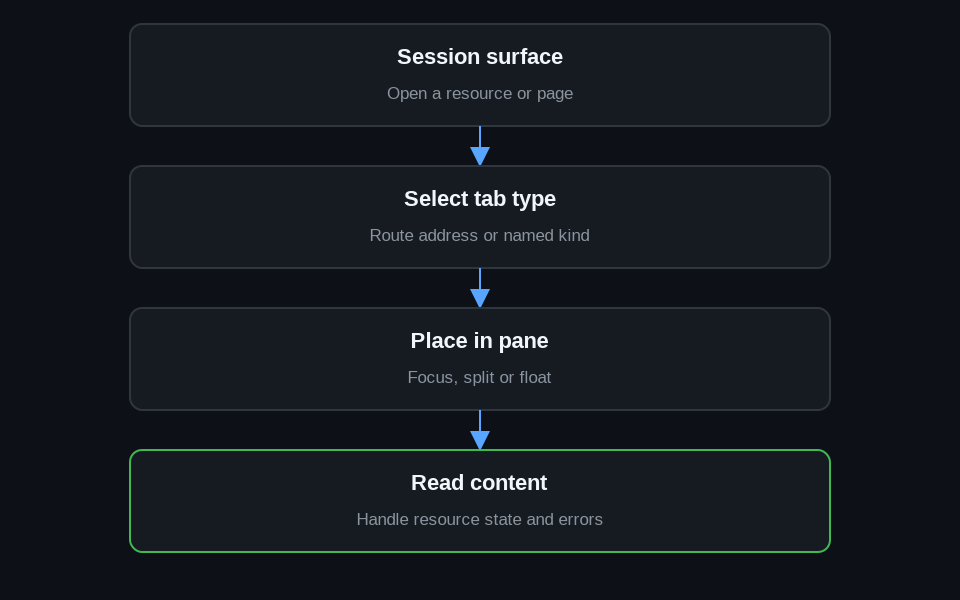
DeepSeek Harness: how does an address become a tab?
A resource address uses the dsh-resource://<type>/… scheme. The protocol identifies a resource provider; a session-scoped file address identifies both the authorizing session and its path. A page such as the guide uses the sidebar's own page bookkeeping instead. A tab's content identity is the pair of type kind and address. Opening the same pair normally focuses the existing tab; the same address opened through two kinds represents two tabs.
| Operation or concept | Purpose | Boundary |
|---|---|---|
openResource | Route a resource address to an eligible tab type | Throws if the address is outside the scheme or no type claims it |
openTab | Open a page by registered kind | Throws if no implementation of that kind is registered |
revealIfOpened | Focus the existing matching tab by default | Setting it false permits another tab |
preferNewPane | Prefer a new docked pane | Falls back when pane budget or room prevents a split |
replaceTab | Replace a tab in its pane and strip position | Placement differs for a floating tab |
Both open paths claim a type, focus an existing match or seat a new tab, expand the column, and record navigation as one history entry. Placement is an option supplied by the caller, not a permanent property of a tab type. An explicit kind for a resource still respects that type's canOpen check.
DeepSeek Harness: how do splits and floating panes work?
The navigation service exposes split, float, dock, focus and close. A split targets the active docked pane or a named pane. It returns the new pane's identifier when possible; if the pane budget or column width forbids the split, it returns no identifier and records no operation. Floating lifts a tab into a floating pane; docking returns a floating pane to the docked area. A nonexistent target or one already in the requested state is a no-op.
For an extension or integration, a practical sequence is:
- Open a session surface and choose whether the content is a resource or a named page.
- Open it with the appropriate service operation. Supply placement only when the caller has a reason to target a pane, replace a tab or prefer a split.
- Check the result of a split instead of assuming a new pane was available. The documented fallback for
preferNewPanekeeps the tab usable in the target pane when a split cannot be made. - Use focus, float, dock or close as needed; service writes require a mounted session surface and throw without one.
- Test switching sessions and returning to the original surface, including the behavior of any retained tab body your extension uses.
An empty docked pane does not remain empty: the reference says an empty root pane receives the default page selected from registered guide entries. A guide tab displays registered entries, and picking an entry opens the contributing type in its place. Thus a default page appearing in a new area is part of the documented layout behavior, not necessarily an extra file tab.
DeepSeek Harness: how do plugins contribute a tab?
A tab type has two registrations sharing an id: a static definition in ctx.sidebarRightTabs declares the kind and address matching, while a keyed slot provides its body. The framework supplies useTabInfo() for live sidebar, pane and tab information. Type definitions can have patterns, a priority band and an optional synchronous canOpen veto. A title is captured when the tab opens; a live chip uses the title slot instead of rewriting that record.
The slots reference explains the general composition contract. SlotMap declares keys and their types; a runtime owner declares children. Registering into an undeclared slot or declaring a child already owned elsewhere fails during plugin activation. Contributions follow the owning lifecycle, so a feature extending another owner's slot should account for that owner being disposed and mounted again.
Shipped types include files for the workspace tree, text for document preview and browser for HTTP(S) pages. A file-tree row opens its resource in its pane. File resource observation supplies metadata; the preview reads content through workspace-file operations. A bare absolute address has no authorizing session and fails rather than borrowing the current tab's session. These distinctions help diagnose an address or authorization problem separately from a layout problem.
DeepSeek Harness: what are the limits and safety boundaries?
The sidebar reference currently contains conflicting statements about reload: its ownership section says saved layouts are restored, while its “Not built” section says layout state is memory-only and reload collapses sessions. Do not rely on either as a universal persistence promise without testing the installed build and checking updated documentation. The reference also describes dockkit as internal and does not promise a public layout snapshot or user-facing general undo.
Opening content in a tab does not establish that a file or web page is trustworthy. Workspace-file reads remain subject to the session filesystem backend and documented transfer limits. The browser and preview have their own content and navigation constraints. A layout operation can succeed even when the underlying resource later fails, so handle loading and failure states separately.
DeepSeek Harness: what do the terms mean?
- Pane: an area containing tabs, docked in the sidebar or floating.
- Tab kind: the category used to choose a registered implementation.
- Resource address: an address identifying content and its protocol.
- Slot: a typed UI contribution point owned by a component.
- Dockkit: the sidebar's internal layout engine, not a stable extension interface.
Frequently asked questions
Are tabs shared between sessions?
The reference describes a separate docking surface for each session.
Does requesting a split always create a pane?
No. Pane budget or available width can prevent a split.
Is layout restoration guaranteed on reload?
The current sidebar reference contains conflicting statements; check the installed build.
Sources
Every claim in this article was checked against the sources below. Community discussions are user reports, not official behavior.
This is an independent community article, not official DeepSeek documentation. Listing a plugin in the registry is not a security review.