DeepSeek Harness: Review Startup Logs Before Sharing
DeepSeek Harness startup reports are not automatically redacted: review a private copy for credentials, configuration values and identifying details before sharing the smallest useful reproduction.
DeepSeek Harness: why does a startup report need review?
The CLI reference says a required plugin activation failure produces a full diagnostic report. It includes versions, platform, profile, root configuration path, inactive plugin modules and states, original errors, and startup warning and error arguments. Import errors without a fiber are included too. This detail helps explain a failure, but original plugin errors may contain configuration or credential values. The report header warns readers to review it; values are not redacted.
The collector does not independently collect environment variables or configuration contents. That narrow statement does not mean the report cannot contain them: an error or logged argument may already include such information. Nested causes, aggregate errors, circular references, non-enumerable and symbol properties are preserved. Inspect the entire report, not just the first error line.
| Material | Useful to an investigator | Review before sharing |
|---|---|---|
| Version, platform and profile | Reproduce the affected startup | Profile and path names may identify an environment |
| Failed plugin and stack | Locate the original error | Error text and arguments may contain values |
| Pending plugins and missing services | Trace downstream dependencies | Preserve their relationships while editing |
| Nested causes and warnings | Explain a failure beyond the top line | Inspect every level for sensitive text |
DeepSeek Harness: where does the report come from?
When the report is written successfully, the Full diagnostics: line names a unique startup-<timestamp>-<uuid>.log directly under $DSH_HOME/logs/, defaulting to ~/.dsh/logs/. The CLI does not automatically delete older reports. On POSIX, new directories and files request modes 0700 and 0600. Those requested modes describe local creation; they do not redact the contents or control later copies.
If the logs directory or file cannot be written, stderr includes the write error and the full report instead; the exit code is still 1. Treat terminal captures and copied stderr with the same care as the file. Optional-only activation warnings do not create the required-failure report, but their output can still deserve review according to its content.
DeepSeek Harness: how should you prepare a shareable copy?
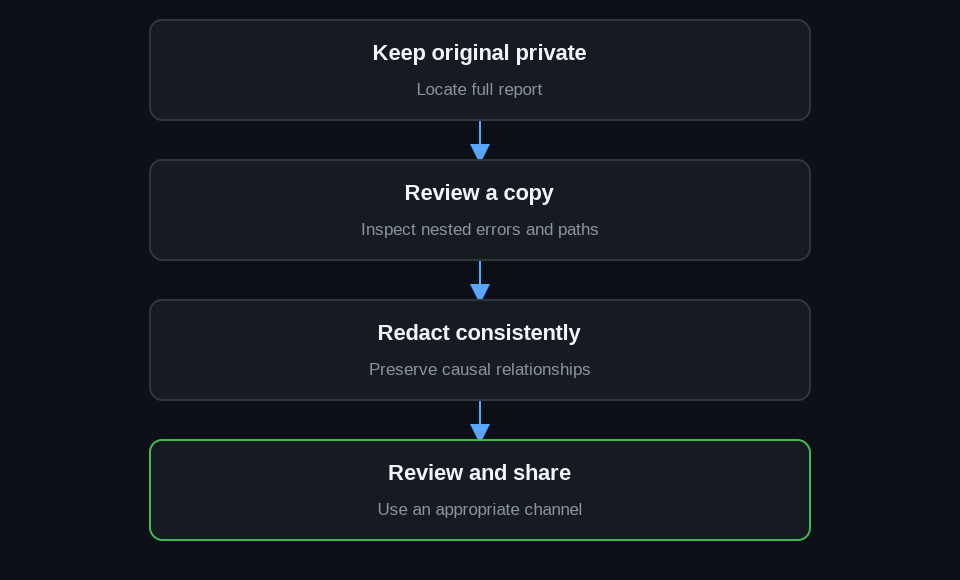
- Keep the original privately for your own investigation. Identify the actual report using
Full diagnostics:or, if writing failed, the report printed in stderr. - Make a separate working copy. Read it from top to bottom, including original stacks, nested causes, warning arguments, module names and paths.
- Remove or replace secrets and sensitive identifiers with consistent placeholders. Preserve which failed provider, missing service and pending consumer relate to one another; destroying that relationship can make the report hard to use.
- Include the minimum necessary context: relevant versions, platform, profile, the failing operation, the original error structure and a short description of what you expected. Generalize a private path while retaining the part needed to understand the failure.
- Re-read the final artifact, including screenshots or pasted terminal output. Share only through a channel appropriate to the recipient and the remaining content. If a value was already exposed, follow the credential owner's incident and rotation process; redacting a later copy does not undo disclosure.
This is a manual review workflow, not a claim that a particular replacement technique catches every secret. Consider URL user information, tokens, keys, account identifiers, private hostnames, workspace names and fragments repeated in a stack. The actual content of an error determines what needs removal. A placeholder should not imply a real key or endpoint that the investigator can use.
DeepSeek Harness: how do credential references affect the review?
The credentials reference says settings and configuration carry credential references, which are POSIX-style environment-variable names, while providers own the values. resolve(ref) can return a non-empty value and its source; describe(ref) provides configured status, source and writability without a value. Consumers re-resolve per operation. These design choices reduce the need to place values in configuration, but they do not guarantee that an unrelated plugin error or command output never prints a secret.
Distinguish a reference name from its secret value when preparing a report. Even a reference name, source label or internal path may reveal information about an organization, so decide whether the recipient needs it. An empty stored value is treated as absent by the credential seam; do not infer from a masked string that a credential is configured or that a particular provider was used.
If the issue concerns credential resolution, report the observable configured state and source when appropriate, not the resolved value. Removing a provider-managed value can reveal an ambient fallback, according to the reference, so changing credentials merely to prepare a report can alter the problem being investigated. Record observations before making a deliberate change.
DeepSeek Harness: what evidence should remain?
A useful sanitized report tells the investigator what failed first and what waited afterward. Keep module identities when they are necessary, the missing service name, the original error type and a stack with private parts replaced. Include the profile and version if relevant. If a replacement obscures the difference between two paths or two services, use distinct placeholders and explain the mapping without exposing the original values.
Do not silently rewrite an error to make it sound definitive. If the failure only shows a missing service, say that the cause is unknown. If an import error has no fiber, preserve that fact. The collector stops when boot settles and captures asynchronous failure cleanup; it is not a record of every later operation. Compare the sanitized version against the original so that edits do not change the causal sequence.
DeepSeek Harness: what are the limits?
There is no documented automatic redaction guarantee for startup diagnostics. Requested file permissions, a credential reference and a successful manual review each have different roles; none proves that a report is safe to publish. Remove unnecessary material, review what remains, and use an appropriate sharing channel. If the necessary evidence cannot be shared, describe the constraint and ask the maintainer for a narrower private diagnostic path.
DeepSeek Harness: what do the terms mean?
- Startup report: detailed evidence recorded for a required activation failure.
- Redaction: replacing or removing sensitive material in the copy to be shared.
- Credential reference: a validated environment-variable-style name, distinct from its value.
- Provider: the implementation that resolves or stores a credential.
- Source layer: the provider-reported origin of a resolved credential.
Frequently asked questions
Are startup reports automatically redacted?
No. Raw plugin errors and warning arguments may contain sensitive values.
Are environment variables collected independently?
No, but errors or logged arguments may still contain their values.
Can credential status be described without its value?
The credential describe operation reports status, source, and writability without the value.
Sources
Every claim in this article was checked against the sources below. Community discussions are user reports, not official behavior.
This is an independent community article, not official DeepSeek documentation. Listing a plugin in the registry is not a security review.