DeepSeek Harness: Schedule a Session Reminder
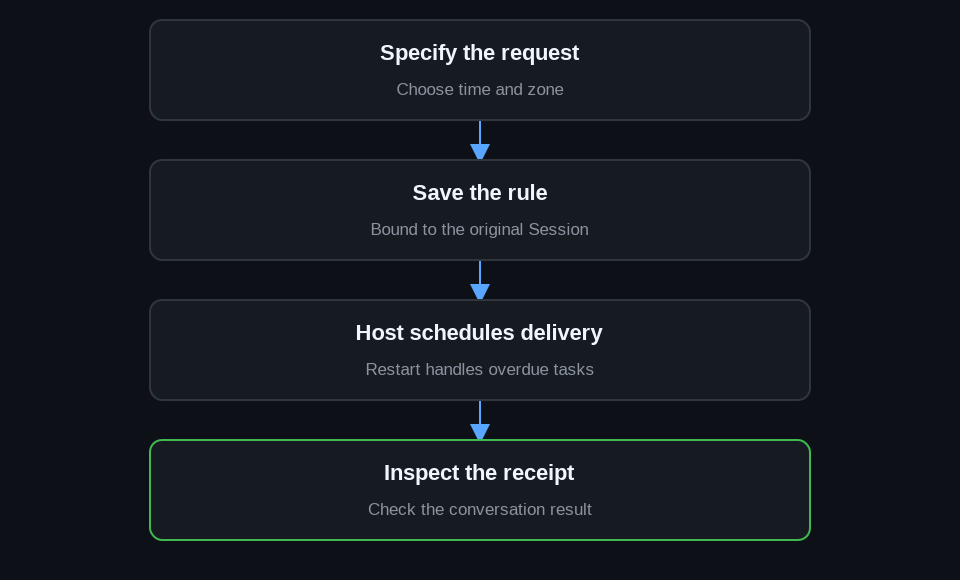
DeepSeek Harness reminders are durable tasks tied to the conversation that created them: specify the timing and time zone, then check the saved rule and delivery records in Automation tasks.
DeepSeek Harness: What can a reminder do?
The schedule guide describes reminders as follow-up messages delivered into their original Session. The shipped Web profile includes the Host Schedule service and Automation tasks page. Configure a model provider first, then ask the model in a conversation to create a reminder. The standard, cordis, and ptc presets expose schedule_create, schedule_list, schedule_update, and schedule_delete and provide clock context; minimal does not. Delegated subagents cannot use these tools under those presets.
A reminder is not a separate notification service. It queues an instruction in the original conversation, and a saved delivery record confirms inbox persistence, not that the model finished the work. Choose a request whose consequences you understand and inspect the resulting conversation when the work matters.
DeepSeek Harness: Which timing rule should I choose?
| Rule | Meaning | Important distinction |
|---|---|---|
| After | One delivery after a positive whole number of seconds | Becomes inactive after delivery |
| At | One delivery at an absolute date and time | Stores an instant, not a recurring zone |
| Every | Fixed elapsed interval of at least one minute | An interval change starts a new anchor |
| Daily or weekly | Local clock time and explicit IANA zone | Weekly days use Monday 1 to Sunday 7 |
| Cron | Five-field expression and explicit IANA zone | Expression is stored in canonical form |
For example, “Remind me every day at 23:00 in Asia/Shanghai to check the weather” describes a daily wall-clock rule. Naming the zone removes ambiguity: the browser otherwise supplies its zone for interpreting natural language. Verify that the saved frequency says Daily with the intended zone rather than Once. A one-shot task never automatically becomes recurring.
Fixed intervals measure elapsed time, whereas daily and weekly rules follow local clock time. Around a daylight-saving transition those are different promises. The guide says a nonexistent local daily time is skipped and an overlap uses the earlier instant once that day. An absolute request rejects a nonexistent local time and chooses the earlier instant in an overlap. Do not infer a delivery simply from what a clock displays on your current device.
DeepSeek Harness: How do I create and inspect one?
- Open the Web profile, configure a model provider and start the conversation that should receive the reminder. Use a preset that exposes the reminder tools.
- Ask for a specific action and timing. Include a meaningful short name and an explicit time zone when the request is based on local time. Check the model's response for the intended recurrence and instruction.
- Open Automation tasks in the sidebar and select the task. The page shows tasks across Sessions without activating their conversations. Search by saved name, instruction or internal Session id; filter by All, Enabled or Inactive.
- Inspect Rules for the saved schedule. If the timing or instruction is wrong, edit the active task and choose Save changes. Cancel discards the local draft. A concurrent delivery or edit can produce a conflict; reload and work from the current rule.
- Open Records to inspect saved deliveries, then open the linked Session if available. Records are ordered newest first by saved order. The initial page contains the newest 20, and older records can be loaded separately.
The page's New action opens a new Session with a creation request in its composer. The Session header's clock opens the only active task directly, or a list when there are several. A linked Session may be unavailable or archived; task details and deletion can remain available without opening it. Browsing does not unarchive it.
DeepSeek Harness: What happens when timing changes or the Host stops?
Editing an active reminder keeps its id, original Session and saved delivery history. An equivalent normalized rule does not rewrite the task or reset its target. A changed Every interval starts at the Host's accepted-save time, with the first target one interval later. Changing an After or At target saves an At rule with the same id. Inactive tasks are read-only; delete an unwanted task explicitly rather than expecting editing to reactivate it.
The schedule reference explains that the Host reads stored tasks and sets a timer for the earliest active target. A closed conversation need not be open: the Host restores the original Session when a task is due. Closing the Host stops scheduling until it starts again. On restart, it sends an overdue one-shot or only the latest missed occurrence of each recurring task. Multiple due recurring tasks for the same Session can share a message. Do not assume every missed occurrence will be replayed.
The model's schedule_list and the Session header show active tasks only. A delivered one-shot becomes inactive after the inbox write is durable, but remains in the global catalog until explicitly deleted. If it disappears from the active list, look under Inactive before concluding it was removed.
A rule can also be edited from the Automation tasks page without opening its original Session. Daily and weekly edits retain the saved zone; changing a one-shot form's zone keeps the entered clock values while changing the interpreted instant. A one-shot stores its resulting UTC instant rather than retaining that zone as recurrence metadata. Check the new instant before saving if you change zones.
A record's saved instruction reflects the instruction at delivery when that snapshot exists. The page does not replace a missing historical instruction with today's task instruction. If a query fails after records were loaded, those records may remain visible with a warning. A warning is not confirmation that they are complete or up to date.
DeepSeek Harness: What are the limits and safety boundaries?
A delivery record is an inbox receipt, not proof of model execution or a result. The Host can fail to resolve the Session, enqueue a message or persist it; the reference describes a later management change or Host restart as retry opportunities. Session persistence and task storage are not one atomic write. A crash after inbox persistence but before the task update can repeat a delivery, so exactly-once delivery is not guaranteed. Make consequential instructions tolerant of repetition and independently verify their results.
Deleting a task removes its saved delivery records and stops future scheduling; it does not delete the original conversation or retract a message already queued. History may be pruned, and older missing history or instruction snapshots are not reconstructed. Empty results differ from loading and request failures: use the page's retry or refresh controls where appropriate. Pause and a new Session for every run are not supported. Reminders from older Session logs are not automatically scheduled; recreate those still needed.
DeepSeek Harness: Which terms matter?
- Session: the original conversation to which the reminder is bound.
- Host: the running service that stores tasks and schedules delivery.
- Active / inactive: whether a saved task can schedule another delivery; inactive is not deleted.
- Delivery receipt: evidence of a persisted inbox message, not an execution result.
- IANA time zone: a named zone used to interpret a wall-clock recurrence.
Frequently asked questions
Does a receipt mean the task completed?
No. It confirms inbox persistence, not model completion.
Does a delivered one-shot disappear?
It becomes inactive and remains until explicitly deleted.
Does scheduling continue when the Host is closed?
No. Scheduling resumes when the Host starts again.
Sources
Every claim in this article was checked against the sources below. Community discussions are user reports, not official behavior.
This is an independent community article, not official DeepSeek documentation. Listing a plugin in the registry is not a security review.