DeepSeek Harness: Inspect Session Read Failures
When a DeepSeek Harness session appears in a list but its history fails to open, preserve the original record and compare the reported sequence and message shape with the persistence catalog before attributing the failure to the reader.
DeepSeek Harness: what does a read failure establish?
A failed history request establishes that the selected reader could not load that session. It does not establish whether the file is truncated, the wrong session was selected, an event has an invalid payload, or a header cannot be resolved. Record the exact error, version, profile and session identifier, and distinguish a list result from an opened history. They exercise different paths.
In discussion #11216, a user reports two reproducible cases on 0.2.0-rc.2: a message with non-array content and a header without cwd. The reporter says the former was written before later validation rejected it, while the latter appeared in a list but history returned session/not-found. These observations describe that environment; they are not a diagnosis for every read error or a guarantee about current versions.
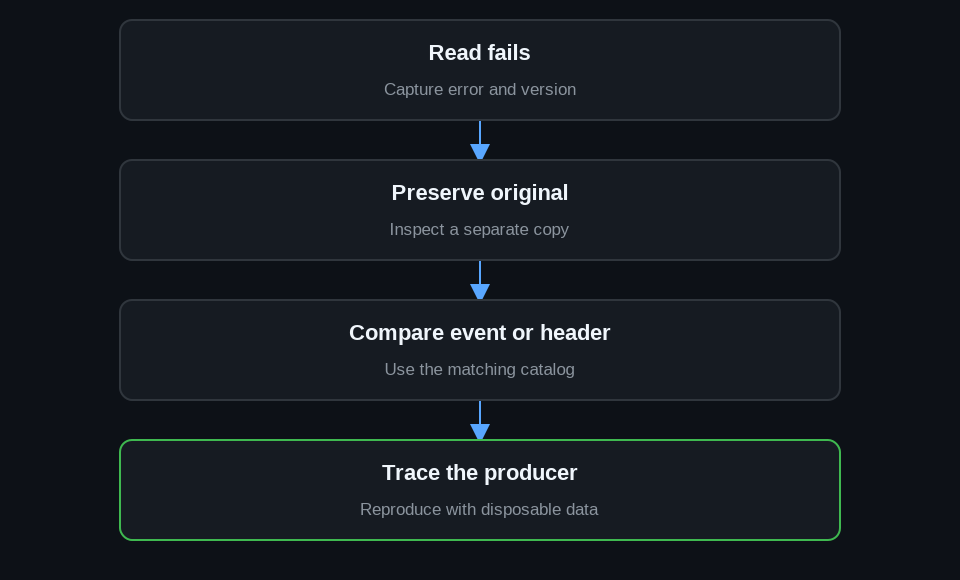
DeepSeek Harness: what should I compare in the record?
The persistence catalog describes durable event declarations, the envelope and resolved types. An envelope includes type, seq, time, data, optional ignorable, and conditional surfaceOp and sourceEventSeqs. The type identifies which declaration to consult; the sequence helps correlate a reader error with a record. Consult the format and declarations for the installed version: a current catalog is not a substitute for the historical format of an older log.
| Evidence | Comparison | Limit |
|---|---|---|
Error and seq | Locate the indicated event in a preserved copy | A sequence alone does not identify the producer |
type and data | Compare the event's declared payload and nested types | External plugin types are outside the repository catalog |
Header and cwd | Compare the reported header problem with actual stored metadata | A missing directory is not the only cause of not-found |
| Producer and version | Compare the producer input with the reported reproduction | A matching symptom does not prove the same code path |
The catalog also distinguishes surface events, which contribute to model history, from log-only events. Do not discard an event simply because it does not look like a visible chat message. The catalog's structural fingerprints cover declared type structure, not opaque payload contents or behavior that changes without a type change.
DeepSeek Harness: how can I investigate without altering evidence?
- Capture the complete sanitized error, including the session identifier, sequence if present, installed version, profile and the operation that failed. Note whether the same session is listed, whether a restart changes the result, and whether other sessions open.
- Preserve a copy of the original using your environment's normal backup procedure. The reporter described multi-frame
session.v4.jsonl.zstdlogs beneath~/.dsh/sessions/<project>/<id>/; treat that as the reported layout, not a universal path. Identify the actual storage location and format before opening a copy. - Examine the header and the event identified by the error in the copy using tooling appropriate for that format. Preserve sequence, type and surrounding context. Compare nested
datafields against the relevant version's catalog and producer contract. - If a
user/messagehas stringcontent, compare it with the reported non-array case. If a header has nocwd, compare the listing and history behavior separately. Do not assume either condition is the only possible source of an error. - Identify any import or plugin that produced the record, then create a minimal reproduction with disposable data. Share a sanitized error and the smallest relevant shape with maintainers. Do not include the actual conversation merely to demonstrate its structure.
The discussion's example calls createUserMessage with a plain string and then agent.followup; the reporter attributes the resulting invalid event to an in-process producer. That is a reproduction of a failure, not an example to copy into production. Its proposed write-side validation is a suggestion, not an established repair.
DeepSeek Harness: why are the two reports different?
In the message case, the reporter observed content.some is not a function during a turn and, after restart, a corrupt-session error naming a sequence and invalid message content. The example record has type: user/message with a string at data.content. The relevant question is whether the producer supplied the expected parts array and whether the reader rejected that event. A valid envelope cannot by itself establish that its nested payload is valid.
In the header case, the reported local import produced conversations without a project directory. The author says these were stored under _no-cwd, listed, and then rejected by the history path. A listing can therefore provide a useful identifier without proving history is readable. The report does not establish that every session/not-found is caused by a missing cwd, nor that changing a header is a supported repair.
Keep the two hypotheses separate. Check the event if the diagnostic names an event; check header and lookup context if it names a missing session. If both are present, retain both observations rather than changing the record until one symptom disappears. A developer can use the concrete input shape and version to investigate the producer and reader together.
How should I describe uncertainty?
Separate observations from hypotheses in the report. “The list contains this identifier, but history rejects sequence N” describes an observation. Naming a plugin as the source requires evidence about the actual input and version. Include the operation order and whether the record came from an import, a plugin or an ordinary interaction when known. If only a subset of the archive was inspected, state that boundary. External plugin declarations may need a separate reference. A disposable reproduction can validate a producer change, but it does not repair records written before the change.
DeepSeek Harness: what are the limits and safety boundaries?
Session records can include prompts, tool results, private paths and credentials. Restrict access to copies and remove sensitive values before reporting. Redaction must preserve the structural facts needed to reproduce the issue, such as whether a field was a string or an array. Keep the unmodified original separately under appropriate access controls.
The supplied sources do not document a universal repair command, a safe way to hand-edit compressed logs, or a UI recovery procedure. Do not delete an event, invent a cwd, or overwrite the only copy based on this report. Such edits can remove history or obscure evidence. Ask the deployment maintainer about supported recovery for the installed version; verify any recovered copy separately before relying on it. A successful list or one successful read is not a comprehensive integrity check.
DeepSeek Harness: which terms matter?
- Envelope: common event metadata, including its type, sequence and payload.
- Payload: event-specific data whose nested shape must match the relevant contract.
- Header: session metadata used by persistence and history lookup.
- Surface event: a durable event that contributes to model history.
- Producer: the component that supplied an event or message before persistence.
Frequently asked questions
A listed session must open, right?
No. The user report describes a session that appeared in a list but failed to load history.
Does a bad sequence prove the producer?
No. Compare the event, version and producer input before attributing the failure.
Should I edit the only copy?
No. Preserve the original and consult the maintainer about supported recovery.
Sources
Every claim in this article was checked against the sources below. Community discussions are user reports, not official behavior.
This is an independent community article, not official DeepSeek documentation. Listing a plugin in the registry is not a security review.