DeepSeek Harness: Build Your First Plugin
Start a DeepSeek Harness plugin with the documented source-checkout tutorial: export apply, insert the local module with a Web overlay, and verify its startup message before adding capabilities.
DeepSeek Harness: What is the starting point?
The first plugin tutorial starts from a repository checkout that has completed the project's run-from-source instructions. Its example is a local TypeScript module, not an already published package. Framework loading calls the exported apply(ctx) function; the context is where a plugin can register capabilities. A minimal log-only plugin establishes that the module can load before you introduce services or tools.
The architecture reference describes a running DSH as a tree assembled from configuration layers. Adding a local row is therefore an assembly operation: the overlay selects the module, while the module's code defines what happens when it is mounted. See the Cordis plugin tree for the relationship between layers and runtime services.
DeepSeek Harness: How do I load the first plugin?
-
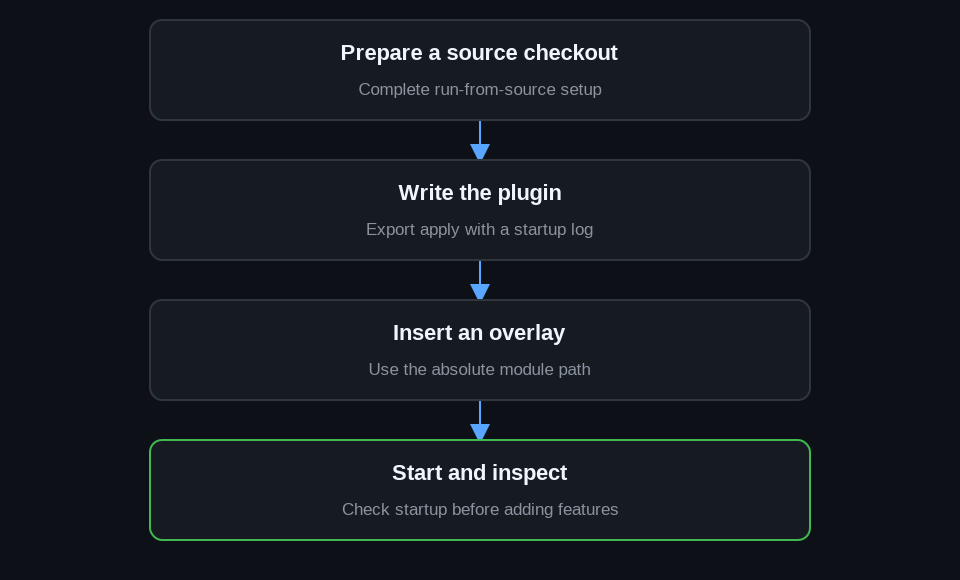
Complete the documented run-from-source setup. From the repository root, create the tutorial directory:
mkdir -p scratch-plugin/src -
Create
scratch-plugin/src/my-plugin.ts:import type { Context } from '@deepseek-ai/cordis' export const name = 'hello-plugin' export function apply(ctx: Context) { console.log('[hello-plugin] plugin loaded!') } -
Run
pwdat the repository root. Createscratch-plugin/cordis.yml, substituting that absolute path:- insert: - id: hello name: '/absolute/path/to/deepseek-harness/scratch-plugin/src/my-plugin.ts' -
Start the Web profile with the overlay:
pnpm dsh web --patch ./scratch-plugin/cordis.yml -
Open
http://127.0.0.1:3080and look for[hello-plugin] plugin loaded!in the terminal during startup. That message verifies this example'sapplyran; it does not establish that a future tool behaves correctly.
The absolute module path is significant. The tutorial says the patch contributes configuration but does not change the profile directory used by the loader to resolve module paths. Replace the example placeholder with the actual checkout location rather than copying it literally. If startup fails, inspect the path and the startup error before adding more code.
DeepSeek Harness: How do dependencies and cleanup work?
Declare a service your plugin consumes with inject. The tutorial's example uses export const inject = ['tools']; the framework waits for required services before apply runs, making ctx.tools available there. This is a dependency declaration, not a guarantee that every possible composition includes that service. A missing dependency explains why a plugin may remain pending instead of reaching its startup log.
The tutorial says registrations through ctx, such as event listeners, tools and timers, are cleaned up on unload. For resources needing explicit cleanup, ctx.effect() can return a disposer. Its example creates an interval inside the effect and returns a function that calls clearInterval(timer). Keep creation and disposal paired, especially for resources not managed by a Cordis helper. Loading once successfully does not prove that reload or teardown has released every independently created resource.
| Concept | First example | When it matters |
|---|---|---|
apply(ctx) | Logs on mount | Entry point for registration |
inject | Declares tools | Waits for required service readiness |
| Overlay | Inserts an absolute local module path | Selects the plugin in a profile |
ctx.effect() | Returns a cleanup function | Reverses a resource on unload |
DeepSeek Harness: What should I build next?
The tutorial offers function, object and class forms. The function form is sufficient for many plugins; it suggests class form when providing a service to other plugins. For an agent-callable capability, continue to the tutorial's linked tool guide rather than guessing the registration schema. For user settings, use its configuration guide. Read the service and event references for the specific capability you consume, and declare its actual dependencies.
Keep the first experiment narrow. Make one change, restart or reload as supported by the chosen composition, and check both startup and the behavior you added. A console message is useful for finding a module-resolution problem, but it cannot verify a tool's inputs, outputs or side effects. Test those separately using the relevant documented interface. Record the exact profile and overlay used so another developer can reproduce the composition.
The overlay row has two distinct identifiers: id: hello identifies the inserted configuration entry, while name names the module to load. The exported name in the TypeScript example describes the plugin. Keep these roles clear when comparing the overlay, terminal output and module contents. The placeholder in the YAML is not a command to create a path; it must be replaced with the path printed from your own checkout.
Once the example loads, use the tutorial's next-step documents to learn the actual tool definition and configuration schema. A declared tools dependency means the service is ready when apply runs; it does not supply a complete tool definition. Likewise, an object or class plugin changes the form of the plugin, not the need to understand its service contract and cleanup.
DeepSeek Harness: What are the limits and safety boundaries?
A plugin runs code when loaded. Review the code and dependencies before loading an unfamiliar module, and test it with appropriate data and permissions. An overlay or successful log is not a security review. The example's path and command describe the source-checkout workflow; they do not establish a production packaging or publication process. Follow the linked packaging tutorial for that separate task.
Configuration overlays can change the active tree, and a missing service can prevent activation. Do not assume that installing a package or seeing it on disk means its capabilities are mounted in the intended profile. Inspect the composed configuration and actual startup result. If you change resources with side effects, verify disposal and error paths as well as the successful path.
DeepSeek Harness: Which terms matter?
- Plugin: a module or other supported form mounted by Cordis to contribute behavior.
- Context (
ctx): the interface through which plugins use services and register effects. - Injection: a declaration of required services and their readiness relationship.
- Overlay: a patch applied to the profile's assembled configuration.
- Disposer: cleanup associated with a registration or effect when it is removed.
Frequently asked questions
Does the example require a source checkout?
Yes. The tutorial starts from a checkout prepared to run from source.
Why use an absolute path?
The overlay does not change the profile directory used to resolve modules.
What does inject do?
It declares required services that must be ready before activation.
Sources
Every claim in this article was checked against the sources below. Community discussions are user reports, not official behavior.
This is an independent community article, not official DeepSeek documentation. Listing a plugin in the registry is not a security review.