DeepSeek Harness: Why Is My Subagent Tool Missing?
Installing a DeepSeek Harness subagent provider and exposing a model-facing tool are separate stages. Check the selected profile, restart boundary and active composition; the current provider READMEs and CLI reference describe different tool-exposure arrangements, so match the guidance to your installed version.
DeepSeek Harness: why can installation leave a tool missing?
The CLI reference describes Codex and Claude Code subagent providers as independent optional bundles. It says package operations change the profile's on-disk bundle list, while a running profile retains the bundle set from its startup. It also describes a provider-only arrangement in which the matching tool row must be enabled separately in a copied preset for new agents.
The current Codex provider reference, however, says its bundle inserts a host-level global subagent_codex tool visible to every preset. The Claude Code provider reference describes the equivalent subagent_claude_code global tool. Both point existing provider-only consumers to an upgrade guide. These descriptions should not be collapsed into a universal claim that every installation always requires a preset edit, or that every older installation has global tools. Inspect the actual installed bundle and effective configuration.
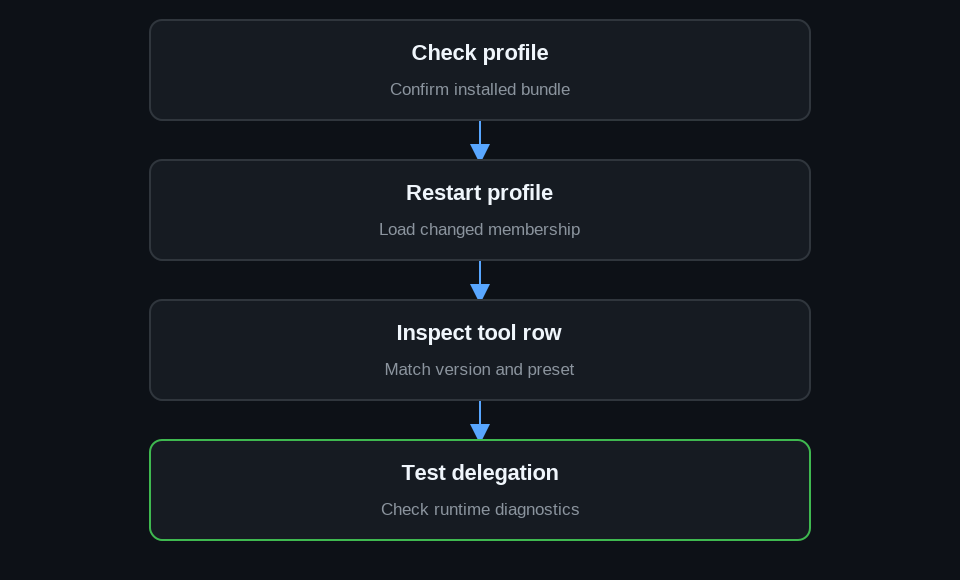
DeepSeek Harness: what can I check first?
| Observation | What to investigate |
|---|---|
| Package added to another profile | The running profile's bundle list and selected profile |
| Bundle added while profile was running | Restart the profile after the membership change |
| Provider exists but tool is absent | Bundle version, selected layer, tool row and preset composition |
| Tool exists but delegation fails | Provider-specific runtime, authentication, permission and diagnostics |
The CLI reference gives the following independent installation commands; replace the placeholder with the intended profile:
dsh plugin --profile <name> add @deepseek-ai/dsh-subagent-codex
dsh plugin --profile <name> add @deepseek-ai/dsh-subagent-claude-code
The first command does not install the other provider. --profile must appear before the pnpm arguments. The CLI forwards package management to pnpm and requires pnpm on PATH; a failed operation is not evidence that the bundle is installed. After a successful add, restart the affected profile for the changed bundle set, then check its startup diagnostics.
DeepSeek Harness: how do I trace tool exposure?
- Identify the profile that is actually running, the package added and the result of the add operation. Check the profile's effective bundle composition, not just the package name in a command copied from another environment.
- Restart after adding or changing bundle membership. For Web or Desktop installation, follow the provider page's restart notice when the installer reports one is needed.
- Match your installed release to its provider documentation. In the current documented bundle arrangement, inspect whether the host tool row is present and whether a later patch disabled it. A preset's own tool of the same name can shadow the global tool.
- If your installed version follows the provider-only arrangement described by the CLI reference, check the copied preset's corresponding tool row and create a new agent after enabling it. Avoid assuming that a preset change applies to an already-created agent.
- Inspect the available tool list for the relevant agent. Then try a bounded delegation and distinguish tool absence from an execution failure. Record the profile and configuration layer involved.
The provider READMEs say the Web or Desktop Plugins page can enable the official entry. In their documented arrangement, switching Off deselects the layer but leaves the package installed; removal is a separate operation. They also say selecting or deselecting that layer registers or removes the global tool in the running host, visible to live agents on their next request. That behavior concerns the layer operation described by those READMEs; it does not erase the CLI's stated restart boundary for changed bundle membership.
DeepSeek Harness: what if the tool appears but fails?
The subagent subsystem separates provider registration from managed activation. It handles local continuable conversations and external executions; external executions do not accept follow-up messages like a local continuable child. Provider capability flags also limit which options a request supports. The presence of a tool says nothing by itself about whether a particular request, runtime or credential will work.
The Codex and Claude Code provider references describe one-shot native executions and provider-specific authentication and permission modes. Check the matching provider's own documentation and sanitized diagnostic. Do not assume the two native tools share executable selection, configuration, permission semantics or error causes. In particular, a missing tool should be investigated at the composition stage before changing native credentials; a failed call needs its own execution evidence.
A later patch may disable a tool row or a preset may shadow it. Check those possibilities against the effective configuration and release documentation rather than adding duplicate rows blindly. If a provider-only configuration has been upgraded, use the linked migration guidance and check for duplicated or conflicting entries. Test with a new, small task after adjusting the configuration, and retain the version and result for future diagnosis.
How do the page switch and package removal differ?
The current provider references explicitly distinguish switching Off from removing the package: Off deselects the layer while the package stays installed. Finding a dependency on disk therefore does not by itself prove that its layer is selected in the running host. Check both facts. The same references say a preset's own tool with the same name shadows the global tool, so an apparently correct global row can coexist with a different effective preset row. Identify which row the agent uses before adding another configuration entry. After an upgrade from a provider-only arrangement, consult the linked migration guide and check the effective composition for old rows.
DeepSeek Harness: what are the limits and safety boundaries?
External subagents can perform work under their native permission and sandbox settings. The provider references document modes with different effects, including explicitly dangerous bypass choices; do not select a bypass merely to make a tool appear. Confirm the provider's intended authority and review the task and resulting changes. Tool visibility and successful registration are not proof of safety or authorization.
The referenced documentation differs on how tool rows are exposed. It does not establish the configuration of your installed release. Verify your version and effective composition, and consult its matching upgrade instructions. Do not infer that a registered provider automatically has working native authentication, or that a missing tool indicates an authentication failure.
DeepSeek Harness: what do the terms mean?
- Provider: an implementation registered to run a kind of subagent activation.
- Bundle: a package contributing configuration to a profile.
- Global tool: a host-level tool exposed across presets in the current provider READMEs.
- Preset: an agent composition that can contain its own tool rows.
- Activation: managed startup and execution of a local or external child task.
Frequently asked questions
Does installing one provider install both?
No. Codex and Claude Code are independent optional bundles.
Does the running profile pick up bundle membership automatically?
The CLI reference says bundle membership changes require a profile restart.
Does every release require a preset edit?
The cited documents describe different arrangements; check the installed release.
Sources
Every claim in this article was checked against the sources below. Community discussions are user reports, not official behavior.
This is an independent community article, not official DeepSeek documentation. Listing a plugin in the registry is not a security review.