DeepSeek Harness Workspace Symlinks and Duplicate Paths
DeepSeek Harness identifies a workspace by its canonical directory path. Adding a symlink and then its target normally refers to the same workspace record, so the second registration returns the existing record rather than creating a duplicate.
DeepSeek Harness: why do two path spellings collide?
The workspace reference defines a workspace as a persistent record with a stable ID, canonical directory path, display title and ordered session account. Its realpathNormalize identity uses fs.realpath: symlinks, .. and trailing slashes are resolved. Uniqueness is string equality of the resulting canonical paths. A symlink that resolves to an already owned directory therefore collides with the existing record.
Consider a directory and a symbolic link that resolves to it. The two strings can look unrelated in a chooser, yet their canonical results are equal. Calling the registry's create(path, title?) with the second spelling returns the existing entity unchanged. It does not make a second record or apply the newly requested title to that existing record. This is specifically the documented registry behavior; the presentation of that result can differ by client.
The Web UI guide explains the user-facing starting point: a fresh Web UI has no selected workspace until one is added, and its session input is unavailable before selection. The process's invoking directory is a default filesystem location, but that fact alone is not the same as a selected workspace record.
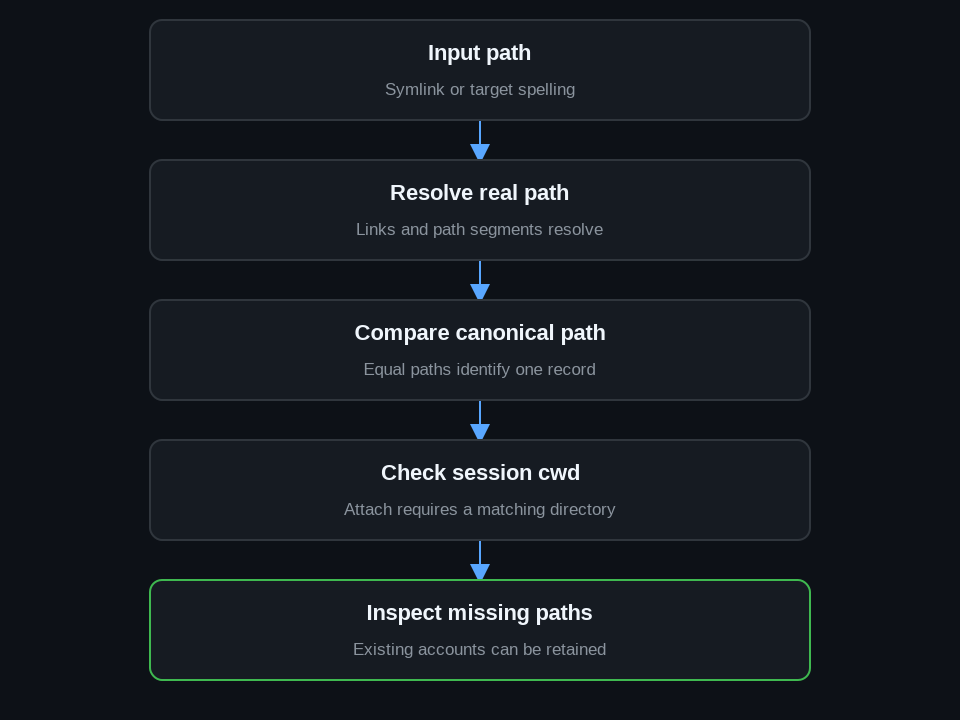
DeepSeek Harness: what is compared, and what is not?
| Item | Role in the documented workspace model | Duplicate implication |
|---|---|---|
| Input path | User-supplied fully qualified directory | Different text can resolve to the same path |
| Canonical path | Result of resolving filesystem path identity | Equal canonical strings identify an existing record |
| Workspace ID | Stable identity of the persistent record | Returned record retains its existing ID |
| Title | Display label | Different records may have the same title |
| Session cwd | Session header's immutable working directory | Canonicalized for attachment validation |
Titles are not the uniqueness key. Two genuinely different canonical directories can have the same title, while two differently titled requests for the same canonical directory still refer to the existing record. The registry requires a fully qualified path and an existing directory for ordinary creation. A nonexistent path yields its original ENOENT; a non-directory is rejected. Do not interpret failure to add a dangling link as successful deduplication.
The normal creation rule also differs from the registry's special default-workspace initialization. That separate path may create a missing directory recursively when initialization is eligible and uses the requested directory's final segment for its initial title. It is not a general promise that adding an arbitrary missing directory creates it.
DeepSeek Harness: how can I investigate an unexpected duplicate?
- Record both path spellings and the intended project, taking care not to share private directory names unnecessarily. Confirm which path was actually selected in the UI.
- Inspect the filesystem using tools available on your own platform to determine whether either path is a symlink and what existing directory each resolves to. The reference defines identity using
fs.realpath; it does not prescribe a portable shell command for this investigation. - Compare the resolved directory identities. If both canonical strings match, the reference predicts the existing workspace will be returned unchanged. Select that record instead of repeatedly adding the alias.
- If the intended projects are separate, confirm that the paths resolve to distinct existing directories. A different display title or spelling alone does not establish that distinction.
- If resolution fails, investigate whether the target is missing, a component is inaccessible, or the path is not a directory. Restore the intended directory or correct the selection before attempting ordinary registration again.
Keep the original path and resolution result together when reporting an issue. A screenshot of a title alone cannot show whether two registrations targeted the same canonical path. Conversely, a path that used to resolve to a target may no longer do so after the symlink is changed; check the current filesystem rather than assuming an old observation remains true.
DeepSeek Harness: what happens to sessions and missing directories?
When the API gateway creates a session for a selected workspace, the reference says it uses the workspace path as the new session cwd, stores that in the immutable session header and then calls attachSession. Attachment validates the stored header cwd against the workspace path using the same canonicalization. A new attachment requires a valid existing directory whose canonical cwd matches; a missing or mismatched path is not admitted.
The rules for an already accounted session are deliberately different. An existing candidate whose fully qualified cwd fails resolution or directory stat with ENOENT, including a dangling symlink, remains accounted for. Missing headers, invalid cwd values and canonical mismatches are filtered. A later accepted mutation prunes filtered candidates, but does not prune the missing-directory candidates. Preservation of the account does not create the directory or allow new sessions to attach while the path is missing.
A workspace record's stored canonical path is never rewritten after creation, even if its directory later disappears. The uncached status() returns ok when that path is currently an existing directory and missing-dir otherwise. This helps distinguish a retained record from a currently usable directory. It does not automatically follow a moved project or repair a changed symlink.
DeepSeek Harness: should I delete or rename a record?
A title can be changed independently of path identity, and duplicate titles are allowed. Renaming a record may make the chooser easier to understand, but it does not split one canonical directory into multiple workspaces. If two labels were expected to represent separate projects, investigate their real directory targets first.
The reference says registry deletion removes the registration, order entry and session account; it does not delete the directory, user files, live sessions or persisted logs. Those sessions become Ungrouped. This makes deletion different from deleting a project directory, but it still changes the workspace organization. Check the current account and intended outcome before removing a record merely to deal with an alias.
For a new task, select the existing record corresponding to the intended canonical directory. For historical sessions, inspect their current workspace association and header cwd instead of assuming a title or a symlink determines ownership. The registry's ordered session account is the ownership source; cwd validates membership rather than deriving the complete account on every read.
DeepSeek Harness: what are the limits and safety boundaries?
The documented equality rule is equality of canonical path strings; it does not establish a universal rule for every filesystem alias, platform case behavior or network filesystem. Check the actual environment and installed version when two apparently equivalent paths do not behave as expected. The source also does not claim that a symlink prevents an agent from reaching files or provides an access-control boundary.
Treat directory paths and session metadata as potentially private when sharing diagnostics. A retained missing workspace or session account is not evidence that the files still exist, and deleting a registration is not a repair for a missing directory. Verify the actual target before changing links or moving project files.
DeepSeek Harness: what do the terms mean?
- Symlink: a filesystem link whose target is resolved as part of path canonicalization.
- Canonical path: the resolved directory spelling stored for workspace identity.
- Workspace ID: the stable identity of a workspace record, separate from its title.
- Session cwd: the working directory stored in the session header and checked at attachment.
- Ungrouped: the state of sessions no longer accounted for by a deleted workspace registration.
Frequently asked questions
Can a symlink and its target create two records?
Ordinary creation returns the existing record when canonical paths match.
Do titles determine uniqueness?
No. Different workspace records can have the same display title.
Does a missing directory erase the record?
No. The record keeps its canonical path and reports its current status.
Sources
Every claim in this article was checked against the sources below. Community discussions are user reports, not official behavior.
This is an independent community article, not official DeepSeek documentation. Listing a plugin in the registry is not a security review.