DeepSeek Harness: System Prompts and Skills
DeepSeek Harness assembles ordered system-prompt contributions for each model step, while skills arrive through a separate catalog and an on-demand instruction body. Both can shape the agent's next response, but their timing, scope and history surfaces differ.
DeepSeek Harness: what reaches the model before a step?
The system prompt reference describes an assembly context, ordered sections, dynamic contexts and tool schemas. The agent loop assembles these for a proposed step, renders prompt sections and materializes the result as a system/message in derived model history. A changed prompt can replace the earlier surface node or, for the documented in-history mode, append an update. This is not simply a static file pasted into every request.
The skills reference describes a different mechanism. When the skill consumer and its exact tool are visible, it can provide a session catalog of model-invocable names and descriptions. The full skill body is loaded when selected, or injected by an eligible explicit user invocation. A catalog is a routing aid, not the full instruction text.
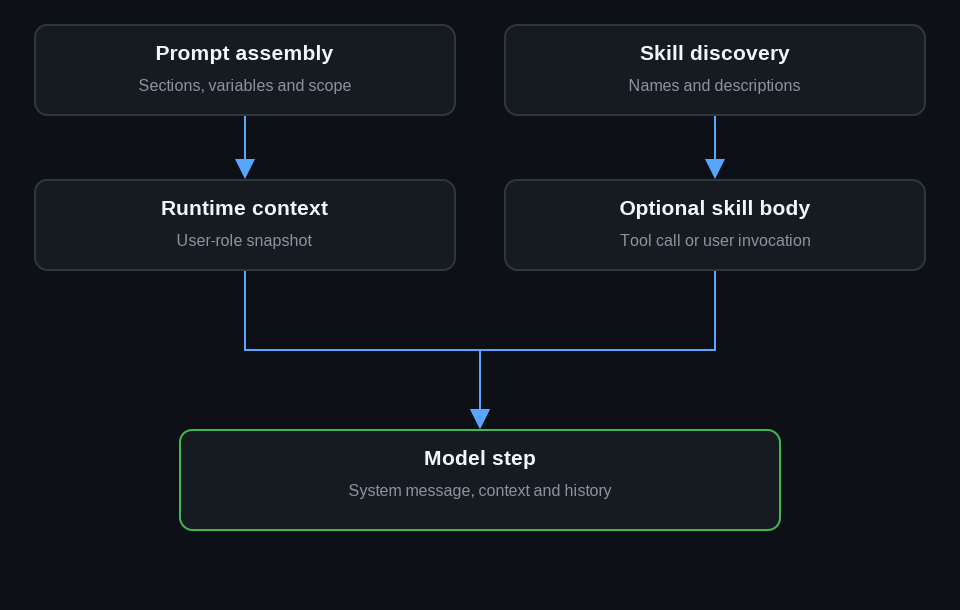
| Input | When it is resolved | Model-facing form |
|---|---|---|
| Prompt section | During prompt assembly | Rendered system message |
| Dynamic context | Assembly and admission refresh | User-role context snapshot |
| Skill catalog | Eligible pre-step discovery | Durable user-role reminder |
| Loaded skill | Tool call or explicit user invocation | Instruction content in tool history or injected user context |
DeepSeek Harness: how is the system prompt assembled?
A PromptSection has a unique name, an order and static or context-dependent text. Sections sort by ascending order, with code-unit name order breaking ties. Scoped contributions can shadow same-named global contributions. Variables are interpolated unless a contribution sets interpolate: false; unresolved variables fail assembly rather than silently reaching the model as a completed prompt.
The system-prompt package guide documents configuration for the Harness identity, deployment persona prefix and suffix, optional runtime context and tool order. It also documents a complete: true section: after cooperative assembly it becomes the sole prompt section, and more than one effective complete section fails assembly. That does not mean tool schemas or dynamic context vanish; those are separately resolved parts of assembly.
Dynamic PromptContext is not another name for a system section. The loop records its current snapshot as user-role context when it changes or compaction removes it. Optional runtime context can be suppressed for a scope, while contributions marked required remain. A deployment's scope, configuration and active plugins therefore matter when comparing what two agents receive.
DeepSeek Harness: how does a skill become usable?
The skill registry merges providers from global and scoped layers. Providers can list candidates and load a selected definition. The model-facing catalog contains names and normalized descriptions, not every full body or absolute path. Discovery is sensitive to the session's working directory. A skill can be available to the user, the model, both, or neither through independent invocation controls.
The skill tool package guide describes two paths. The model may call skill with an exact name and receive the body and resource guidance as tool history. A direct user message containing a recognized /name token for a user-invocable skill can inject the same rendered instruction content into the step. The catalog tells the model to follow an already injected body rather than load it again. The existence of a description does not itself load the instructions.
An incomplete discovery can show confirmed candidates with a warning and is retried; it is not an authoritative complete view. Once a catalog has been published, visibility loss or removal of all entries produces an empty replacement that retires earlier names. A skill's body may change without its description changing, so a later load can differ even without a changed catalog entry.
DeepSeek Harness: how should you trace an unexpected response?
- Identify the agent, session and current working directory. Check which prompt and skill plugins are actually composed and whether the exact
skilltool is visible in that scope. - Inspect the rendered system sections and applicable runtime context. Check section ordering, scope shadowing, persona templates and variable failures rather than assuming that every plugin contributes to every agent.
- Inspect the current skill catalog and its completeness. If a relevant skill is missing, check provider discovery, invocation policy and scope. A transient incomplete observation is not proof that a skill was deleted.
- Determine whether the full skill body was actually loaded or explicitly injected. Read its current contents and relevant resources; a catalog description alone cannot explain all instructions the model received.
- Compare those inputs with the actual tool calls and results. If the behavior depends on an external action, inspect its permissions and outcome separately; prompt wording and a skill body do not execute the action by themselves.
For example, a deployment persona may set general response style while a skill describes the steps for a particular task. The system section can be assembled for each step, while the skill body appears only after its loading path runs. A later catalog change affects discovery but does not retroactively rewrite an earlier tool result. This distinction helps explain why two requests in one session can have different task-specific instructions despite sharing the same deployment persona.
DeepSeek Harness: what are the limits and safety boundaries?
The documentation describes how input reaches the model, not a guarantee that the model will follow every instruction or select the right skill. A skill is instruction content, not an authorization or a security boundary. A tool call remains subject to its own registration, restrictions, sandbox and approval policies. Review a skill's origin, referenced resources and requested effects before acting on them.
Context can contain sensitive workspace information, and a skill or its resources may contain sensitive instructions or paths. Review what is sent to a model and redact diagnostics before sharing. A registered provider, a listed skill or a successfully assembled prompt is not proof that the content is trustworthy.
The documented scope rules explain which contribution wins a same-name collision; they do not establish a universal hierarchy for resolving every possible conflict in prose. If instructions conflict, inspect their actual source and applicable user and deployment requirements. Do not infer hidden skill bodies from their summaries.
DeepSeek Harness: what do the terms mean?
- Prompt section: an ordered contribution rendered into the system prompt.
- Dynamic context: runtime information materialized as a user-role snapshot.
- Skill catalog: discoverable names and descriptions, rather than full bodies.
- Provider: a source that lists skill candidates and loads definitions.
- Scope: the layer that selects or shadows contributions for an agent.
Frequently asked questions
Is every skill body in the system prompt?
No. The catalog lists summaries; a body is loaded or explicitly injected when invoked.
Are dynamic contexts system sections?
No. The loop materializes dynamic contexts as user-role snapshots.
Does a skill authorize actions?
No. Tool restrictions, sandbox and approval still apply.
Sources
Every claim in this article was checked against the sources below. Community discussions are user reports, not official behavior.
This is an independent community article, not official DeepSeek documentation. Listing a plugin in the registry is not a security review.