How DeepSeek Harness Saves Web Settings
DeepSeek Harness settings forms edit the live fields of a uniquely identified plugin instance: the Host validates the complete configuration, writes a profile patch, and updates the live values. A saved form is not the whole configuration tree.
DeepSeek Harness: What does a settings form represent?
The settings subsystem projects volatile Config fields from active profile entries. Each form namespace is the local id of a uniquely addressed entry in the active profile. Two instances of the same plugin need different entry ids to have separate forms. A form descriptor carries resolved and inherited values, explicit profile overrides, and an optimistic revision. Ordinary, non-volatile fields are excluded.
The configuration guide explains the underlying contract: a plugin exports a Config type and a same-named Schemastery schema. Cordis validates configuration and fills defaults when loading the plugin. A form is a view of the editable live part of that contract, not an independent store of every field or a replacement for the plugin's schema.
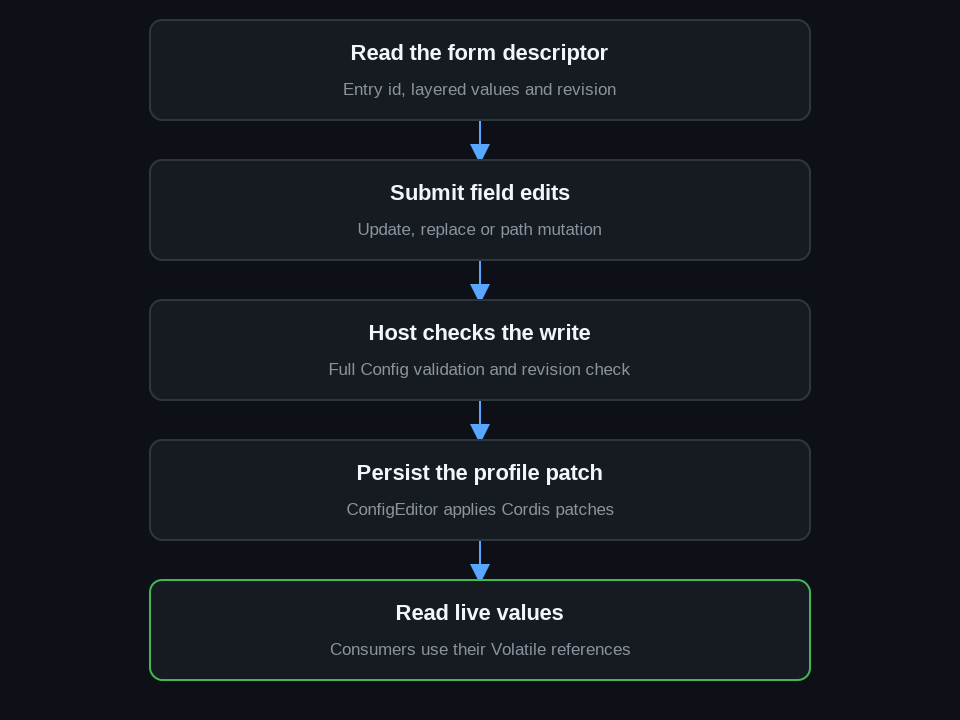
The distinction matters when a user sees an inherited value in a form. The displayed value need not already be an explicit profile override. The descriptor makes the layered state visible; editing it changes the appropriate profile section through the configuration editor. It does not mean that an earlier bundle's file was rewritten.
DeepSeek Harness: How does a save reach the plugin?
The browser reads the form descriptor through the settings controller. A custom plugin page receives form.state and form.mutate(operations, expectedRevision) from the Plugins page owner, according to the settings-card cookbook. The controller sends operations to the Host settings service. The Host validates the complete Config, checks the revision when one is supplied, and uses ConfigEditor to persist changes as Cordis patches. Volatile HMR applies the live edit; business consumers read their own references with .get().
A useful way to follow the path is:
- Locate the active profile and the unique entry id. Read its descriptor and retain the revision alongside the form state.
- Edit the intended live fields. For a custom page, use the page owner's mutation interface and its current revision.
- Submit the operation. Treat a validation refusal or conflict as a failed save, and obtain current state before deciding what to submit again.
- After acceptance, inspect the relevant profile patch and exercise the next operation that consumes the changed value. Restart and verify restoration where persistence is important.
- Try an invalid value in a suitable test environment and confirm that neither the file nor the live value changed.
These checks distinguish a visible draft from an accepted write and a persisted value from a consumer actually using it. The cookbook also recommends verifying that the plugin instance identity remains unchanged for a volatile edit. Capture values once when an operation needs a consistent snapshot; reading a live reference at different times can otherwise observe different values.
DeepSeek Harness: Which write operation should a form use?
The service exposes three operations with materially different semantics. The controller returns the namespace's redacted view after a successful write. Its remote methods classify refusals as settings/conflict or settings/rejected with the service message.
| Operation | Documented effect | Practical consequence |
|---|---|---|
update | Merges submitted editable fields | Omitted editable fields are not a request to reset everything. |
replace | Resets live fields to inherited configuration, then applies submitted fields | Use only when a complete replacement of the editable section is intended; ordinary config is preserved. |
mutate | Applies ordered path edits against stored state | A field can change without restating a redacted secret; unsetting an array index removes its element. |
All writes validate the full configuration before persistence. The optional expectedRevision provides optimistic concurrency: a stale supplied revision is refused, whereas the remote API documents an undefined revision as an unconditional write. An unconditional write gives up the stale-state check, so a client that needs to prevent overwriting concurrent changes should retain and submit the revision it read.
A refusal is not evidence that the plugin changed. On conflict, read the latest descriptor, compare the user's intent with the new values and ask for a fresh decision if needed. On rejection, surface the service's explanation and correct the input. Do not silently retry a replacement against new state: the meaning of the replacement may have changed.
DeepSeek Harness: What happens after another configuration change?
The settings/document-updated event tells form clients that a profile entry's values, availability, or page policy changed. Clients re-read the schema, resolved values and revision. It is a UI invalidation notification, not the business consumer's new configuration value. A consumer that needs to refresh registration facts uses loader/volatile-update; otherwise it reads its Volatile references when performing work.
This live path differs from an ordinary configuration edit described in the configuration guide, which hot-replaces the plugin instance where HMR is available. The live form cookbook describes volatile HMR and asks authors to verify unchanged instance identity. Do not infer that every configuration field is live just because some fields are editable in the page, or that a running operation has automatically reread a value it captured earlier.
The schema can use .check() for cross-field validation. The cookbook says those checks run on the Host before persistence and are omitted from serialized form schemas. Client-side controls can help users enter values, but the Host's full validation is the authority for acceptance. Defaults declared in a schema also have a different role from an explicit profile override: inspect inherited and resolved values to understand which layer supplies a value.
DeepSeek Harness: What are the limits and safety boundaries?
The controller redacts fields marked role('secret') in remote responses. Path-based mutation can preserve a secret absent from that response, but redaction does not establish that every other field or diagnostic is non-sensitive. The cookbook recommends credential references for values managed by the credentials domain. Check files and logs before sharing them, and avoid placing real credentials in examples.
A valid configuration is not necessarily appropriate for a particular deployment. Verify the actual plugin's documented behavior and test the affected operation. Custom profiles need the relevant services mounted; the base bundle supplies settings and config-editor, but the sources do not promise that every custom composition does. If no settings provider is mounted, the controller documents a remote error. The sources do not establish a universal file path for every deployment or guarantee that all plugin settings appear in a form.
For configuration layer order and row replacement outside this form-specific operation, see configuration precedence. Those patch semantics should not be confused with the settings service's update merge or mutate operations.
DeepSeek Harness: What do the terms mean?
- Namespace: the local id identifying one uniquely addressed active profile entry's form.
- Volatile field: a live configuration reference whose current value the consumer reads with
.get(). - Revision: the value used to detect a stale form write when supplied as
expectedRevision. - Inherited value: a value supplied by an earlier configuration layer rather than an explicit override in this profile section.
- ConfigEditor: the service that persists edits through Cordis patches.
Frequently asked questions
Does the form show every configuration field?
No. Settings forms project volatile fields from uniquely addressed active profile entries; ordinary fields are excluded.
What happens if the form revision is stale?
A write with a stale expected revision is refused. Read the current descriptor before deciding how to apply the edit.
Can an edit preserve a redacted secret?
Path-based mutation can edit stored fields without restating secrets omitted from the client response.
Does validation guarantee a setting is appropriate?
No. Validation checks the plugin's configuration contract; the deployment still needs to assess and test the setting.
Sources
Every claim in this article was checked against the sources below. Community discussions are user reports, not official behavior.
This is an independent community article, not official DeepSeek documentation. Listing a plugin in the registry is not a security review.