DeepSeek Harness: Navigate Definitions and References with LSP
DeepSeek Harness can use the optional lsp tool for semantic definitions, references, implementations, and hover information when a configured provider supports the source file; start with the exact symbol position and check whether the result was truncated.
DeepSeek Harness: when should you use LSP?
Text search finds matching characters; a language server attempts to resolve a symbol in its code context. That makes LSP useful when the same name belongs to several declarations, or when a planned change needs a more precise picture of callers and implementations. The LSP subsystem reference describes a service, provider registry and tool consumer. The tool README recommends search and read for ordinary navigation and LSP for ambiguous or precision-sensitive questions.
These methods complement each other. Use a text search to find a likely symbol, read enough surrounding code to identify the correct occurrence, and ask for a semantic relationship at that occurrence. A server response is evidence from that server's analysis of that workspace; it is not an unconditional guarantee that every use has been found.
| Operation | Question | Result |
|---|---|---|
goToDefinition | Where is this symbol defined? | Locations |
findReferences | Where is it referenced? | Locations, including the declaration |
goToImplementation | Where is it implemented? | Locations |
hover | What information is available here? | Text or no hover information |
The operation set is closed in the documented seam. Symbol search and call hierarchy are not exposed as operations in this interface. A language server may support other methods, but that does not put them in this tool's schema.
DeepSeek Harness: what does a query need?
The model-facing schema takes four fields: operation, file_path, line, and character. The path may be relative to the session workspace or absolute. Both coordinates are positive, one-based values, and the character is counted in UTF-16 code units. The underlying service uses zero-based UTF-16 coordinates; the tool converts in both directions. After a non-BMP character, a visually counted column can differ from the UTF-16 count. A cursor off the symbol may return no result even when the symbol exists.
For example, the following shows the shape of a tool call, not a shell command. The path and position are illustrative: replace them with a real symbol's location.
{"operation":"findReferences","file_path":"src/example.ts","line":12,"character":8}
findReferences includes declarations; there is no model-facing flag to exclude them. The session's current working directory supplies the workspace root. The consumer does not ask the model to pick the provider, language ID, executable, timeout or result limits. Changing the session directory affects later queries, but does not change an already running server's root, according to the tool README.
DeepSeek Harness: how do you navigate a change?
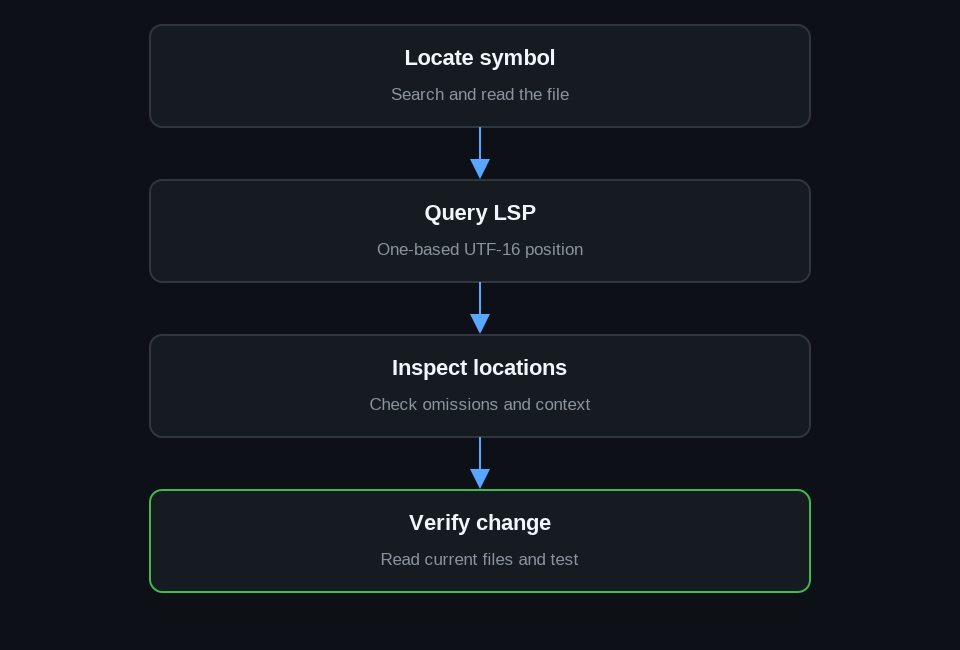
- Confirm the session is operating in the intended workspace and that the
lsptool and a provider for the file extension are available. The capability is optional; a schema in the catalog does not establish that a provider is running. - Search and read the relevant file to locate the exact symbol. Record its one-based line and UTF-16 character position, rather than using the beginning of an unrelated line.
- Ask for
goToDefinitionto resolve an ambiguous use, orhoverfor information at the cursor. Read the returned file and surrounding code to understand the declaration in context. - Run
findReferencesat the appropriate symbol and inspect the declaration as well as returned uses. For an interface or dispatch point,goToImplementationcan add another view when the server supports it. - Check for omission or truncation markers and compare the results with text search and relevant tests before editing. After a change, repeat suitable checks against the updated workspace; LSP results alone are not a test of behavior.
If the tool reports no locations, first check path, workspace and cursor. A successful empty result is different from a structured error. The server may also return partial or empty results while indexing or because its language support differs. Do not interpret an empty list as proof that no callers exist.
DeepSeek Harness: how are results and errors presented?
Navigation responses are grouped by file and rendered as path:line:character, using one-based positions. Hover returns normalized text or a no-hover notice. At the service seam, locations have URIs and zero-based ranges; the result also carries resolvedWorkspaceUri so consumers can interpret locations against the provider's canonical root, including when the requested root involves a symlink. Non-file URIs may remain verbatim.
The tool README documents defaults of maxLocations: 100, maxResultChars: 16000, and timeoutMs: 60000 for that package. The first two bound rendered output, with markers included in the character cap; they do not alter the canonical result. A truncated display must not be counted as an exhaustive list. Timeout covers the queued open/query/close lifecycle and is controlled by the deployment, not supplied as a model argument. Verify the configuration of the installed version before relying on these defaults.
LSP_UNAVAILABLE means no provider matched the extension. LSP_WORKSPACE_REQUIRED indicates a non-agent call without a session workspace. LSP_MALFORMED_RESPONSE identifies an invalid provider payload. Unsupported operations and provider conflicts also have structured codes. Preserve the error code and context when diagnosing; retrying a different cursor position does not install a missing provider.
DeepSeek Harness: what are the limits and safety boundaries?
LSP navigation is read-only, but source contents, paths, hover text and results can still reveal private code. Review what leaves your environment and sanitize logs before sharing. A configured provider may start a language-server process, so review its source and deployment configuration. A registered tool or a successful query does not establish that the server or its output is trustworthy.
The filesystem reference describes separate read and edit behavior. An LSP location is not a substitute for reading the target file before editing: the filesystem's observation policy uses file versions and can reject stale changes. Read the relevant current content and handle any stale-version error according to the actual tool's contract. Avoid assuming a navigation response grants authority to modify a file.
The sources promise neither complete cross-server results nor support for every language. Dynamic dispatch, generated code, indexing readiness and provider behavior can complicate an impact assessment. Treat LSP as one input alongside inspection and tests, and verify the actual behavior after a change.
DeepSeek Harness: what do the terms mean?
- LSP: the language-server protocol used here for semantic navigation.
- Provider: an implementation registered for specific file extensions.
- Workspace root: the session directory used to resolve and index a query.
- UTF-16 position: a line and code-unit offset; tool and service use different index bases.
- Canonical result: the structured result before bounded model-facing rendering.
Frequently asked questions
Does findReferences include the declaration?
Yes. The documented operation includes it and exposes no exclusion flag.
Are coordinates zero-based?
The model-facing tool uses one-based UTF-16 positions; the underlying service uses zero-based positions.
Does an empty result prove there are no references?
No. Check the cursor, provider and workspace, and combine navigation with other inspection.
Sources
Every claim in this article was checked against the sources below. Community discussions are user reports, not official behavior.
This is an independent community article, not official DeepSeek documentation. Listing a plugin in the registry is not a security review.