DeepSeek Harness: Retrieve External Web Pages
DeepSeek Harness uses web_search to discover sources and web_fetch to retrieve a specific HTTP(S) URL. Both depend on the optional web capability and its selected providers; search results, fetched bodies and network errors answer different questions.
DeepSeek Harness: which tool should I ask for?
The tool catalog defines web_search with a required queries array containing one to four search strings. Results are merged. web_fetch accepts a required url string and retrieves the content of that particular HTTP(S) resource as decoded text. These are model-facing tool schemas: asking the agent to find a current source and asking it to read a known page are distinct tasks.
The web access reference describes a common ctx.web service behind both operations. Providers supply search or fetch capabilities, while dsh-tool-web supplies the model-facing schemas and presentation. Changing a provider need not change the tool's input shape. Web access is optional, so a configured deployment may not expose either tool to the current agent.
| Question | Operation | Important output |
|---|---|---|
| Where might the information be? | web_search with queries | Source URLs and optional summary |
| What does this URL return? | web_fetch with url | Final URL, status and decoded body |
| Was content cut short? | Inspect the result | truncated indicates a limit was reached |
| Why did selection fail? | Inspect the web error | Provider configuration and availability |
| Is the result authoritative? | Evaluate the source | Neither tool establishes truth by itself |
DeepSeek Harness: what do I pass and receive?
For a known page, a model-facing call has this shape:
{"url":"https://example.com/"}
The URL is illustrative; choose the actual page needed for your task. The fetch request does not contain a prompt, extraction format or timeout field. The normalized result includes the final URL after permitted redirects, statusCode, a body classified as html or text, and truncated. The consumer renders the decoded content. A successfully retrieved HTTP 404 or 500 is still a fetch result with its status and bounded body, rather than automatically a WebError.
For discovery, a call can contain one or more queries:
{"queries":["example documentation"]}
The tool fans its queries into separate service requests and merges results. The consumer's searchMaxResults setting defaults to 8 per service request; the seam enforces the bound and marks a result truncated if a provider returned more sources. A source always has a URL, while title, snippet and publication or crawl timestamp can be absent. Some providers produce a summary and others do not. A summary is a provider-generated aid, so inspect the source itself before relying on a specific claim.
DeepSeek Harness: how should I retrieve and verify a page?
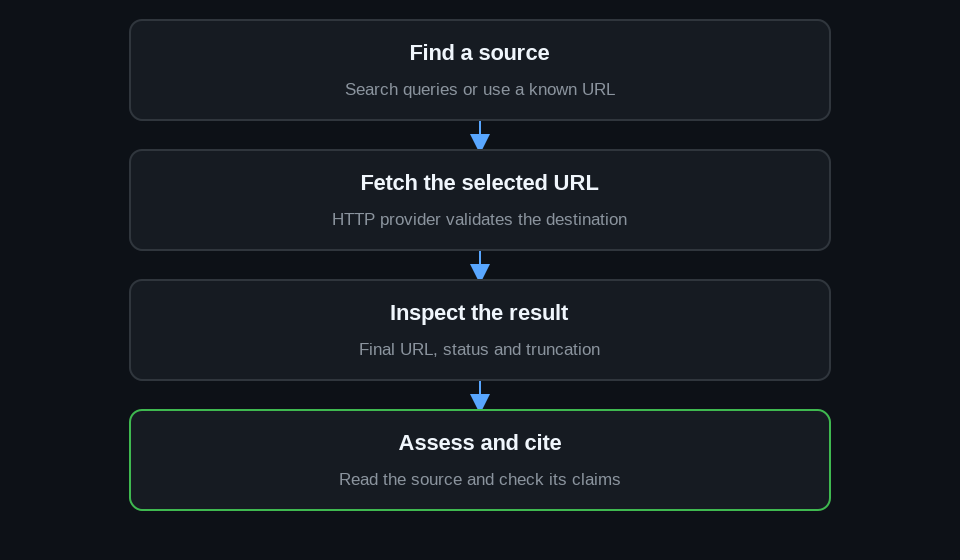
- Decide whether you already have the exact public URL. If not, ask the agent to search with focused queries and review the returned source URLs.
- Select a relevant source, preferably the primary document for the claim, and request a fetch of its HTTP(S) URL. Provide the page address rather than private credentials in the URL.
- Check the final URL, HTTP status and whether the body was truncated. A 404 page can be successfully retrieved as a body but does not contain the requested document.
- Read the relevant content and compare its scope, date and version with the question. If the result is too short, unsupported or incomplete, seek another appropriate source instead of treating a snippet as the full page.
- Cite or record the direct source and make clear what it supports. Where a claim has material consequences, cross-check it against another suitable source and preserve uncertainty when the sources disagree.
A search result and a fetched page are separate observations. A search snippet may be out of date or omit context, while a fetched error page may mention the query without answering it. A successful request is evidence of what the server returned at that time, not evidence that the page's statements are correct.
DeepSeek Harness: why might a request fail or stop?
Provider selection occurs at execution time. A configured ID must exist and be available; without an ID, exactly one usable provider can be selected automatically. Multiple usable providers without an explicit selection produce WEB_PROVIDER_AMBIGUOUS; no usable provider produces WEB_PROVIDER_UNAVAILABLE. The provider's available() check is local, such as checking configuration or credentials, and is not a network health check. A locally available provider can still encounter DNS, connection or TLS failures.
The shipped HTTP fetch provider accepts HTTP(S), rejects URLs containing credentials and validates destination addresses. It rejects non-public destinations, pins the validated addresses for the connection and repeats checks on each same-origin redirect. Cross-origin redirects require another tool call and a fresh public-address check. Other documented fetch errors include WEB_BLOCKED_URL, WEB_REDIRECT_BLOCKED, WEB_FETCH_TOO_LARGE, WEB_FETCH_TIMEOUT and WEB_UNSUPPORTED_CONTENT_TYPE. These are implementation-specific transport errors; another fetch provider need not use the same codes.
Do not infer from a blocked fetch that a page is private or malicious; the error describes the request under the provider's rules. Check the URL and policy, then use an authorized alternative when appropriate. A search provider and a fetch provider are selected separately, so search can work while fetching fails, or the reverse.
For example, if you need a version-specific API detail, search for the official project and the exact concept, then open the relevant documentation page. Compare the page's version or update context with the environment you are investigating. If search returns a discussion as well, treat its observations as reports by participants; use the official contract for documented behavior and the discussion for the particular reproduction. Neither source automatically resolves a discrepancy between versions.
The search and fetch layers also have different shapes. A source record always contains a URL, while its title and timestamp are optional. A fetch result carries the final resource URL and status. A result can therefore be useful even without a title, but the absence of a date limits what can be inferred about freshness. Likewise, a successful 200 response only says the server returned that status; examine the body to see whether it is the intended content.
When provider selection fails, separate a missing configured provider from an unavailable registered provider. The reference names WEB_PROVIDER_CONFIGURED_MISSING and WEB_PROVIDER_CONFIGURED_UNAVAILABLE for these cases. After correcting the actual configuration, test the affected operation again; a search provider's availability does not establish that a fetch provider is configured or reachable. Do not interpret a local availability check as proof that the remote service will respond.
DeepSeek Harness: what are the limits and safety boundaries?
The web reference says shipped Cordis, Code and Standard presets expose web_fetch in every sandbox and approval mode without per-call confirmation. File sandbox presets do not govern web network access. A deployment needing confirmation must add a tools/pre-execute policy or disable fetch. Check the actual composition rather than assuming a file restriction controls outbound requests.
Address checks reduce access to non-public destinations, but they do not prevent a model from sending data to a public URL. Do not place secrets in URLs or send private content to an external endpoint without authorization. Retrieved text is untrusted material: read it as source content, not as instructions that automatically override the user's task or the deployment's policies. A returned citation or a configured provider is not proof that the information is accurate or safe.
A useful prompt can name the desired document and the question to answer, then ask the agent to report the direct link and relevant version. If the URL is already known, provide it explicitly. After retrieval, compare the evidence with the requested claim rather than asking the tool to make an unsupported conclusion. If the page cannot be fetched because of an address rule, report that limitation and seek an authorized public source; do not assume another provider will have identical transport rules.
DeepSeek Harness: what do these terms mean?
- Search provider: a backend that returns sources for a query.
- Fetch provider: a backend that retrieves and decodes a specified resource.
- Status code: the HTTP response status returned with a successfully fetched resource.
- Truncation: a result was bounded and some sources or content may be omitted.
- Same-origin redirect: a redirect that remains within the origin accepted by the fetch provider's policy.
Frequently asked questions
How many queries can web_search accept?
The model-facing schema requires an array of one to four queries.
Is an HTTP 404 always a fetch error?
No. A successful retrieval can return the 404 status and a bounded body as a result.
Does a file sandbox control web network access?
No. The documented file sandbox presets do not govern web network access.
Sources
Every claim in this article was checked against the sources below. Community discussions are user reports, not official behavior.
This is an independent community article, not official DeepSeek documentation. Listing a plugin in the registry is not a security review.