DeepSeek Harness: Windows Profile Manifest BOM Errors
A leading byte-order mark in a profile manifest is one possible explanation for a DeepSeek Harness startup JSON error on Windows. A community report identifies this failure in a release candidate; verify the affected file and version before changing any manifest.
DeepSeek Harness: what does the Windows report say?
Discussion #10883 is a user report titled around a Windows startup failure in 0.2.1-rc.3 and a manifest containing U+FEFF. The original post includes a crash-report archive and says reinstalling did not resolve the problem. The visible post does not establish the complete contents of that archive or independently prove the cause of every failure.
A participant replied that several profile resolver paths read a package.json as UTF-8 and pass the result directly to JSON.parse, without removing a leading BOM. They described an Unexpected token error for a string beginning with \uFEFF and proposed removing that character before parsing. This is a community investigation and proposed code change, not a documented release fix. The discussion is marked closed and unanswered; that status is not proof of a fix or of the cause in your environment.
DeepSeek Harness: why does a profile manifest matter?
The CLI reference says dsh <name> starts a profile at $DSH_HOME/profiles/<name>. Its manifest lists bundles in dsh.profile.bundles, which contribute patches before the profile, home and command-line overlays. A startup failure while reading profile metadata can therefore occur before the application is ready, even when the visible symptom looks like a general launch failure.
| Evidence | Possible meaning | What it cannot establish alone |
|---|---|---|
| JSON parse error at startup | A file could not be parsed in that context | The first character is necessarily a BOM |
Leading U+FEFF in the identified manifest | The reported parser path may encounter the same issue | The installed version has the same implementation |
| Reinstall did not help in the report | Reinstallation was insufficient in that case | It is useless for every installation problem |
| Successful later startup | The tested startup path proceeded | Every configuration or feature is correct |
A BOM is an encoding signature that can appear at the beginning of a text file. In the reported code path the participant distinguished a literal leading character from the JSON content following it. Other malformed JSON, inaccessible files, module resolution, schema validation and plugin startup errors are separate possibilities. The CLI reference says those startup failures are reported and exit nonzero; it does not say a parse error must be caused by a BOM.
DeepSeek Harness: how can I check before editing?
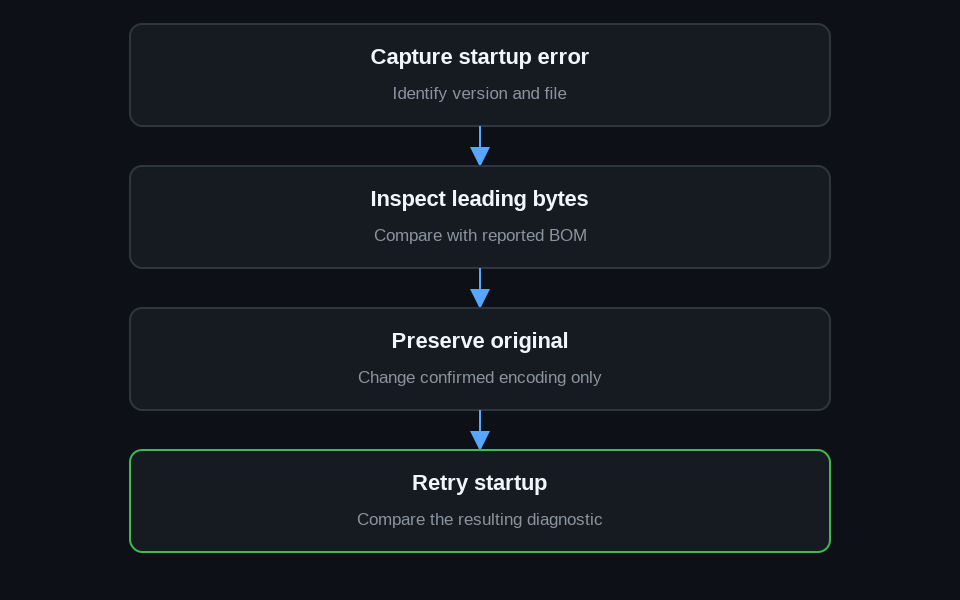
- Record the installed version, exact error and the file identified by the diagnostic. Keep the full report private until sensitive information has been reviewed.
- Identify the selected profile and whether the error actually concerns its manifest or a different package manifest. The discussion participant described several resolver reads; do not assume every JSON file under the profile is implicated.
- Inspect the beginning of the identified file using a trusted editor or byte viewer that exposes encoding and the leading marker. Compare the actual evidence with the report. If the diagnostic names a different problem, investigate that problem instead.
- Make a recoverable copy before any edit. If the file is user-managed and a leading BOM is confirmed, use an editor capable of saving the same JSON as UTF-8 without BOM. Preserve the JSON content and verify the editor's encoding choice rather than changing fields while troubleshooting.
- Retry the same startup and record the result. If it still fails, retain the new diagnostic and compare it with the original; the marker may have been incidental or there may be another failure.
These are investigative steps, not a promise that rewriting a file resolves this report. The linked discussion does not give a tested end-user editing procedure or demonstrate its effect on the original archive. If the file is managed by an installer or another tool, determine how it is generated before editing it: a later operation could recreate the previous bytes. Use the appropriate maintainer or support channel if ownership is unclear.
DeepSeek Harness: why not reset the profile immediately?
A profile can contain installed dependencies and user patches. The CLI documents --from-default-profile as a replacement operation for a custom target: it stages a fresh template copy and, on successful replacement, removes the old target directory, including installed dependencies and user patches. It is not a harmless encoding check. The reference also explains recovery behavior for failed replacement, but a successful reset changes the target before a later boot failure can be diagnosed.
A reinstall or reset may change more than the suspected encoding, making it harder to identify what caused the symptom. First identify the precise file and compare its bytes. Keep the original available for recovery, and record any deliberate change. If a clean profile is used for comparison, recognize that it has different composition and user data; a successful clean start is a useful comparison, not proof that the original manifest is repaired.
DeepSeek Harness: what are the limits and safety boundaries?
The report concerns a particular release candidate and a participant's source reading. It does not provide a current fixed-version guarantee, a universal Windows failure, or evidence that every Unexpected token is a BOM. Consult the installed version's diagnostics and release notes; avoid editing source code or unrelated package manifests based only on the discussion.
Crash reports, paths and profile files may reveal personal information or credentials. The CLI warns that raw plugin errors can contain sensitive values and are not redacted. Review any material before sharing. Editing a manifest can affect the profile's dependencies and bundle composition, so preserve its content and recovery copy and verify the resulting behavior.
DeepSeek Harness: what do the terms mean?
- BOM: a byte-order mark; a leading
U+FEFFis the marker discussed here. - Manifest: package metadata read while resolving a profile or package.
- Profile: a named composition of bundles and user configuration.
- JSON parse error: failure to interpret text as JSON; its cause requires inspection.
- Release candidate: a specific pre-release build, whose behavior should not be generalized to every version.
Frequently asked questions
Is every JSON startup error caused by a BOM?
No. Inspect the named file, version and actual error before drawing that conclusion.
Does reinstalling prove the profile was repaired?
No. The report says reinstalling did not resolve that particular incident.
Should I reset the profile to inspect encoding?
A reset replaces a custom target and can remove dependencies and user patches; inspect first.
Sources
Every claim in this article was checked against the sources below. Community discussions are user reports, not official behavior.
This is an independent community article, not official DeepSeek documentation. Listing a plugin in the registry is not a security review.