Add a DeepSeek Harness Web Settings Card
A DeepSeek Harness settings card starts with a plugin's live Config fields and a uniquely identified profile entry. The Web page presents those fields; the Host owns validation and persistence, while the plugin reads current values from its references.
DeepSeek Harness: What does a card need?
The settings-card cookbook describes a product-owned card for live configuration. The settings subsystem projects volatile fields from active, uniquely addressed profile entries. Ordinary fields are excluded. The local entry id is the form namespace, so give separate instances different ids if they need separate forms.
There are two halves to plan: a Host plugin that declares and consumes configuration, and a browser contribution that presents the desired page. The base bundle mounts settings and config-editor; for a custom profile, consult those packages' documentation before mounting services. An installed package alone does not prove that the profile has the services or entry needed to expose its card.
DeepSeek Harness: How do you declare live fields?
The cookbook's example exports both the TypeScript interface and the Schemastery schema. Its endpoint is an optional volatile string, while retries is a volatile number with a default of three, a minimum of zero and integer steps:
import type { Context, Volatile } from '@deepseek-ai/cordis'
import z from '@deepseek-ai/schemastery'

export interface Config {
  endpoint: Volatile<string | undefined>
  retries: Volatile<number>
}

export const Config = z.object({
  endpoint: z.string().volatile(),
  retries: z.number().step(1).min(0).default(3).volatile(),
})

export function apply(ctx: Context, config: Config): void {
  ctx.on('loader/volatile-update', () => {
    ctx.logger.info('Retry limit: %d', config.retries.get())
  })
}
Read .get() when starting an operation. If several values must remain consistent throughout a request, capture them together at the start. Use .check() for cross-field checks: the cookbook states that they run on the Host before persistence and are omitted from serialized form schemas. A browser form cannot infer all validation rules solely from the serialized schema.
The schema distinguishes fields meant for live editing from ordinary configuration. Marking a value role('secret') keeps it out of form responses; the cookbook recommends credential references for values managed by the credentials domain. Redaction is a response property, not a general guarantee about other files or logs.
DeepSeek Harness: How is the browser page delivered?
A custom page receives form.state and form.mutate(operations, expectedRevision) from the Plugins page owner. The Host validates the complete Config and applies edits through ConfigEditor and volatile HMR. For the detailed write semantics, including revision conflicts and the difference between update, replace and mutate, see how settings forms save configuration.
The cookbook explains that the client module system scans enabled Loader entries for packages declaring dsh.client and serves their built ./client export. The browser half attaches to the Loader row whose specifier is the bare package name. A row mounted from a subpath export does not carry it. If a bundle splits one package over several rows, its client half remains attached to the root row and its pages disappear when that row is switched off. A sub-plugin whose page must outlive the other rows needs its own package.
The built client file must use the documented lazy-CJS factory format. The clientBundle tsdown preset is in the repository rather than a published package; an external package must reproduce the build itself. The cookbook's manifest example includes a ./client export and dsh.client with platform: "web" and an injection of @deepseek-ai/dsh-client-ui-settings. Follow the linked client module README for the exact build contract instead of assuming a normal browser bundle is interchangeable.
| Concern | Owner or mechanism | What to verify |
|---|---|---|
| Editable fields | Plugin Config schema | Fields are volatile and validation matches the intended contract. |
| Instance identity | Unique active profile entry id | Each intended instance has the correct namespace. |
| Save | Host settings and ConfigEditor | Invalid or stale writes do not persist. |
| Browser module | Root package Loader row | Built client export and dsh.client are present and the row is enabled. |
| Another plugin's detail page | Declared detail slot | Contribution handles the page subject and returns null when unrelated. |
DeepSeek Harness: How do you implement and verify it?
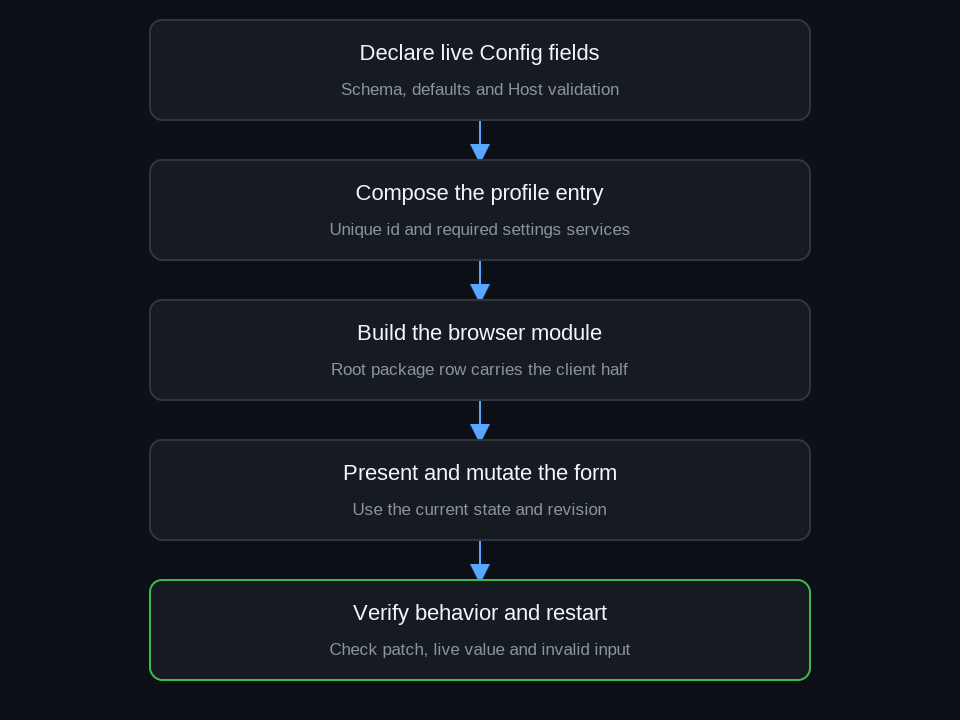
- Define the plugin interface and schema, marking only intended live fields volatile. Add appropriate defaults and validation, including Host-side cross-field checks where needed.
- Compose the plugin with a unique profile entry id. Confirm that the target profile has the settings and config-editor services it needs.
- Build the browser half using the client module contract and provide the package's client export and metadata. Keep its root Loader row enabled for as long as the page should exist.
- Present the fields through the Plugins page owner's state and mutation interface. Submit the revision associated with the state the user edited.
- Change a field and save. Inspect the profile patch, verify the next consumer operation reads the new value, check instance identity, and restart to verify restoration. Submit an invalid value in a test environment and confirm neither file nor live value changes.
The check after restart matters because a page can display a draft before a Host write succeeds. A successful Host response and an observed consumer operation answer different questions: the former confirms acceptance, while the latter tests whether that consumer reads the new value at the expected boundary.
DeepSeek Harness: Can a plugin add content to another page?
Yes, when the page exposes the documented detail slots. The cookbook identifies plugins.detail.actions for a control at the top, plugins.detail.badge for a tag beside the title, and plugins.detail.section for content below the page's own content. Each contribution receives a subject: a bundle subject carries pkg, a row subject carries pkg and row, and an item subject carries id. Return null for a subject the contribution does not address.
This is a different use case from owning a plugin's configuration page. A badge can communicate information about another bundle without claiming ownership of its form or changing its configuration. Check the subject before rendering; a contribution registered for the detail surface can be invoked for different kinds of subject. The cookbook also describes a client-only companion package for a built-in namespace using ctx.configForms.whileServed, so that its page exists while the Host serves that namespace. Follow that example only when its lifetime matches the intended page.
DeepSeek Harness: What are the limits and safety boundaries?
The sources do not promise that a browser page remains visible if its owning root row is disabled, nor that a form includes ordinary fields. A schema check validates the configuration contract, not the suitability of a value for every deployment. Test the actual operation and review the effect of network endpoints or other privileged settings before enabling a card for users.
The cookbook's build snippets describe repository-specific tooling and give a starting point, not a universal external build command. Verify your installed version and the linked package READMEs. Never put real secrets into sample configuration or share unreviewed profile patches. A secret redacted from a form response may still exist in the configuration system, and other fields may also be sensitive.
DeepSeek Harness: What do the terms mean?
- Volatile: a live configuration reference whose current value can be read with
.get(). - Namespace: the unique local profile entry id used to identify the form.
- ConfigEditor: the service persisting configuration edits through Cordis patches.
- Loader row: a configured plugin entry whose enabled root package row carries its browser half.
- Detail slot: a declared extension point for a control, badge or section on a plugin detail page.
Frequently asked questions
Does a settings card expose ordinary fields?
The settings service projects volatile fields; ordinary fields are excluded.
What identifies an instance form?
The local id of a uniquely addressed active profile entry is its namespace.
What happens when the root package row is disabled?
The client half attached to that row and the pages it registers go away.
Sources
Every claim in this article was checked against the sources below. Community discussions are user reports, not official behavior.
This is an independent community article, not official DeepSeek documentation. Listing a plugin in the registry is not a security review.