DeepSeek Harness: Add or Remove Plugin Packages
Use dsh plugin --profile <name> to run pnpm against a specific DeepSeek Harness profile; inspect the package and the resulting bundle stack because installing a dependency and activating a bundle are related but distinct steps.
DeepSeek Harness: What does the command manage?
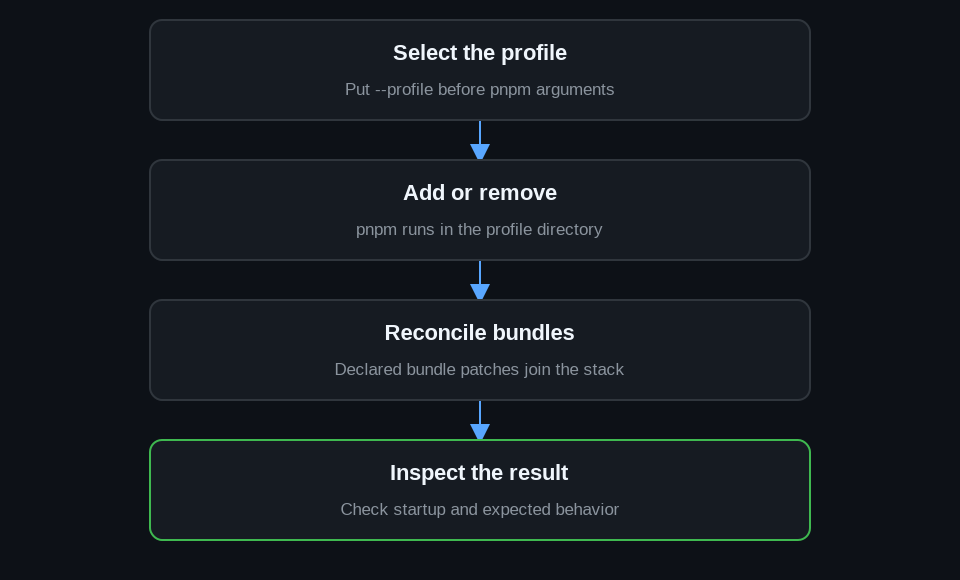
The CLI reference says dsh plugin --profile <name> <args...> initializes a missing profile and forwards the remaining arguments to pnpm with the profile directory as its working directory. pnpm must be on PATH. A missing shipped profile is initialized from its template; another missing profile starts with @deepseek-ai/dsh-base alone.
After each successful pnpm run, DSH reconciles dsh.profile.bundles against installed dependencies. A dependency whose package manifest declares a dsh.bundle.patch joins the layer stack. A dependency without that declaration stays a plain dependency, with a one-time warning; a removed dependency leaves the stack. A successful package-manager command therefore does not by itself prove that a plugin capability is running.
DeepSeek Harness: How do I add or remove a package?
-
Identify the profile you intend to change and review the exact package source and version. The marketplace guide warns that marketplace metadata is supplied by third parties; examine the actual artifact rather than relying on its displayed title.
-
Ensure pnpm is available on
PATH. Put--profilebefore the forwarded command. The CLI reference gives these examples for an optional subagent bundle:dsh plugin --profile <name> add @deepseek-ai/dsh-subagent-codex dsh plugin --profile <name> remove @deepseek-ai/dsh-subagent-codex -
Substitute the intended profile name. Read pnpm's output and any DSH warning. Both commands change that profile's installed dependencies; removal also removes a matching bundle from the reconciled stack after success.
-
Inspect the composition and the running profile. A package can be a plain dependency rather than a bundle. Configuration, required services, and startup errors can still affect the feature you expected to use.
-
Test the intended behavior with suitable inputs. Record the exact package and version for future updates and troubleshooting.
For a local checkout, the reference explicitly says relative path specs such as . and ../plugin, including file: and link: forms, are anchored to the invoking directory first. Thus add . from the plugin checkout refers to that checkout, even though pnpm subsequently runs in the profile directory. Check your current directory before using a relative spec.
DeepSeek Harness: How are arguments and profiles interpreted?
| Invocation position | Interpretation |
|---|---|
--profile <name> before pnpm arguments | Selects the target profile |
add, remove, why, update | Forwarded pnpm verbs |
--help after the pnpm command | Passed to pnpm |
--help before forwarded arguments | Prints the forwarder's help |
| Relative package spec | Anchored first to the invoking directory |
The first unrecognized token begins forwarded arguments. In particular, place --profile before add or remove; a later option belongs to the forwarded arguments. The reference notes an additional help nuance: when forwarded arguments begin with a pnpm option such as --filter or -r, a later help flag still prints the forwarder's help. Put the pnpm command before help when you intend pnpm's help.
The CLI also accepts other pnpm verbs unchanged. An update can make a previously plain dependency join the bundle stack if its updated manifest gains the bundle declaration. Conversely, removing a bundle affects the selected profile's composition. Review the result in that profile rather than assuming a different profile received the same change.
DeepSeek Harness: How does this relate to the marketplace?
The marketplace is a discovery interface for indexed DSH bundles. In its Web UI, selecting Install opens a confirmation showing the npm package and registry or the Git repository, commit and directory; confirming starts normal installation with compatibility and registry checks. The market has no built-in index source by default, and index sources belong to the current profile. The CLI workflow instead forwards the package operation you provide to pnpm for the selected profile.
Both routes require attention to the artifact being installed. The marketplace's metadata and compatibility checks do not verify its claims or audit code. The CLI's successful installation likewise confirms a package operation, not trustworthiness. See installing through the plugin market for discovery and confirmation details.
The command's initialization behavior deserves attention when you mistype a name: the reference says a missing profile is created rather than silently redirecting to an existing one. Confirm the selected name in your own records before running a mutating package operation. The package examples use <name> as a placeholder, not a literal profile to assume on every machine.
After installation, distinguish three questions: did pnpm install the dependency, did the manifest make it a bundle, and did the assembled profile start the capability you need? A warning about a bundle-less dependency answers the second question, not the first. A startup error answers neither whether the source was trustworthy nor whether a different profile was changed. Keep the output for each stage separate when troubleshooting.
DeepSeek Harness: What are the limits and safety boundaries?
Install or remove only the dependency intended for the named profile. Removing a package can change the profile's bundle stack and capabilities; inspect dependencies and configuration before changing a shared setup. Use a suitable test profile or environment when evaluating an unfamiliar package, and review its code and dependencies. A compatible or installed plugin is not thereby safe.
The reference documents reconciliation after a successful run; it does not promise that a failed pnpm operation leaves every intermediate state untouched. Read the error and inspect the resulting profile before retrying. Nor does the cited CLI reference claim that every installed package is a bundle or that every bundle provides a particular tool. Check the manifest, configuration and startup evidence.
DeepSeek Harness: Which terms matter?
- Profile: the named assembly whose package directory and configuration are changed.
- pnpm forwarding: executing the supplied package-management arguments in that profile directory.
- Bundle: a package declaring a DSH patch that can participate in the layer stack.
- Reconciliation: aligning the bundle list with installed dependencies after a successful command.
- Plain dependency: an installed package without the bundle declaration.
Frequently asked questions
Does every installed dependency become a bundle?
No. Dependencies without a bundle declaration remain plain dependencies.
Is pnpm required?
Yes. The CLI reference requires pnpm on PATH.
Where does add . resolve?
The relative spec is anchored first to the invoking directory.
Sources
Every claim in this article was checked against the sources below. Community discussions are user reports, not official behavior.
This is an independent community article, not official DeepSeek documentation. Listing a plugin in the registry is not a security review.