Which DeepSeek Harness Profile Should You Use?
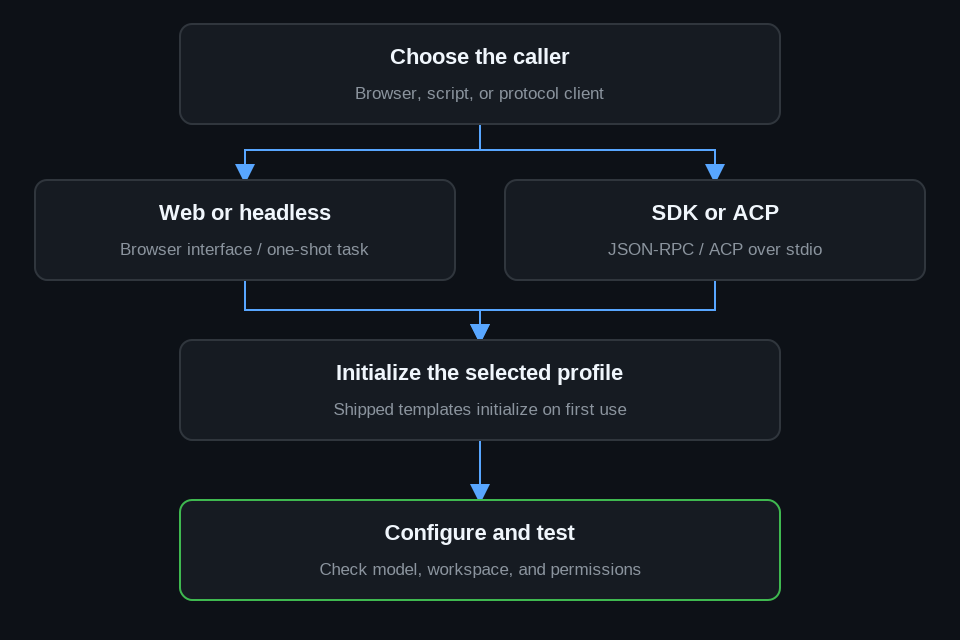
Choose the DeepSeek Harness profile by the interface you need: web for a browser, headless for one task, sdk for JSON-RPC integration, and acp for an ACP client.
DeepSeek Harness: which profile fits the caller?
A profile is a named plugin composition, not a model or a permission preset. The reference overview describes profiles as bundle lists plus a user patch. The CLI reference describes the shipped launchers and their input channels.
| Need | Profile | Input and boundary |
|---|---|---|
| Interactive browser | web | Web app and browser client |
| One task from a script | headless | Positional task; final text on stdout |
| Integrate an SDK client | sdk | JSON-RPC over standard input and output |
| Connect an ACP client | acp | Agent Client Protocol over standard input and output |
| Smaller SDK composition | sdk-minimal | Same JSON-RPC transport, different capabilities and permissions |
The last row matters: sdk-minimal is also a shipped profile, but it is not simply another spelling of sdk. The CLI reference describes it as a standalone bundle that omits text filesystem tools, instruction discovery and SQLite. It also documents a fixed danger-full-access tree without approval or permission settings services. Inspect its actual capabilities before choosing it.
DeepSeek Harness: is dsh web different from dsh --profile web?
The first is shorthand for the second: both select the profile named web. The name must immediately follow dsh for shorthand. plugin is reserved as the plugin-management command in that position; a profile named plugin must be selected with --profile. A second --profile before app arguments is rejected, including one following shorthand.
Launcher flags come before app arguments. The launcher stops parsing its own flags at the first token it does not recognize, then passes the remainder to the selected app. For example, dsh --profile web --port 8080 passes the port option to the web app. Put a launcher overlay such as --patch before app-specific arguments. Help also depends on context: dsh --help describes the launcher, while dsh --profile web --help describes the app without booting it.
These are parsing rules, not different configuration universes. Either spelling selects the same named profile and its files. A custom profile with a web bundle may behave differently because its bundle list and patches differ; do not infer its contents from its name alone.
DeepSeek Harness: what happens the first time?
The shipped web, headless, sdk, sdk-minimal, and acp templates initialize automatically on first use. The selected profile lives under $DSH_HOME/profiles/<name>. The profile manifest names its bundle layers, and its cordis.patch.yml holds the profile's own overrides. The launcher resolves in-box bundles from the running installation; it does not create fallback links for runtime resolution.
An unknown missing profile does not silently become web: normal boot fails and suggests the plugin-management route for creating it. The CLI also offers --from-default-profile for a custom target, but that operation replaces the target with a fresh template copy, including deleting its previous dependencies and user patch after replacement succeeds. It is not needed for ordinary first use. Read the reference and preserve anything you need before using it.
- Decide whether a person, a script, or a protocol client will own the interaction.
- Launch the matching shipped profile using the documented syntax. For a browser, use
dsh web; for a single task, usedsh --profile headless "run the tests". - Configure the model and credentials appropriate to that environment; selecting a profile does not validate them. See model configuration.
- Test the intended interface with a small task. For an SDK or ACP client, use the corresponding protocol client rather than typing a task into its protocol stream.
- Record the profile and working directory when investigating unexpected behavior. Base-based profiles use the invocation directory as the default workspace root.
DeepSeek Harness: how do changes reach a running profile?
The composition starts with the bundles listed by the profile, then applies the profile patch, home patch, and command-line patches in order. Later layers can replace a row's entire configuration. The web template includes live patches; the shipped headless, SDK and ACP templates apply patches at startup. Bundle membership changes require a restart. For the precise ordering and replacement behavior, see configuration layer precedence.
Do not assume that a setting visible in one profile is necessarily present in another. A profile can mount different plugins, and its own patch is not the shared home patch. Conversely, a home-level preference can affect several profiles. A setting may also take effect on a later request or only on restart depending on the plugin and composition; consult its documentation rather than extrapolating from the web template.
How should a team document its choice?
Record the interface as well as the profile name. A browser-oriented support procedure should say who can reach the Web UI and which host runs it; a headless procedure should state the working directory and how its output is consumed. An SDK or ACP integration should identify the client responsible for the protocol stream. This makes a profile choice reproducible without assuming that every caller uses the same entry point.
For example, a developer exploring a repository interactively might start with the web profile, configure a model, and inspect the response in the browser. A CI job reviewing a bounded task might instead invoke headless and retain its exit status separately from its text. Neither choice decides the model provider for the other: both still require a working route and credentials. If the job needs repeated, programmatic conversations, evaluate the SDK interface rather than trying to turn the one-shot output into a protocol.
First-use initialization also means that a profile may have local state that evolves after the template is copied. It is useful to distinguish the shipped template, the profile currently on disk, and the configuration tree assembled for a particular invocation. Updating the application does not mean an existing local profile is a pristine template. Before diagnosing a mismatch, identify the selected name and inspect its bundle list and patches; do not overwrite it to discover what it contains.
A team's handoff should describe how to stop the process, where its logs are retained, and what information must be removed before logs are shared. A new operator can then distinguish a browser access issue from a model request or permission issue. These checks are operational recommendations, not extra CLI guarantees. The authoritative behavior remains the documentation for the installed version and the particular bundles that were composed.
A useful acceptance check is to follow the entire intended path once. For Web, verify that the page connects to the intended server, then make a small model request. For headless, confirm that the caller receives the final text and status separately. For a protocol client, confirm that the client understands the selected transport and can handle errors from that connection. A successful startup alone only establishes that the composition booted; it does not establish that every model, tool, or integration is ready.
If two environments behave differently, compare their installed version, selected profile, bundle list, and patches before attributing the difference to the shorthand command. Also compare working directories and the credential source used by the actual process. These observations narrow the question without requiring a reset. Save a sanitized record of the test and the result so that a later upgrade can be compared with the same baseline.
The profile table is a starting point, not a substitute for an integration's protocol documentation. A client may have its own requirements for process lifetime, errors, and recovery. Confirm those requirements with the client maintainer, and test them in an environment appropriate for the data involved. This prevents a convenient launch command from being mistaken for a complete deployment plan.
DeepSeek Harness: what are the limits and safety boundaries?
A profile chooses an interface and composition, not a blanket guarantee about what an agent may read, write, or send. The base-based profiles use the documented permission infrastructure; the CLI reference says new sessions default to workspace-write, while filesystem reads and network access are not restricted by that preset. Approval and sandbox behavior are separate concerns; see permission presets.
Headless removes the browser interface, not the possibility of tool execution. Give unattended tasks a suitable workspace and policy, and review outputs before publishing them. Do not send secrets through a protocol stream or include them in a prompt merely to make a test work. When changing profiles, verify the behavior of the installed version: the upstream reference is a moving document.
DeepSeek Harness: what do the terms mean?
- Profile: a named composition and its local configuration under Harness home.
- Bundle: packaged plugin rows and code included in the composition.
- Patch: an overlay that can modify or insert configuration rows.
- JSON-RPC: the protocol carried over standard input and output by the SDK profiles.
- ACP: Agent Client Protocol, carried over standard input and output by the ACP profile.
Frequently asked questions
Is dsh web different from dsh --profile web?
No. The first is shorthand for selecting the same web profile.
Does first use initialize a shipped profile?
Yes. The five shipped templates initialize when first used.
Does headless prevent tool execution?
No. It removes the browser interface; tool permissions still matter.
Sources
Every claim in this article was checked against the sources below. Community discussions are user reports, not official behavior.
This is an independent community article, not official DeepSeek documentation. Listing a plugin in the registry is not a security review.