DeepSeek Harness: Clip a Stream VOD Into a Vertical Short
To clip a stream VOD inside DeepSeek Harness you install three general-purpose plugins, not a dedicated clipper: dsh-ffmpeg cuts and reframes, dsh-video-lens tells you which minute is worth cutting, and powerful-subtitle-studio handles captions. This post walks one long recording through those five stages and names the failure mode at each one.
The job behind a search like "neon clipping" always has the same shape: take a streamer's broadcast VOD, find a thirty-second moment worth watching, reframe it to 9:16, caption it, publish it. Someone typing that query wants one button that does all of it. The DSH registry has no such thing, because its plugins are cut along general capabilities rather than one content niche, so you assemble the pipeline yourself.
That is not a downgrade. Chaining tools means every intermediate file is inspectable, you can tell which stage broke, and you never put an opaque binary you cannot review in the middle of a publishing workflow.
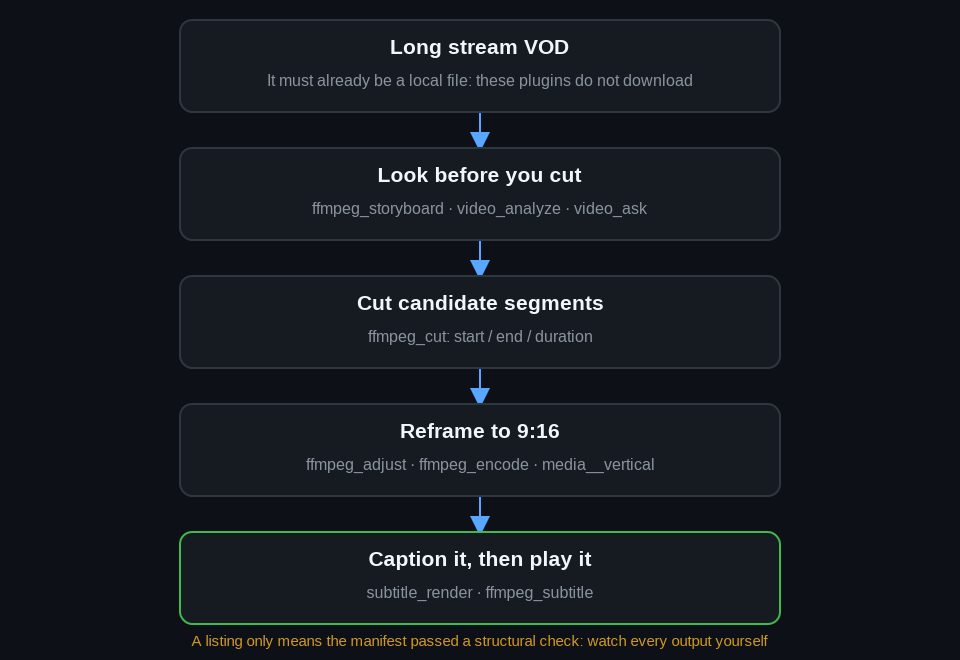
A recording becomes a publishable short through four operations that map one-to-one onto buttons in any editor:
| Stage | The judgment you make | Tools that serve it |
|---|---|---|
| Find the moment | Which thirty seconds anyone will watch | ffmpeg_storyboard, video_analyze, video_ask |
| Cut | Where the in and out points are, and whether to stream copy | ffmpeg_cut |
| Reframe | Which vertical slice to keep, or whether to pad instead | ffmpeg_adjust, media__vertical |
| Caption | Burn into the frame, or attach a soft subtitle track | ffmpeg_subtitle, subtitle_render |
The point is that nothing happens in one shot. Every stage leaves a file you can stop and look at, which matters when ten attempts produce one usable clip.
Start with the constraint that decides whether any of this applies: none of these plugins downloads a recording for you. dsh-ffmpeg and dsh-video-lens work on local files, so the input must already be on disk, inside the session workspace or a path the plugin may read. A streaming-platform URL is outside their scope; turning one into a file happens before this pipeline starts, and this post does not cover it.
DeepSeek Harness: how do you find the segment before cutting it?
Do not guess from memory. On a two-hour VOD, "somewhere in the middle" is a sixty-minute window.
Begin with the storyboard tool from dsh-ffmpeg. It samples the whole file into a single contact-sheet PNG with a timestamp on each cell:
ffmpeg_storyboard { input: "vod.mp4", count: 12, columns: 4, width: 320 }
The parameters are bounded: count 2–36, columns 1–6, cell width 160–640, frames letterboxed to 16:9 rather than stretched. start and end narrow the range first, accepting seconds or HH:MM:SS.mmm.
Know the documented limit before you trust it for cutting. The storyboard reports each cell's sampling target time, not the exact timecode of a decoded frame; uniform sampling is not shot detection and does not guarantee coverage of short shots. So it answers "roughly where" and nothing finer.
If you want the model to describe what is happening, use dsh-video-lens. Its video_analyze takes a different route: scene-change detection through ffmpeg's scdet filter, one representative frame per detected shot, an optional audio transcript from an ASR endpoint, and all of it fused with a vision model into structured evidence:
{
  "shots": [{ "timeSec": 12.3, "score": 45.2 }],
  "framesSampled": [{ "timestampSec": 5.5, "jpegBytes": 12345 }],
  "transcript": { "segments": [{ "start": 0.0, "end": 2.4, "text": "…" }] }
}
Those shots times are real cut boundaries, finer than uniform sampling. To ask about a specific moment, video_ask accepts explicit time references like "at 3:20" or 第2分钟, and can also locate relevant speech by matching transcript keywords before re-sampling frames from those windows. It answers with a conclusion, a confidence, and supporting timestamps.
Defaults worth knowing: sceneThreshold is 10 on a 0–100 scale, where higher means fewer cuts; maxFrames is 12. ASR is strictly optional — with no asrApiKeyEnv or a failing endpoint, visual analysis still completes and transcript comes back null. The transcript raises your hit rate considerably, because the moment a streamer says the funny thing usually is the highlight.
DeepSeek Harness: how do you cut the segment to the second?
With an approximate location, cut with dsh-ffmpeg:
ffmpeg_cut { input: "vod.mp4", start: 4210, end: 4265 }
start plus duration works too. The default is stream copy, which finishes in seconds and re-encodes nothing; the plugin also supports a precise re-encode. Prefer the stream-copy default for the rough cut, because the reframe step will re-encode anyway — paying for two encodes to produce a throwaway intermediate buys nothing.
Three protections apply:
- A same-name output is never overwritten; the plugin appends
_1,_2. - An output path equal to the input is rejected outright.
- Each operation times out at five minutes by default (
timeoutMsis adjustable from 10 seconds to two hours).
That last one bites on long recordings. If cutting a late timestamp times out, cut a larger chunk out first and work from that, or raise timeoutMs — the plugin's troubleshooting section recommends exactly that order.
With several candidates, ffmpeg_concat joins 2–20 segments and can normalize them to one canvas with proportional padding on re-encode, filling silent segments with silence while keeping other audio. For a three-highlight reel that beats assembling by hand.
DeepSeek Harness: how do you turn landscape footage into 9:16?
This is where most clips break, because landscape to vertical must discard picture. Two approaches, very different results:
| Approach | Result | Suits |
|---|---|---|
| Crop | Keep one column, fill the frame | A centred subject with irrelevant sides |
| Pad | Keep the full frame, add bars | Footage with information in the corners |
dsh-ffmpeg covers this with rotate in ffmpeg_adjust for portrait-landscape conversion, and a vertical 1080p preset in ffmpeg_encode. To see how the filter chains are built, read the implementation notes of dsh-plugin-media-studio, which spells out both:
verticalwithcrop:crop=floor(ih*9/16/2)*2:ih,scale=1080:1920,setsar=1verticalwithpad:scale=1080:1920:force_original_aspect_ratio=decrease, thenpadwith black
Note the floor(ih*9/16/2)*2 in the crop chain: it rounds the computed width down to an even number, because encoders reject odd dimensions. That is exactly the detail people miss when hand-writing a filter.
That plugin documents itself in Spanish and exposes MCP-style tools, mcp__media__*, seven of them: status, probe, convert, trim, vertical, thumbnail, burn_subtitles. Its safety design is worth copying even with a different plugin: allowedPaths bounds what can be read and written, DSH_MEDIA_MODE=read-only leaves only status and probe, heavy operations are capped at six per minute, each ffmpeg process gets seven minutes, an audit line goes to cache/media-studio/audit.jsonl, and an input is never overwritten.
Play the reframed file yourself before going further. A bad crop slices the subject in half, and no automated check will ever tell you that happened.
DeepSeek Harness: how do you caption a vertical short?
Vertical short-form is watched muted, so captions are not optional. Two plugins, two routes.
powerful-subtitle-studio covers video to finished captions. Its tools split cleanly: subtitle_transcribe transcribes in segments of at most seven seconds, subtitle_frames screenshots a timestamp for the session model to look at, subtitle_compose maps the translation back onto the original timeline and writes SRT, and subtitle_render produces the output — a 视频名.语言.srt file, a soft subtitle track without re-encoding, or burned-in captions with re-encoding.
Several features exist because real footage is messy: multiple speakers become separate captions in different colours, with a sentence spanning two speakers split at word-level timing but kept inside its original start and end; when background music swamps the voice, it finds voice intervals in the speech band and transcribes segment by segment; later episodes of the same project reuse established name translations in the same session.
Weigh the trade-off first. ASR is fixed to Alibaba Cloud Bailian paraformer-v2 and audio is uploaded to Alibaba Cloud; the key lives at ~/.powerful-subtitle-studio/config.json. That is the one step here that sends media off your machine by default. If the footage cannot leave, burn an SRT you wrote yourself with ffmpeg_subtitle from dsh-ffmpeg and stay local end to end.
One more: burning captions always re-encodes, while a soft track does not. Platform support for soft tracks varies, so check your target platform before publishing.
DeepSeek Harness: what does one clip look like end to end?
Wiring the tools together, in order:
- Confirm the file is local, then run
ffmpeg_healthto verify ffmpeg and ffprobe resolve; it prints the executable paths it actually used. ffmpeg_probefor duration, resolution, frame rate, audio and subtitle tracks. Generate affmpeg_storyboardcontact sheet and scan it by eye.- On a promising region, run
video_analyze(with audio, so ASR runs) to get realshotsboundaries and timestamped speech. ffmpeg_cutat those times, stream copy, original preserved.ffmpeg_encodeorffmpeg_adjustto 9:16, choosing crop or pad deliberately.- Transcribe and burn captions, or produce the SRT, check it, then burn.
ffmpeg_probethe output for its specs, then actually play it and check picture against sound.- Unhappy? Return to step 4 with new in and out points. The intermediates are still there.
Step 7 is not ceremony. The dsh-ffmpeg documentation puts it last in its own workflow — keep the source, play the output, then deliver. The classic clipping failure is audio drifting out of sync with picture, or a time-base mismatch, and only watching and listening finds either.
DeepSeek Harness: what are the limits and risks?
A listing is not a security review. Every plugin linked here shows "Manifest verified" in the registry, which means only that the root manifest and its declared patch file have the expected structure. It says nothing about the code being safe, behaving as described, or being endorsed.
Plugins run as trusted code inside the host process. With no official plugin review, self-review is the installer's job: read the entry point and dependencies before installing, and note which paths it reads or writes and which network addresses it reaches. The dsh-video-lens README is unusually direct, enumerating its own behaviour — it reads any local path the agent passes it, executes ffprobe/ffmpeg with argv arrays only and never a shell, makes one outbound call per analysis, and does not eval, phone home, auto-update, or read files on its own.
Credentials. dsh-video-lens reads VIDEO_LENS_API_KEY for vision and optionally VIDEO_LENS_ASR_KEY; subtitle studio takes DASHSCOPE_API_KEY or a key in its settings. Send keys only to endpoints you trust.
Decide about data leaving your machine yourself. Visual understanding means frames go to a vision endpoint; cloud ASR means audio goes to a provider. If that is unacceptable, use the local ffmpeg route and give up automated "which part is interesting".
Time and size. Storyboard timestamps are sampling targets, not frame-accurate timecodes. scdet needs ffmpeg ≥ 6.0 and degrades to uniform sampling on older builds. Long recordings need encode time, and a per-operation timeout is worked around by cutting in pieces rather than raising it indefinitely.
Copyright and platform rules. Clipping someone else's broadcast and republishing it raises rights questions that differ by jurisdiction and platform; no plugin solves that.
DeepSeek Harness: glossary
- VOD: video on demand, the full recording left after a live broadcast ends.
- Clipping: cutting a long recording into short segments for republishing.
- 9:16: the vertical aspect ratio short-form platforms favour.
- Stream copy: remuxing without re-encoding. Fast, but cuts only land on keyframes.
scdet: ffmpeg's scene-change detection filter, used byvideo_analyzeto find shot boundaries.- Burn-in: rendering captions into the pixels. Viewers cannot switch them off, and it always re-encodes.
- Soft subtitle: a separate subtitle track the player can toggle, with no re-encode.
- Storyboard: many frames composited into one PNG with a timestamp per cell.
- ASR: automatic speech recognition, turning an audio track into timestamped text.
- Manifest verified: a registry structural check, not a safety or quality signal.
If your goal is generating a video from scratch rather than cutting one up, the route is different: dsh-directorx and dsh-short-video-studio work on the generation side, taking a brief through storyboard, shots, and assembly. You can also browse /explore?q=video for the current set, or read how to find and install a DeepSeek Harness plugin for the install and verification steps.
Frequently asked questions
Is there a DeepSeek Harness plugin made for clipping streamer VODs?
Not as a dedicated clipper. The registry splits the work into general plugins: dsh-ffmpeg probes, cuts and reframes; dsh-video-lens finds shot boundaries and speech; subtitle plugins produce captions. You chain them per clip.
Do these plugins download the VOD from a streaming platform?
No. dsh-ffmpeg and dsh-video-lens operate on local files, so the recording must already be on disk inside the session workspace or a path the plugin may read.
Can a storyboard contact sheet give me exact cut points?
No. The plugin documents its timestamps as sampling targets, not exact frame timecodes, and uniform sampling is not shot detection. Use scene detection or probe the cut result to confirm.
Which step sends my footage off the machine?
Cloud ASR in the subtitle studio plugin uploads audio to Alibaba Cloud Bailian, and vision analysis sends sampled frames to the configured endpoint. Burning a local SRT with ffmpeg_subtitle keeps everything local.
Does a registry listing mean the plugin is safe?
No. It means the root manifest and declared patch file passed a structural check. It is not a security review, and plugins run as trusted code in the host process.
Sources
Every claim in this article was checked against the sources below. Community discussions are user reports, not official behavior.
This is an independent community article, not official DeepSeek documentation. Listing a plugin in the registry is not a security review.