DeepSeek Harness: Create a Missing Custom Profile
An unknown DeepSeek Harness profile does not automatically become a Web profile: create a custom composition through plugin management or explicitly copy a shipped template, then inspect and launch the intended profile.
DeepSeek Harness: why does a missing name fail?
A profile is a named composition of bundles, installed packages and a user patch under Harness home. The architecture reference describes the manifest's ordered bundle list and the patch layers. A profile name is not itself a model, a permission policy or a guarantee of an interface.
The CLI reference says the shipped web, headless, sdk, sdk-minimal and acp profiles initialize automatically on first use. Another missing name fails with a hint to use dsh plugin --profile <name> add <package>. This prevents an unknown name from silently selecting an arbitrary shipped interface.
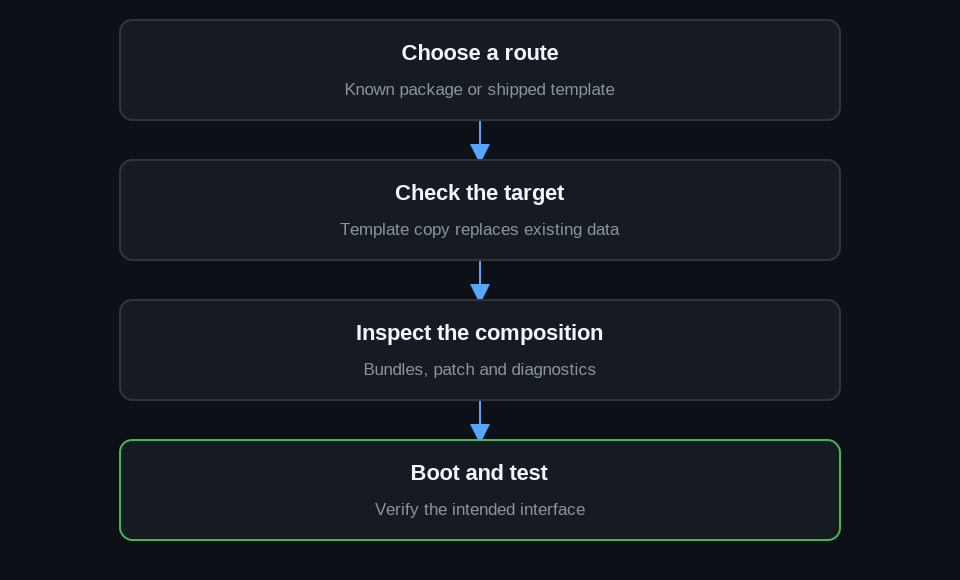
DeepSeek Harness: which creation route fits?
| Route | Starting point | Consequence |
|---|---|---|
| Plugin management | Add an intended package to the named profile | The package and its composition determine what is available |
--from-default-profile | Fresh copy of a shipped template's bundle list | Replaces an existing custom target, including its dependencies and patch |
| Normal boot | An already existing custom profile | Leaves its existing profile in place |
| Shipped profile first use | A shipped name | Initializes that shipped template automatically |
The template-copy route uses the shipped template, not a locally modified profile of the same name. It creates a new manifest with the template's current bundle list, empty dependencies and an empty user patch. It does not persist inheritance: later changes to the template list do not rewrite the custom profile. The named in-box bundles still resolve from the running installation.
A package-management route is useful when the desired package is already known. The reference provides the generic form but does not say that any arbitrary package yields a runnable application. Consult the package's documentation and choose a composition appropriate for the intended interface. Do not invent a package name merely to silence the missing-profile error.
DeepSeek Harness: how do I create from a template?
-
Select a new custom name and identify the interface you need. The five shipped templates include Web, one-shot headless, SDK, minimal SDK and ACP. Their capabilities and startup behavior differ; see choosing a profile.
-
Verify that the target is genuinely new or preserve any existing user-managed profile and dependencies. Template copying replaces a custom target. The target cannot be a shipped profile name, regardless of letter case.
-
The CLI reference gives this example:
dsh rescue --from-default-profile webIt creates or replaces
rescuefrom the shipped Web template and then boots it. Replace the illustrative name only after checking your own target and use the intended documented template. -
After successful boot, use
dsh rescuefor subsequent launches. Omitting--from-default-profileavoids resetting the profile on each invocation. Configure the model and other settings needed for the intended task. -
Inspect the composed configuration and test the actual interface. The documented command
dsh --profile web --dump-configshows how to dump a profile; substitute the intended existing custom name. Review both output and diagnostics, and remember that a dump is not a running application.
Launcher flags precede application arguments. For example, the CLI reference shows dsh rescue --from-default-profile web --no-open: the template operation is processed before the Web app receives --no-open. A custom name immediately following dsh is shorthand for --profile <name>. plugin in that position selects management; use --profile plugin to boot a profile actually named plugin.
DeepSeek Harness: what happens if replacement fails?
The launcher prepares a new profile in a staging directory next to the target and moves it into place. It attempts to restore the previous directory if the move fails. If restoration also fails, or the process stops between the two renames, the reference identifies $DSH_HOME/profiles/.<name>.staging-*/previous as the previous directory's recovery location. Treat that path as recovery evidence and follow an appropriate local recovery procedure.
Replacement is committed before bundle resolution and application boot. A later resolution or startup failure therefore leaves the fresh profile on disk; it does not mean the old custom patch was retained. An unknown template or a shipped target name fails before the target changes. A successful replacement produces no extra launcher output. Config-dump modes also accept the option and can replace a target without booting it, so a diagnostic command with that option is still a mutation.
This distinction matters when diagnosing a missing profile on a shared machine. First establish the actual selected name and home. If a profile is present in another home or owned by another deployment, resetting a same-named local target will not recover its contents. Record the operation and compare the manifest and patch after creation so the next operator can reproduce the chosen composition.
How do I check the intended starting point?
Choose the template for the interface the caller actually needs. A protocol client and a browser have different expectations even when both use a model. After copying, inspect the manifest and patch for the selected custom name, then configure and test that interface. For the package route, read the package's own instructions to determine whether it supplies an application entry and its required services. The generic command only describes how to add a specified package; successful installation does not guarantee a configured model or a working interface. Keep the target name and home in your operational notes so another operator can reproduce the result.
DeepSeek Harness: what are the limits and safety boundaries?
A copied template is a starting composition, not a copy of another user's local customizations, credentials or dependencies. Installing a package brings code into the profile; review its source and requirements under your organization's process. A profile selection or a successful launch does not establish that its permissions, model credentials or network exposure are appropriate.
Patches apply in bundle, profile, home and explicit command-line order, and later matching patches replace a row's complete configuration. A shared home patch can therefore affect the new profile. Dumps show an unevaluated composition and initialize missing profile files; inspect diagnostics and sanitize output before sharing. Test the intended behavior after boot, and retain a recoverable backup before replacing an existing target.
DeepSeek Harness: which terms matter?
- Profile: a named local composition and its user patch.
- Bundle: a package that supplies configuration rows and their code.
- Template: the shipped starting bundle list used for initialization or explicit copying.
- Patch: a layer that replaces or inserts configuration rows.
- Staging directory: the temporary location used during template replacement.
Frequently asked questions
Does an unknown profile initialize as Web?
No. Unknown missing names fail and suggest the plugin-management route.
Does copying a template preserve an existing patch?
No. It replaces the custom target, including its user patch and dependencies.
Does a copied profile inherit future template changes?
No. Its copied bundle list is not a persistent inheritance relationship.
Sources
Every claim in this article was checked against the sources below. Community discussions are user reports, not official behavior.
This is an independent community article, not official DeepSeek documentation. Listing a plugin in the registry is not a security review.