DeepSeek Harness: Filesystem Paths and Workspaces
DeepSeek Harness uses the session's working directory as an important path context, while the filesystem provider resolves each supplied path into its own target. A workspace record groups sessions by a canonical directory; selecting one does not itself confine every filesystem operation.
DeepSeek Harness: what does the workspace identify?
The workspace reference defines a workspace as a persistent record with a stable id, canonical directory path, display title and ordered session account. The registry is an optional host capability. It does not itself add model tools or prompt text. Membership checks compare a session's recorded working directory with the workspace path; the API gateway uses the selected workspace path when creating and attaching a session in its documented UI flow.
The filesystem reference describes a separate capability: a service, a provider, model-facing tools and an optional observation policy. A workspace record and a filesystem provider answer different questions. The first organizes sessions; the second resolves and operates on targets. The same user-facing path can have different significance under another backend or working directory.
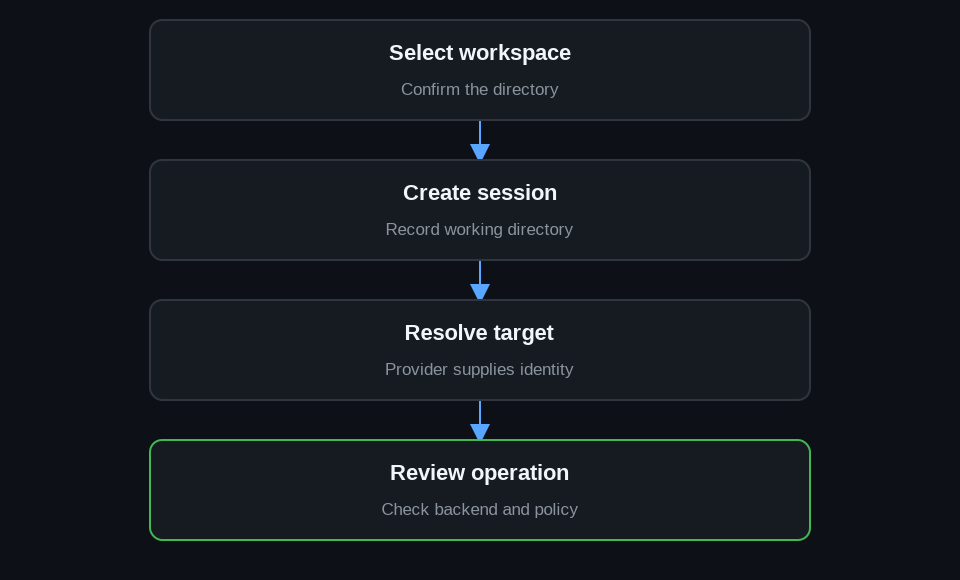
DeepSeek Harness: how are paths resolved?
The filesystem service's resolve contract says relative paths resolve against opts.cwd; that option overrides the backend's default base. Each operation resolves a supplied path to a backend target before operating on it. The target has an opaque targetKey and a displayPath. The latter can be a local absolute path, workspace-relative path or remote URI depending on the backend. Do not parse the target key or assume it is a local absolute path.
| Concept | Purpose | Important distinction |
|---|---|---|
| Workspace path | Canonical directory used for registry identity and membership | A record, not an automatic filesystem fence |
| Session working directory | Context recorded for the session | Not necessarily the display path of every file |
opts.cwd | Base override for provider path resolution | Provider contract, not a universal UI field |
displayPath | Human- or model-facing representation | Can differ by backend |
targetKey | Opaque target identity for lookup and guards | Must not be interpreted as a pathname |
For a local workspace, realpath normalization resolves symlinks, .. and trailing separators for workspace identity. Two paths resolving to the same directory collide in the registry. A display title can be shared by different directories, so check the path when choosing between similarly named projects. This canonicalization for membership is not a promise that every string shown by every filesystem backend will have the same form.
DeepSeek Harness: how should I approach a file task?
- Select the intended directory in a host that uses workspace selection, and confirm the path rather than only the display title. In the documented UI flow the gateway creates the session with that path and attaches it to the workspace.
- Describe the intended target and operation to the agent. Distinguish a path relative to the relevant working directory from an absolute location; when in doubt inspect the actual path shown by the provider.
- Read the relevant file and surrounding context before requesting a focused edit. The file tools guide explains the documented
read,editandwriteoperations and their differences. - Review the selected target and resulting change, then run checks appropriate to the task. A successful read or write establishes an operation occurred, not that the right project was chosen or the result is correct.
- If a path fails, distinguish a missing target, host permission denial and a sandbox-policy denial before changing configuration. Check the active backend and current session context.
A registered workspace's directory can disappear without its record being deleted. Existing accounted sessions can be preserved under the documented missing-directory exception, but that does not recreate the directory or permit attaching a new session to a missing path. If the workspace moved, establish the actual location before attempting a file operation; a familiar title does not prove the original canonical path exists.
DeepSeek Harness: how do guards and errors affect paths?
The optional observation policy records whether a target was seen as present or absent, normally for a session owner. With the policy enabled, an edit of an unseen target can return FS_NOT_OBSERVED; a changed observed version can yield FS_STALE_VERSION; confirmed absence can yield FS_NOT_FOUND. Re-read and reassess rather than blindly retrying against a changed file. A narrow read may establish a version observation, but it may still omit context required to make a correct edit.
The reference distinguishes FS_SANDBOX_DENIED, a policy refusal from a sandbox-enforcing backend, from FS_PERMISSION_DENIED, a refusal by the host kernel. These are not interchangeable explanations. The bare filesystem backend ignores the per-call sandbox policy described for writes and edits; a sandbox-enforcing backend can enforce it. The observation policy is also optional, so the expected read-before-write behavior must be checked in the actual composition.
For subprocess interoperability, the provider offers processPath(target) to obtain a canonical absolute path in its execution world. This is separate from the opaque target identity. A consumer should use the documented provider conversion instead of interpreting the key or assuming a displayed remote path can be passed directly to a local process. A different backend can have a different execution world.
Why does a familiar name still deserve a path check?
Two directories may have the same workspace title. The registry's stable id identifies its record, while the canonical path identifies the directory used for membership. A symlink and its target can normalize to one path, even if their original spelling differs. When a task seems to be reading the wrong project, record the session and the path actually selected before changing a tool argument. That comparison helps distinguish a session-assignment problem from a later provider-resolution problem.
DeepSeek Harness: what are the limits and safety boundaries?
Selecting a workspace organizes and supplies context for work; the workspace registry does not establish confinement. Check the actual filesystem backend, sandbox policy, host permissions and requested operation. An observation or version guard addresses particular freshness conditions, not whether a change is authorized or correct. Review file content and diffs, and avoid exposing sensitive paths or data in shared diagnostics.
The reference permits different providers, so an implementation-specific local path should not be generalized to all deployments. Workspace membership checks, filesystem resolution and process path conversion are related but distinct contracts. If a target cannot be resolved or a directory is missing, use the reported failure and the active provider's documentation rather than assuming that reselecting a similarly named workspace fixes it.
DeepSeek Harness: what do the terms mean?
- Workspace: a host-side directory record with an ordered account of sessions.
- Working directory: the directory context recorded or supplied for a session or resolution.
- Provider: the filesystem implementation resolving and operating on targets.
- Target key: opaque identity for the provider's target.
- Observation: presence, absence or version information used by the optional freshness policy.
Frequently asked questions
Does a workspace confine every file operation?
No. Confinement depends on the actual backend and policy.
Are target keys filesystem paths?
No. Target keys are opaque provider identities.
What does a stale version mean?
The backend version no longer matches the observation, among the documented cases.
Sources
Every claim in this article was checked against the sources below. Community discussions are user reports, not official behavior.
This is an independent community article, not official DeepSeek documentation. Listing a plugin in the registry is not a security review.