DeepSeek Harness: Which Agent Tools Are Available?
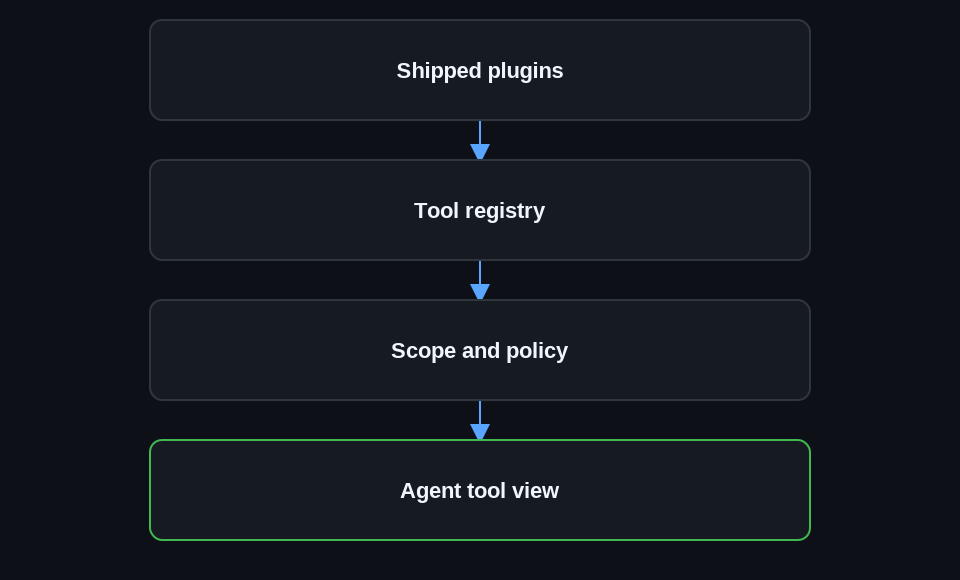
DeepSeek Harness agents receive tools from the composed registry and their scope; the generated catalog shows shipped possibilities, while the actual agent's offered tools depend on configuration, restrictions, and transport mode.
DeepSeek Harness: where are tools listed?
The Tool Schema Catalog lists model-facing tools contributed by shipped plugins. Its package map shows names, dependencies, affected events, aliases, and deployment notes, followed by detailed descriptions and parameter schemas. It is generated from plugin registrations under default configuration, with documented choices where a required setting has no default. It excludes example tools. Use it to identify candidates and understand their contracts, not to infer a live session's exact inventory.
The tools subsystem describes the registry and execution pipeline. A deployment must compose the relevant plugin and services, and a scope can filter inherited tools. Thus the documentation answers “what can a shipped package provide?”; the agent's current context answers “what is offered here?”
DeepSeek Harness: which kinds of tools are documented?
| Need | Catalog examples | Important qualification |
|---|---|---|
| Inspect files | read, glob, grep | Search and file tools come from separate packages |
| Run commands | bash, pwsh | One-shot and persistent implementations have different contracts |
| Use a skill | skill | Requires the skill consumer and registry |
| Delegate work | subagent | The registered name can be configured |
| Manage background work | job_list, job_output, job_kill | Requires the jobs capability |
| Access the web | web_search, web_fetch | Provider selection is behind the service |
These examples are not a promise that a particular session includes all of them. The catalog explicitly identifies opt-in terminal and session-query tools, and experimental packages. Some tools require a service at execution time; a visible schema alone cannot prove that the provider is operational. The LSP entry, for example, describes LSP_UNAVAILABLE when no provider is registered.
DeepSeek Harness: how can I check my agent's context?
- Identify the session, preset, and task for which you need the tool. A different agent or scope can have a different view.
- Inspect the tools actually offered to that agent in its available context or tool interface. If that view is not exposed by your client, the cited references do not define a universal end-user command that lists every live tool.
- Find each relevant name in the catalog, and read its package note and schema. Check for aliases and dependencies.
- Compare the deployment's composed plugins and scope restrictions when a documented tool is absent. An allow-list excludes inherited names not listed; a deny-only filter removes named inherited tools while allowing later unlisted inherited names.
- Test only an appropriate operation and inspect its result. A registered tool can still encounter policy denial, invalid arguments, or a missing backend.
Restrictions intersect along the inherited scope chain. The tools reference says a scope's own registrations are overlaid and exempt from those inherited-tool restrictions. This is why a deployment-wide list cannot by itself predict the exact view of a delegated agent. See reading parameters for a practical schema example.
DeepSeek Harness: why might the transport look different?
In native mode, tools can be presented as individual model-facing schemas. The catalog explains that in ptc mode the reserved run_code transport is the registry's only wire contribution; available capabilities are declared in a generated SDK section, and calls from the program re-enter the guarded tool pipeline. The presence of run_code therefore does not mean the underlying capabilities disappeared, nor does it bypass their policy.
The distinction is between how calls reach the model and which capabilities are available for the current scope. Do not copy an invocation format from one mode into another without checking the current context. The catalog's run_code entry describes its code and description arguments and the await tools.name(args) convention for that documented transport.
Follow a capability to its dependency
Suppose you need file-content search. The catalog maps grep to @deepseek-ai/dsh-tool-fs-search, with ctx.subprocess among its dependencies. Its note says the package uses the packaged ripgrep binary, not a host rg installation or shell layer. This helps distinguish an absent tool from a failed search and avoids prescribing an unrelated host installation. The same map identifies the separate filesystem package for read; a deployment may compose capabilities differently. Check the actual result and the exact package note before drawing conclusions.
For parameters, follow the package link to the detailed schema and examine required fields, types and descriptions. A capability listed as opt-in or experimental needs the relevant composition; a familiar name from another session is not evidence that it is registered here.
The tool pipeline can reject a call before its implementation runs, and the tool can also return an error after dispatch. When reporting a problem, preserve the exact tool name and error so the maintainer can distinguish these stages.
A catalog reference helps identify the relevant package, but the current session remains the decisive context for the specific call.
DeepSeek Harness: what are the limits and safety boundaries?
A tool being visible does not grant every call. The registry pipeline applies pre-execution decisions and guards before dispatch, and tools can fail after dispatch. In addition, a tool's existence does not establish its network or filesystem boundaries. Review proposed effects, paths, and approval requests under the active policy. Treat plugin and external-tool outputs as information to evaluate, not as proof of safety.
The catalog is a generated snapshot of shipped packages; versions and local composition matter. It includes names that are optional, experimental, configurable, or require other services. If a capability is absent, do not assume an undocumented switch enables it. Ask the deployment maintainer or inspect its actual composition before changing it.
DeepSeek Harness: what do the terms mean?
- Registry: the service that stores tool definitions and dispatches calls.
- Scope: an agent's context for visibility and policy over inherited tools.
- Preset: a composition that can provide an agent's capabilities.
- Native mode: a model-facing presentation using individual tool schemas.
- PTC: a mode using
run_codeas transport for calls to available capabilities.
Frequently asked questions
Is the catalog the live tool list?
No. It describes shipped plugin contributions under documented generator settings.
Can agent scopes differ?
Yes. Scope restrictions filter inherited tools, and scoped registrations can differ.
Does a visible tool always execute?
No. Policy, arguments, and backend availability can affect a call.
Sources
Every claim in this article was checked against the sources below. Community discussions are user reports, not official behavior.
This is an independent community article, not official DeepSeek documentation. Listing a plugin in the registry is not a security review.