DeepSeek Harness: Why Does a Profile Depend on a Plugin?
Use dsh plugin --profile <name> why <package> to ask pnpm for the dependency paths to a package in one DeepSeek Harness profile. The result explains package relationships, not whether a bundle is enabled, a plugin is running, or the package is trustworthy.
DeepSeek Harness: what question does why answer?
The CLI reference says dsh plugin forwards pnpm arguments in the selected profile directory. why is one of the forwarded verbs. The pnpm reference says it shows packages that depend on the requested package as a reverse dependency tree: the searched package is at the root, and its dependents form branches back toward workspace roots. A direct dependency and a transitive dependency are different explanations for its presence.
This is useful when a package appears in a profile and you want to identify the package chain before considering a change. It is not a Cordis activation trace. A dependency can be present without being a DSH bundle, and a bundle can be installed without establishing that a particular service or tool is active in a running session. Keep package-manager evidence and runtime evidence separate.
| Evidence | Answers | Does not establish |
|---|---|---|
why output | Which installed packages depend on a named package | Whether its plugin started |
| Bundle declaration and profile composition | Whether the package contributes a bundle layer | Whether every feature is enabled |
| Startup and behavior | What the running composition actually does | Why pnpm installed a dependency |
| Market card | What an index lists and claims | Provenance or safety of installed code |
DeepSeek Harness: how do I run the trace?
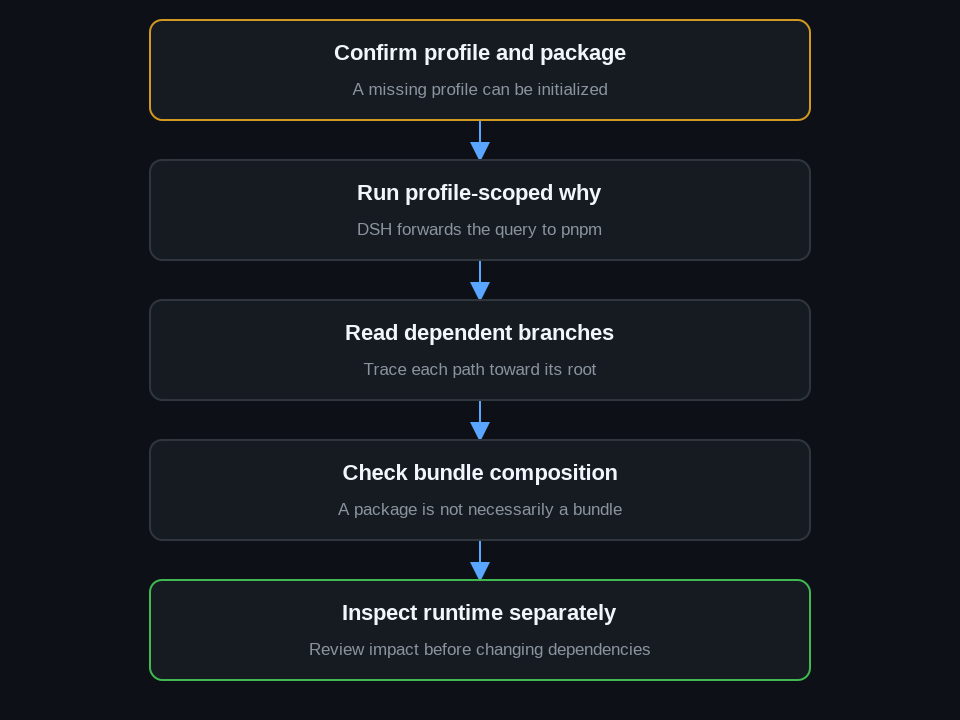
- Identify the exact profile and package name. Use the package name, not merely the display title of a marketplace card. Confirm that the intended profile exists before proceeding.
- Ensure pnpm is available on the invoking environment's
PATH. The wrapper runs it with the selected profile directory as its working directory. - Substitute the actual values for the placeholders below and run the query. Put
--profilebefore the pnpm verb, because forwarding begins at the first unrecognized token. - Read the root package and each dependent branch. Follow the branch toward the profile or workspace root to identify the chain; do not interpret the root as a package that depends on all its children.
- Compare the answer with the profile's bundle composition and actual runtime before making an installation or removal decision. Keep the output and the profile name together for reproducibility.
dsh plugin --profile <name> why <package>
The placeholders stand for your actual profile and package; do not type the angle brackets literally into a shell. The wrapper initializes a missing profile, using a shipped template or the base bundle alone for other names. Thus even this investigation can create profile files if the name is wrong. Confirm the profile before invoking it, rather than assuming a typo will simply fail without changing disk state.
The CLI also reconciles dsh.profile.bundles against installed state after every successful forwarded run. A why query should not be described as guaranteed to leave the profile untouched: the forwarded pnpm operation is a dependency query, but the wrapper's initialization and reconciliation are separate effects. This matters in shared or carefully controlled environments.
DeepSeek Harness: how should I read the dependency tree?
pnpm's tree is reversed relative to the question “what does this package depend on?” Start at the named package and follow its dependents. If one intermediate package depends on it and the profile depends on that intermediate package, the tree gives a reason to investigate that intermediate package's role. If the output contains multiple branches, more than one chain may explain why the package is present; removing only one parent need not eliminate all paths.
pnpm deduplicates duplicate subtrees and marks them deduped. That marker is a presentation of repeated structure, not evidence that the repeated path is irrelevant. For machine consumption pnpm documents --json; --long gives verbose output, while --depth <number> limits the displayed depth. These are pnpm options, so consult the installed pnpm version's help and do not mistake a limited view for the complete graph.
The forwarder has a help-ordering nuance. When forwarded arguments begin with the pnpm command, later --help reaches pnpm. If forwarded arguments begin with an option such as -r, a later help flag prints the forwarder's help instead. Put the command before help when seeking pnpm's help. Also place the profile selection before the forwarded command: a later --profile is part of the pnpm arguments, not a new DSH profile selection.
DeepSeek Harness: how is a package different from a bundle?
The CLI reference states that a dependency whose package manifest declares the DSH bundle patch joins the profile's bundle layer stack during reconciliation. A dependency without that declaration remains a plain dependency, with a one-time warning. A dependency trace can therefore explain why a package is installed without proving that it contributes a bundle layer. An update may change bundle membership if the updated manifest gains the declaration; a running profile retains its current bundle set until the next start.
The plugin market guide describes a different view: a market index lists installable DSH bundles, and an installation confirmation shows the selected npm or Git source. The index is third-party content, and its titles and other claims are not verified by DSH. A card can help identify the intended package, but it is not a reverse dependency tree and does not explain the current profile's complete installed graph. See package management for the separate add and remove workflow.
DeepSeek Harness: what if the answer is surprising?
First recheck the selected profile and exact package name. Different profiles have different package directories and compositions, so a result for one does not explain another. Preserve stderr and the command context, especially if pnpm or the wrapper reported an error. If the output is constrained by a filter or depth, broaden the investigation using the installed pnpm documentation before concluding no other branch exists.
Next distinguish a direct package relationship from operational necessity. A dependent branch says which package depends on the target; it does not tell you whether a particular user-facing feature is used, whether that feature is currently enabled, or what another version would require. Review the dependent package and its documented role. Then compare bundle membership and startup behavior, including the restart boundary for a running profile.
Before removing anything, identify every affected dependent and plan how to restore the original configuration. Do not assume that deleting a transitive dependency directly is equivalent to changing the package that requires it. The trace is diagnostic evidence; the choice to alter a shared profile needs its own review and testing.
DeepSeek Harness: what are the limits and safety boundaries?
why is not a code audit, malware check, compatibility guarantee, or proof that an installed package is safe. Marketplace metadata and successful installation are not safety guarantees either. Review the actual source and dependency chain before trusting a package, and inspect diagnostic output for sensitive local paths or other information before sharing.
The exact graph and pnpm output depend on the selected profile, installed packages, and pnpm version. The references do not promise a universal output tree or a read-only DSH wrapper. Do not infer that a missing branch in a filtered result means there are no dependents elsewhere, and do not make a package change on the strength of one display label alone.
DeepSeek Harness: what do the terms mean?
- Profile: the named installation and configuration context selected for the command.
- Reverse dependency tree: the searched package and packages that depend on it.
- Transitive dependency: a package reached through another dependency rather than directly.
- Bundle: a package with the DSH bundle declaration that can contribute a patch layer.
- Reconciliation: updating the profile's bundle list against installed state after a successful forwarded run.
- Deduped: pnpm's marker for a repeated subtree that it does not print again.
Frequently asked questions
Does why show whether a plugin is running?
No. It reports package dependency paths; inspect composition and runtime separately.
Is the DSH wrapper guaranteed not to change files?
No. It can initialize a missing profile and reconciles bundle membership after successful forwarded commands.
What does deduped mean?
pnpm uses it for a repeated subtree omitted from the display.
Sources
Every claim in this article was checked against the sources below. Community discussions are user reports, not official behavior.
This is an independent community article, not official DeepSeek documentation. Listing a plugin in the registry is not a security review.